

To restart a Rising World server every day on PlayNHost, open Quick Tasks, choose Schedule… in the menu of Send Restart, pick Repeats, Every day and a time, and click Schedule. Rising World's developer writes that "It's highly recommended to restart the server at least every 24 hours". A new server has no restart schedule.
How do I schedule a daily restart?
- Open your server in the panel and click Quick Tasks in the left menu.
- Under All tasks, open Default tasks and find Send Restart.
- Open its menu and choose Schedule….
- Give the schedule a Name, for example
Daily restart, and click Next step. - Choose Repeats, set How often to Every day, and set the time under At. Pick an hour when nobody plays.
- Keep Enabled on and click Schedule.
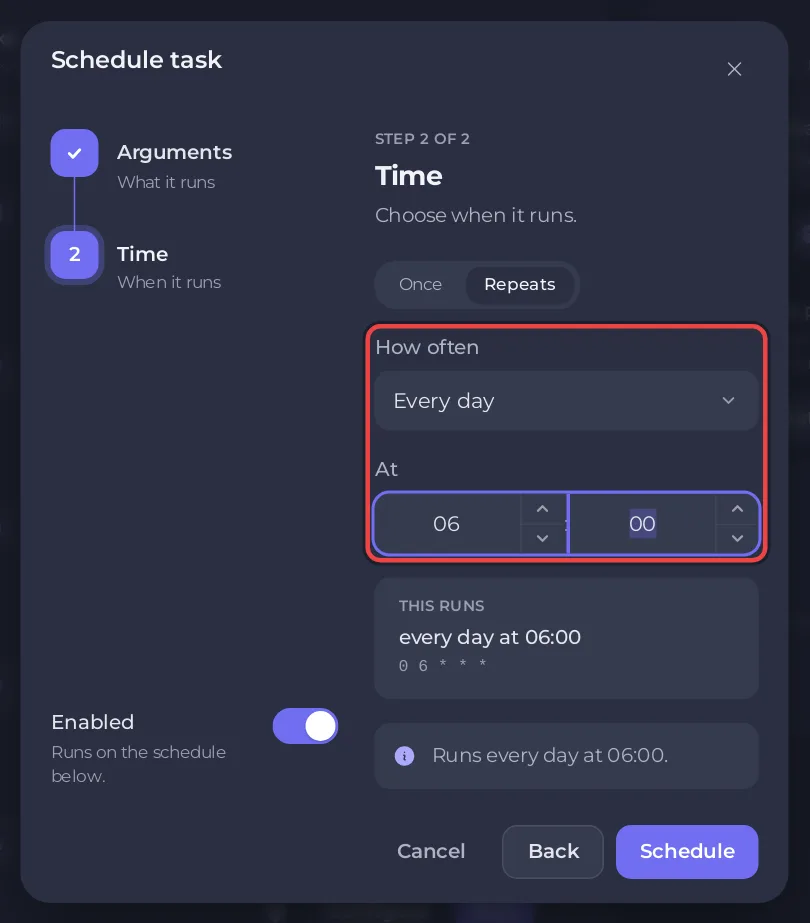
The schedule appears under Schedules. Send Restart stops the server the way the Stop button does and starts it again. Players are disconnected until the Console shows Dedicated server is ready! again. With Auto Update on, each restart also installs a waiting Rising World update.
The recommendation comes from the developer's dedicated server guide.
Should I save the world before the restart?
Rising World saves world changes on its own every few seconds, according to the developer. To be sure the last moments are on disk, add a second schedule a few minutes earlier: choose Schedule… in the menu of Save World, with the same steps and a time 5 minutes before the restart. Save World sends the game's saveall command.
How do I warn players before the restart?
The schedule does not warn anyone. Before the time, type yell and a message in the Console tab, for example yell Restart in 5 minutes. yell shows a big announcement to every player. For a warning on a schedule, choose Schedule… on Send Command, type yell Restart in 5 minutes in the Command box, and set it 5 minutes before the restart.
How do I switch it off, test it or delete it?
- On Quick Tasks, find the schedule under Schedules.
- Use its switch to turn it off or on.
- Open its menu and choose Run now to test it, which restarts the server at once, or Delete schedule to remove it.
Quick Tasks cannot change the time of a schedule that exists. For another time, create a new schedule and delete or switch off the old one.
Can it skip the restart while people play?
Open the schedule and switch on Skip while players are online. The panel then needs to know who is on the server. When it cannot read the players of a server, the schedule runs anyway: the panel says "If the server cannot report its players, it runs." So choose an hour when nobody plays.
More about Quick Tasks and schedules: How to schedule tasks and automatic backups. Backups on a schedule: How to back up and restore your Rising World server.


