

All RimWorld Open World server settings are in the Game Settings card on your server's Settings tab. The panel writes them into the game's Data/Config.json before every start, so a change takes effect after a restart. The one players must match is Player Version, which a new server sets to 1.3.
How to change a setting
- Open your server in the panel and click the Settings tab.
- In Game Settings, flip a switch, or type a new value and press Enter. Switches save as soon as you flip them.
- The card says Saved. The server must restart before these take effect. Click Restart now.
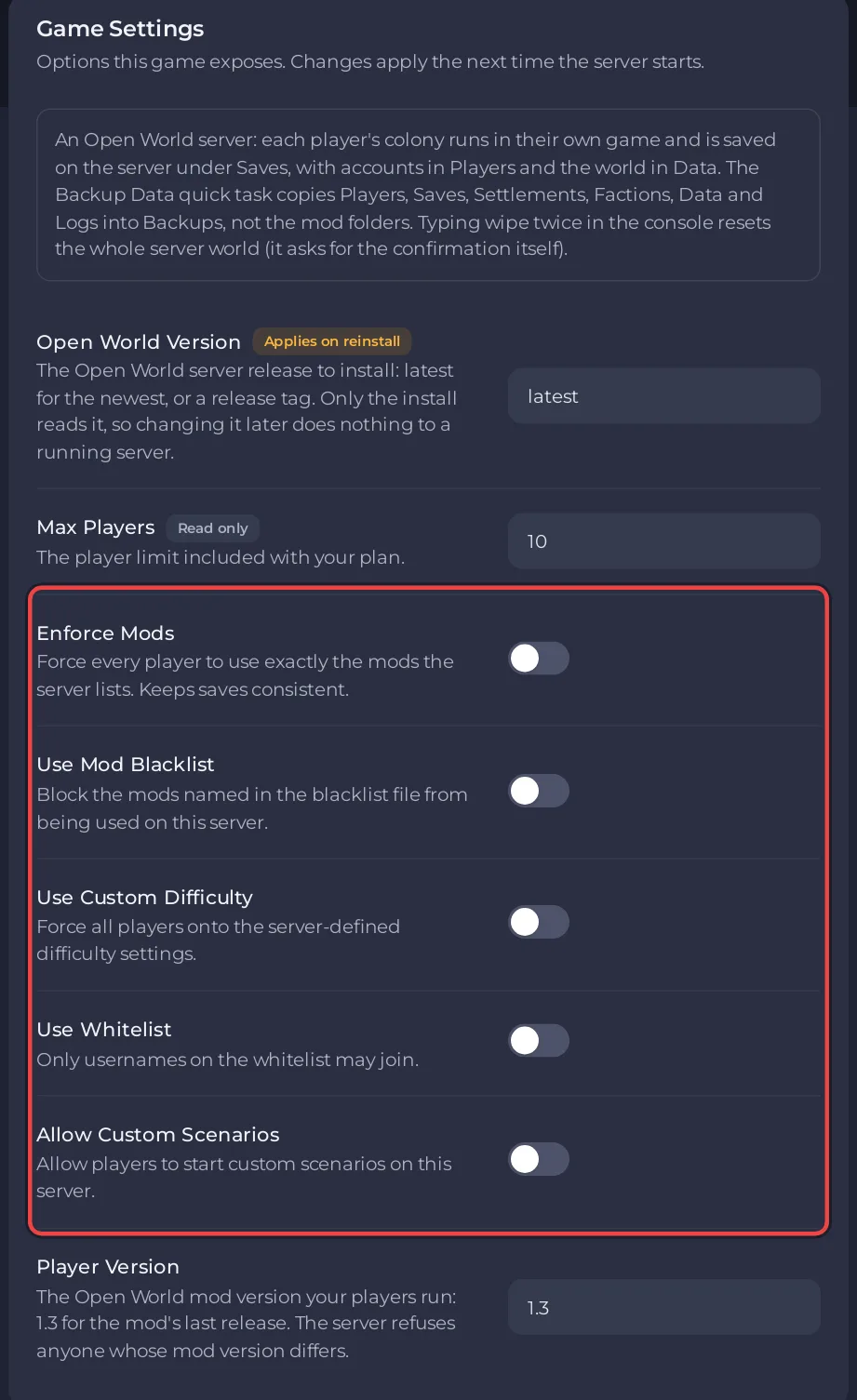
Every setting
| Setting | Default | What it does |
|---|---|---|
| Player Version | 1.3 | The Open World mod version players must run. Players with any other version are refused. 1.3 is the last mod version. |
| Enforce Mods | off | When on, players must run every mod in Mods enforced and nothing outside Mods enforced and Mods whitelisted. |
| Use Mod Blacklist | off | When on, players running a mod in Mods blacklisted are refused. |
| Use Custom Difficulty | off | When on, every player gets the difficulty values in Data/Difficulty.json. |
| Use Whitelist | off | When on, only usernames in Data/Whitelist.json can log in. |
| Allow Custom Scenarios | off | Allows players to start custom scenarios on this server. |
| Max Players | your plan | How many players can be connected at once. Marked Read only here; change it with the pencil on the Slots row on Overview. |
| Open World Version | latest | The server release to install. Only the install reads it, so a restart does not change it. |
What each setting means in practice
Player Version
Open World compares this text with the version the player's mod reports. The last mod, version 1.3, reports 1.3, and a new PlayNHost server is set to 1.3. The panel's description says: "The server refuses anyone whose mod version differs." Any other value refuses every player with "You have a different version of the mod from the server!". See Which RimWorld version does a RimWorld Open World server need?
Enforce Mods and Use Mod Blacklist
The two switches decide whether the server checks the DLL lists in Mods enforced, Mods whitelisted and Mods blacklisted. Enforce Mods is also on the Modding tab. Setup and the messages players see: How to add mods to your RimWorld Open World server.
Use Custom Difficulty
Forces the values in Data/Difficulty.json on every player. A new file has every value at 0, so fill it in before you turn this on: How to set a custom difficulty on your RimWorld Open World server.
Use Whitelist
Only the usernames in Data/Whitelist.json can log in: How to use a whitelist on your RimWorld Open World server.
Max Players
Your plan sets the top value. You can lower or raise it within that limit: How many players can a RimWorld Open World server have?
Open World Version
The install uses this once, to download the Open World server release. The panel's description says: "Only the install reads it, so changing it later does nothing to a running server." latest installs v1.0.4 (5 May 2023), the last release, so there is nothing newer. The row shows Applies on reinstall. After you save a new value, the panel says "Saved. This is read while the server installs, so a restart will not apply it." with a button Update and reinstall to apply. Click it, or use the Update and reinstall card at the bottom of Game Settings, to install that release. The panel takes a backup first, replaces only the server program (OpenWorldServer, OpenWorldServer.dll, Newtonsoft.Json.dll and two .json files) and keeps Data with Config.json, Saves, Players, Settlements, Factions, Logs and Backups.
What about Data/Config.json?
Data/Config.json is listed under Config files on the Settings tab. Its editor says there is nothing to change there, because every setting in the file comes from Game Settings. The panel also writes LocalAddress (0.0.0.0) and ServerPort (your server's own port) into it before each start. An edit you make to the file by hand is replaced at the next start.
Which settings does the game have that the panel does not show?
Other files in Data belong to the game and are not managed by the panel: Difficulty.json, Whitelist.json, Values.json (costs of faction buildings), Deep Config.json and AuthFile.json. Edit only the two the guides above describe, take a backup first, and restart afterwards: the server reads them when it starts.


