

To move a RimWorld Open World server to PlayNHost, stop the old server with shutdown, copy its Players, Saves, Settlements, Factions and Data folders plus the three mod folders, and upload them to your PlayNHost server's top folder while it is stopped. Then copy your old settings into Game Settings and start it. Players keep their accounts and colonies; they only need the new IP and port.
What to copy from the old server
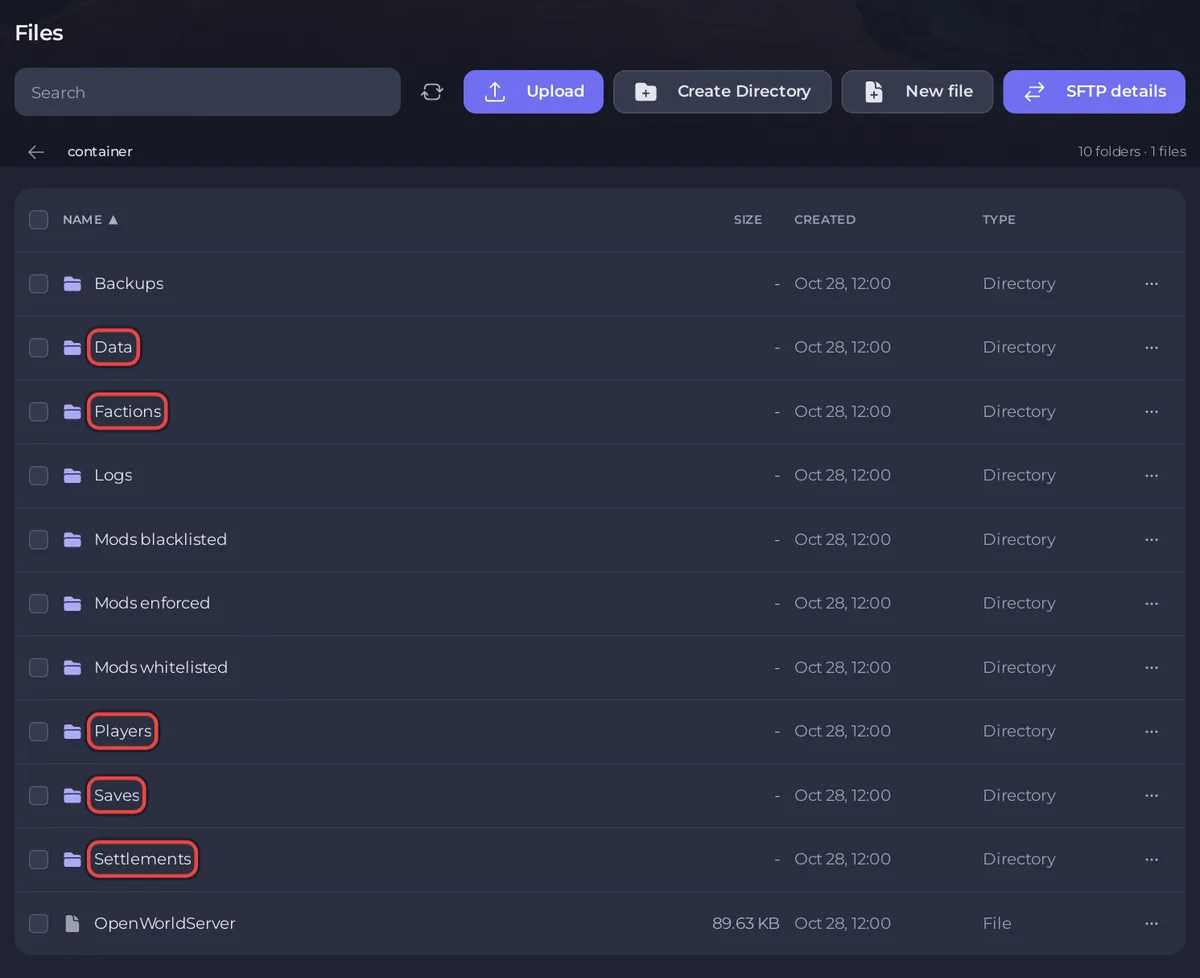
Open World keeps everything in folders next to the server program. Copy these:
| Folder | Holds |
|---|---|
Players | Accounts: usernames, passwords, admin and ban state |
Saves | Each player's colony save |
Settlements | Where each colony sits on the world map |
Factions | Open World factions |
Data | Settings files, whitelist, difficulty, World.json (the world settings) and WorldGenData/BaseGame.zipx (the world) |
Mods enforced, Mods whitelisted, Mods blacklisted | Your mod lists, if you used them |
You do not need the server program itself, Logs or Backups. PlayNHost runs Open World server v1.0.4 (5 May 2023), the last release. Move from a server on the same release.
Move it
- On the old server, type
shutdownin its console, so it saves player files before it stops. Do not useexit, which stops without saving. - Put the folders from the table into one
.zipfile on your PC. - In the panel, click Stop on your PlayNHost server and wait for Offline. If it has run before, take a backup on Backups first.
- Click the Files tab. If the server has started before, it already has its own
Players,Saves,Settlements,FactionsandDatafolders: select those and delete them, so only your old ones remain. - At the top folder, click Upload and upload the
.zip. Select it and choose Unzip. - Check that
Data/World.jsonandData/WorldGenData/BaseGame.zipxare both there, and delete the.zip. - Click the Settings tab. In Game Settings, set Player Version, Enforce Mods, Use Mod Blacklist, Use Custom Difficulty, Use Whitelist and Allow Custom Scenarios the same as in your old
Data/Config.json. - Click Start and wait for
Server Launchedin the Console.
Step 7 matters because the panel writes those settings into Data/Config.json before every start, so the values in your uploaded Config.json are replaced. The panel also writes your PlayNHost server's own port, so you never edit it.
With many files, SFTP is quicker than the browser: How to connect to your server files with SFTP.
Check that it worked
- In the Console, type
inspectand one player's username. The Console lists their details, which means the accounts came over. - Connect from RimWorld with the new IP and port and log in with your existing username and password. You should land in your colony, not in world generation.
If RimWorld asks you to generate a new world, Data/World.json did not come over: see RimWorld Open World server problems and fixes.
Tell your players
Send them the new address from the Server details card on Overview: the part before the colon is the Server IP, the number after it the Server Port. Their usernames and passwords stay the same. See How to invite friends to your RimWorld Open World server.
The general guide to moving: How to move your existing server to PlayNHost.


