

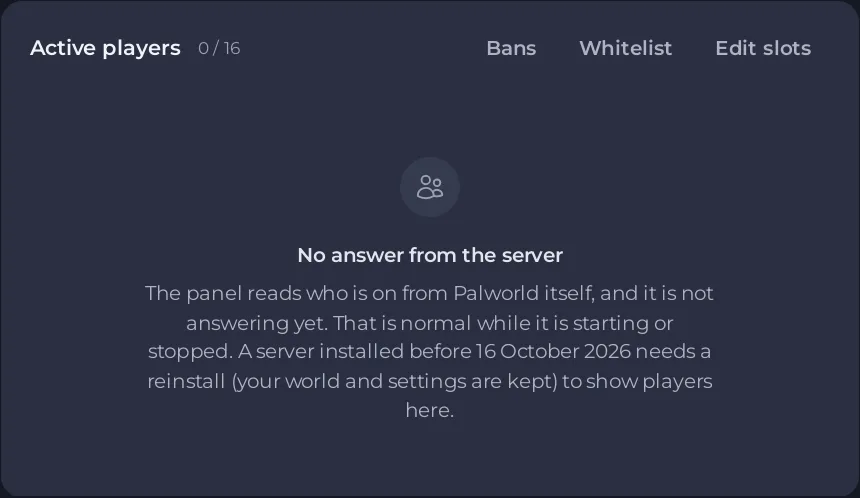
The Active players card of a Palworld server reads who is on from Palworld itself. No answer from the server means Palworld has not answered yet, which is normal while the server is starting or stopped. Wait until the Console shows [playnhost] Palworld is answering: the server is ready.: the list appears within about 10 seconds after that.
The card's own text: "The panel reads who is on from Palworld itself, and it is not answering yet. That is normal while it is starting or stopped. A server installed before 16 October 2026 needs a reinstall (your world and settings are kept) to show players here."
Steps
- Look at the badge. If it says Starting, Stopping or Offline, wait or start the server.
- Open the Console and look for
Running Palworld dedicated server onand[playnhost] Palworld is answering: the server is ready. - Wait 10 to 20 seconds. The panel reads the list every 10 seconds, and treats a list older than 45 seconds as no answer.
- If the server has been online for minutes and the card still says it, and the server was installed before 16 October 2026, it needs a reinstall to get the panel's Palworld tools. Your world and settings are kept. Open a ticket if you are not sure.
While the card has no answer
- Kick and ban from the card are not possible. Use
/KickPlayeror/BanPlayerin the game: How to become admin on your Palworld server. - Bans still works, because the ban list is a file: How to unban a player on your Palworld server.
- The whitelist is only enforced while Palworld answers.
- Schedules with Skip while players are online run anyway: "If the server cannot report its players, it runs."
Not the same as an empty server
Nobody is online means Palworld answered and no one is playing: How to see, kick, ban and unban players on your Palworld server.


