

To restart an open.mp server on a schedule on PlayNHost, open Quick Tasks, choose Schedule… in the menu of Send Restart, and set it to repeat every day at the time you want. A second schedule with Send Command and say Server restarts in 5 minutes, five minutes earlier, warns players in chat.
Schedule the restart
- Open your server in the panel and click Quick Tasks in the left menu.
- Under All tasks, open the menu of Send Restart ("Gracefully restarts the server container.") and choose Schedule….
- The Schedule task window opens on Arguments. Send Restart needs nothing filled in. Give the schedule a Name, for example
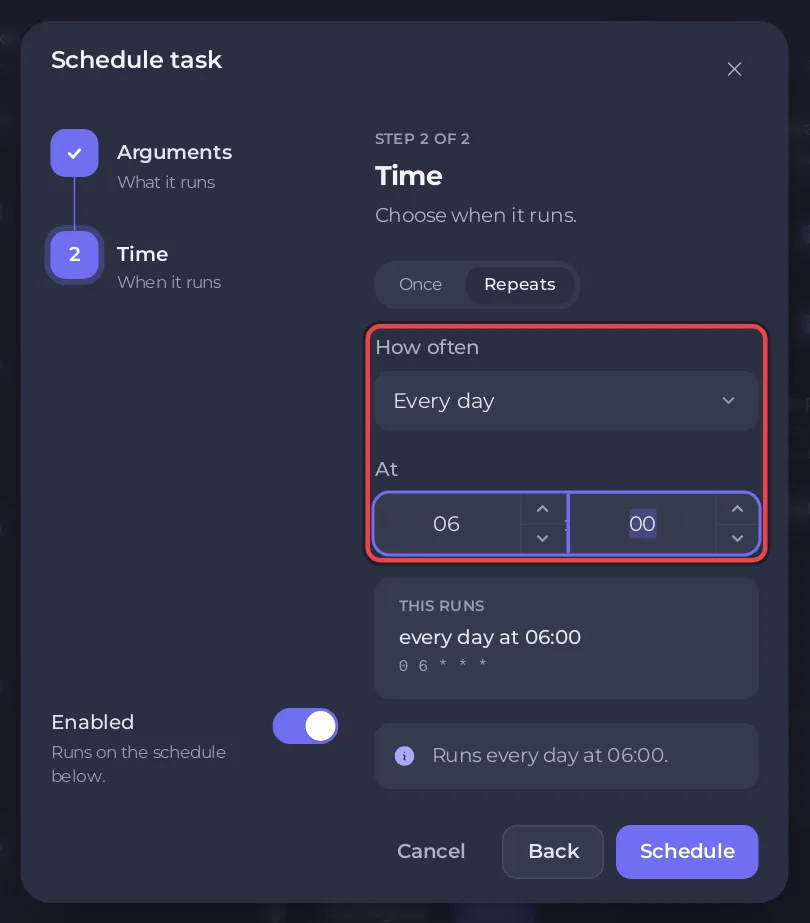
Daily restart, and click Next step. - On Time, choose Repeats, then Every day, and pick the time under At, for example 06:00. If your own time zone is different, the window also shows that time where you are.
- Leave Enabled on and click Schedule. The new schedule appears under Schedules.
A restart stops open.mp with its own exit command and starts it again. The gamemode starts fresh from config.json, so a gamemode you switched to with changemode goes back to the one in main_scripts.
Warn players before the restart
- Under All tasks, open the menu of Send Command and choose Schedule….
- In Command, type
say Server restarts in 5 minutes, and give it a name such asRestart warning. Click Next step. - Choose Repeats, Every day, and a time five minutes before the restart, for example 05:55.
- Click Schedule.
At 05:55 every player sees * Admin: Server restarts in 5 minutes in chat, and at 06:00 the server restarts. The say command is open.mp's own: How to use the Console and commands on your open.mp server.
Does it wait until nobody is playing?
No. Each schedule card has Skip while players are online, but the panel does not read the player list of an open.mp server. The panel's hint says "If the server cannot report its players, it runs.", so on open.mp the restart always goes ahead. Pick a quiet hour instead.
What can I change later?
Each schedule card has a switch to turn it off, and a menu with Edit schedule…, Run now and Delete schedule. The time of an existing schedule cannot be changed: for another time, make a new schedule and delete or switch off the old one, for both the restart and its warning.
The nightly Automatic backup is also a schedule, and its time can be changed on the Backups page: How to back up and restore your open.mp server. The general guide: How to schedule tasks and automatic backups.


