

The Modding tab is where you find, install, update and remove plugins, mods, modpacks and data packs on your Minecraft server. It searches the big catalogues for you, starts with the filters set to your server's Minecraft version and type, and puts each file in the right folder. Open your server in the panel and click Modding in the row of tabs at the top.
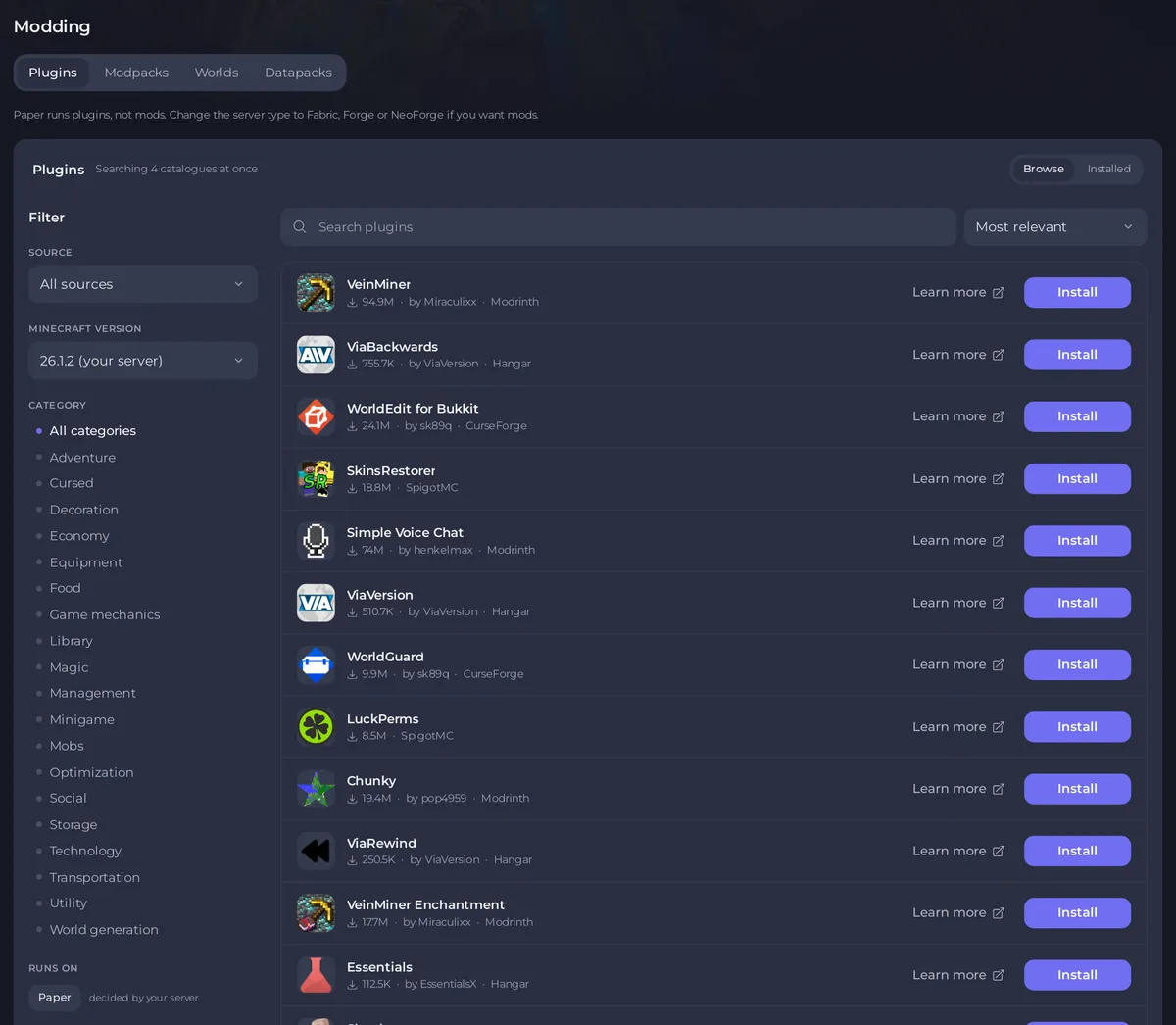
The tabs and why some are missing
The page shows only the tabs your server type can use:
- Paper, Purpur, Spigot and Folia: Plugins, Modpacks, Worlds, Datapacks.
- Fabric, Forge, NeoForge and Quilt: Mods, Modpacks, Worlds, Datapacks.
- Magma, Ketting and Mohist: all five tabs, because they run plugins and mods together.
- Vanilla: Modpacks, Worlds, Datapacks.
- Velocity, BungeeCord and Waterfall: Plugins only, and only plugins made for a proxy.
When a tab is missing, a line under the tabs says why, for example Paper runs plugins, not mods. Change the server type to Fabric, Forge or NeoForge if you want mods. To change the type, see How to change your Minecraft version or server type. On a server that runs a modpack, Modpacks is the first tab.
The Worlds tab holds your world folders and Find a map. See How to use the Worlds tab on your Minecraft server and How to install an adventure map on your Minecraft server.
Browse and Installed
Each tab opens on Browse, where you search the catalogues. The switch at the top right of the list changes to Installed, which lists what is on your server now.
- Browse shows how many catalogues it searches at once, for example
Searching 4 catalogues at once. Type in the search box (it says Search plugins, Search mods and so on) and the results update after a short pause. - Installed lists every file in your
pluginsormodsfolder, with its version, an Update button when a newer build exists, an on and off switch and a menu with more actions. See How to update plugins and mods on your Minecraft server and How to switch off or uninstall a plugin or mod on your Minecraft server.
The filters
The Filter column sits beside the results. On a phone, the Filters button next to the search box opens the same choices, and Show results closes them.
- Source: which catalogue to search. Plugins can search All sources or one of Modrinth, CurseForge, Hangar, SpigotMC and Polymart. Mods can search All sources, Modrinth or CurseForge. Modpacks searches one source at a time.
- Minecraft version: starts on your server's version, marked
(your server). Choose All versions to see everything. - Category: what a project does, such as Economy or Utility. It is shown when Source is All sources or Modrinth. Categories come from Modrinth, so choosing one while All sources is selected searches Modrinth only, and the panel says so.
- Runs on: your server's loader, for example
Paper, with the notedecided by your server. It is not something you change. - Hide the N that cannot run here: appears when some results cannot run on your server. Tick it to make the list shorter.
- Reset, shown once you change a filter, puts every filter back.
The menu beside the search box sorts the results: Most relevant, Most downloaded, Recently updated or Newly added. Results come 50 to a page, with Previous, page numbers and Next below the list.
What each result shows
- The name. Click it to open the details window with screenshots, tags and a Full page on link to the catalogue.
- An Installed badge if the project is already on your server.
- Downloads, the author and the catalogue it comes from.
- Learn more, which opens the project's own page in a new tab.
- The button: Install, Reinstall if it is already installed, or Won’t run here when it cannot run on your server. The reason is written under the name, for example
Built for fabric, and this server runs Paper.
To install something, see How to install plugins on Paper, Spigot and Purpur, How to install mods on Forge, Fabric and NeoForge or How to install a modpack on your Minecraft server. Data packs: How to use resource packs and data packs on your Minecraft server.
Who can use the page
The Modding tab needs access to files. Installing needs permission to create files, and switching a plugin off needs permission to change files. Installing or updating a modpack is for the server owner only. To let a friend help, see How to let a friend help run your Minecraft server.
If something goes wrong
Could not load pluginswithThe catalog could not be reached. Try again in a moment.: a catalogue did not answer. Wait a moment and search again, or pick another Source.Nothing matches that search: try a shorter name, another Source, or All versions.- An install is refused: A plugin or mod will not install on your Minecraft server.
- The project is not in any catalogue: How to upload your own plugins or mods to your Minecraft server.


