%7B.s%7Banimation%3Ab%201.5s%20ease-out%20both%7D.d%7Banimation-delay%3A.16s%7D%7D%40keyframes%20b%7B0%25%7Bfill%3A%23F4F6FA%7D18%25%7Bfill%3A%23FFE08A%7D34%25%2C70%25%7Bfill%3A%23FF8A1F%7D80%25%7Bfill%3A%23FFE08A%7D100%25%7Bfill%3A%23FF8A1F%7D%7D%3C%2Fstyle%3E%3Cg%20transform%3D%22translate(143%20428.93)%20scale(3.885906)%22%3E%3Cg%20transform%3D%22translate(0%202)%22%20fill%3D%22%23706EF0%22%3E%3Cpath%20d%3D%22M0%200%20H48%20A40%2040%200%200%201%2048%2080%20V100%20H0%20Z%22%2F%3E%3Cpath%20transform%3D%22translate(91.75%200)%22%20d%3D%22M0%200%20L48%200%20L48%2050%20L76%2050%20L76%20100%20L0%20100%20Z%22%2F%3E%3Cpath%20transform%3D%22translate(173%200)%22%20d%3D%22M0%20100%20L58%20-4%20L116%20100%20Z%22%2F%3E%3Cpath%20transform%3D%22translate(264.25%200)%22%20d%3D%22M0%200%20L104%200%20L76%2050%20L76%20100%20L28%20100%20L28%2050%20Z%22%2F%3E%3Cg%20transform%3D%22translate(375%200)%22%3E%3Cpath%20d%3D%22M0%200%20L50%2038%20L50%200%20L100%200%20L100%20100%20L0%20100%20Z%22%20fill%3D%22%23F4F6FA%22%2F%3E%3Crect%20class%3D%22s%22%20x%3D%2247%22%20y%3D%2263%22%20width%3D%2219%22%20height%3D%2230%22%2F%3E%3Crect%20class%3D%22s%20d%22%20x%3D%2274%22%20y%3D%2263%22%20width%3D%2219%22%20height%3D%2230%22%2F%3E%3C%2Fg%3E%3Cpath%20transform%3D%22translate(484.75%200)%22%20d%3D%22M0%200%20L48%200%20L48%2037%20L52%2037%20L52%200%20L100%200%20L100%20100%20L52%20100%20L52%2063%20L48%2063%20L48%20100%20L0%20100%20Z%22%2F%3E%3Cpath%20transform%3D%22translate(588.5%200)%22%20d%3D%22M0%2050%20A53%2053%200%201%200%20106%2050%20A53%2053%200%201%200%200%2050%20Z%22%2F%3E%3Cpath%20transform%3D%22translate(698.25%200)%22%20d%3D%22M25%200%20H102%20V50%20H77%20A25%2025%200%200%201%2077%20100%20H0%20V50%20H25%20A25%2025%200%200%201%2025%200%20Z%22%2F%3E%3Cpath%20transform%3D%22translate(804%200)%22%20d%3D%22M0%200%20L90%200%20L90%2050%20L69%2050%20L69%20100%20L21%20100%20L21%2050%20L0%2050%20Z%22%2F%3E%3C%2Fg%3E%3C%2Fg%3E%3C%2Fsvg%3E)


Click Start on your server's Overview page and wait for the badge to say Online. That is the moment the game has finished loading and players can join.
Start it
- Open your server in the panel.
- Click Start.
- Open the Console tab, or watch the small console on Overview, to see what the server is doing.
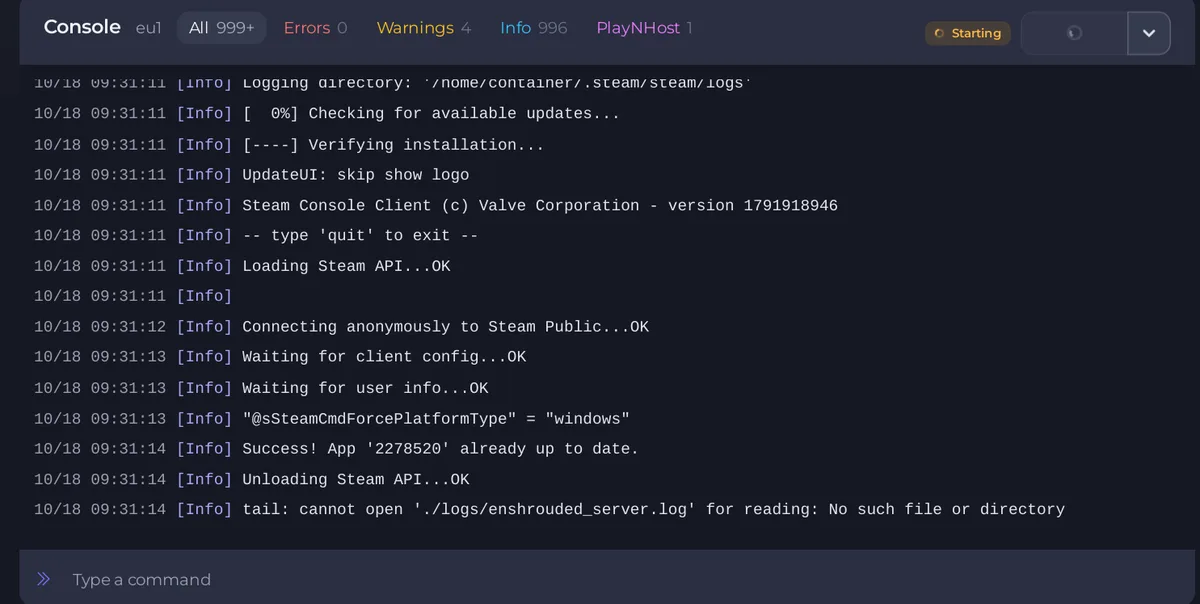
What the Console shows
With Auto Update on (the default), every start first checks Steam for a newer server version and downloads it if there is one. You see Steam's own lines for that. A start right after a game update takes longer than usual because of this.
Then the game loads your world. The server is ready when the Console shows this line:
[Session] 'HostOnline' (up)!
Keen Games, the developer, documents this line, and one more that says the world has been loaded, a line starting with [server] Load deserialization took. When the line appears, the badge changes to Online.
The first start of a new server creates a new world. This is also when the game writes its first save. Give it a moment: the Worlds page shows There is no world yet until the game has saved for the first time. See How to check which world your Enshrouded server loaded.
If a start seems to take very long, read the Console. If it says Update failed, retrying without the old build record, the server is repairing its game files and will carry on by itself.
What a new server already has
- Server Name:
A PlayNHost Enshrouded Server. Change it before you invite people. - Server Password: empty, so anyone who finds the server can join. Set one on the Settings tab under Game Settings.
- Admin password: a random password was made when the server was installed. Read it on Settings, Gameplay Settings, under Admins.
- Difficulty: the Default preset.
- Chat: text chat on, voice chat off.
- Daily restart: a schedule that restarts the server early every morning. See How to restart your Enshrouded server on a schedule.
Next steps
- Set the name and password.
- Join your server.
- Invite your friends.
- Bring your own world if you already have one.
If the server does not reach Online, see How to fix a server that will not start and Enshrouded server problems and fixes.





