%7B.s%7Banimation%3Ab%201.5s%20ease-out%20both%7D.d%7Banimation-delay%3A.16s%7D%7D%40keyframes%20b%7B0%25%7Bfill%3A%23F4F6FA%7D18%25%7Bfill%3A%23FFE08A%7D34%25%2C70%25%7Bfill%3A%23FF8A1F%7D80%25%7Bfill%3A%23FFE08A%7D100%25%7Bfill%3A%23FF8A1F%7D%7D%3C%2Fstyle%3E%3Cg%20transform%3D%22translate(143%20428.93)%20scale(3.885906)%22%3E%3Cg%20transform%3D%22translate(0%202)%22%20fill%3D%22%23706EF0%22%3E%3Cpath%20d%3D%22M0%200%20H48%20A40%2040%200%200%201%2048%2080%20V100%20H0%20Z%22%2F%3E%3Cpath%20transform%3D%22translate(91.75%200)%22%20d%3D%22M0%200%20L48%200%20L48%2050%20L76%2050%20L76%20100%20L0%20100%20Z%22%2F%3E%3Cpath%20transform%3D%22translate(173%200)%22%20d%3D%22M0%20100%20L58%20-4%20L116%20100%20Z%22%2F%3E%3Cpath%20transform%3D%22translate(264.25%200)%22%20d%3D%22M0%200%20L104%200%20L76%2050%20L76%20100%20L28%20100%20L28%2050%20Z%22%2F%3E%3Cg%20transform%3D%22translate(375%200)%22%3E%3Cpath%20d%3D%22M0%200%20L50%2038%20L50%200%20L100%200%20L100%20100%20L0%20100%20Z%22%20fill%3D%22%23F4F6FA%22%2F%3E%3Crect%20class%3D%22s%22%20x%3D%2247%22%20y%3D%2263%22%20width%3D%2219%22%20height%3D%2230%22%2F%3E%3Crect%20class%3D%22s%20d%22%20x%3D%2274%22%20y%3D%2263%22%20width%3D%2219%22%20height%3D%2230%22%2F%3E%3C%2Fg%3E%3Cpath%20transform%3D%22translate(484.75%200)%22%20d%3D%22M0%200%20L48%200%20L48%2037%20L52%2037%20L52%200%20L100%200%20L100%20100%20L52%20100%20L52%2063%20L48%2063%20L48%20100%20L0%20100%20Z%22%2F%3E%3Cpath%20transform%3D%22translate(588.5%200)%22%20d%3D%22M0%2050%20A53%2053%200%201%200%20106%2050%20A53%2053%200%201%200%200%2050%20Z%22%2F%3E%3Cpath%20transform%3D%22translate(698.25%200)%22%20d%3D%22M25%200%20H102%20V50%20H77%20A25%2025%200%200%201%2077%20100%20H0%20V50%20H25%20A25%2025%200%200%201%2025%200%20Z%22%2F%3E%3Cpath%20transform%3D%22translate(804%200)%22%20d%3D%22M0%200%20L90%200%20L90%2050%20L69%2050%20L69%20100%20L21%20100%20L21%2050%20L0%2050%20Z%22%2F%3E%3C%2Fg%3E%3C%2Fg%3E%3C%2Fsvg%3E)


Open your server's Overview page and click Copy invite message on the Play with friends card. Paste the message to your friends. It holds the server name, the password and the steps to join.
Send the invite message
- Open your server in the panel.
- Find the Play with friends card on the Overview page.
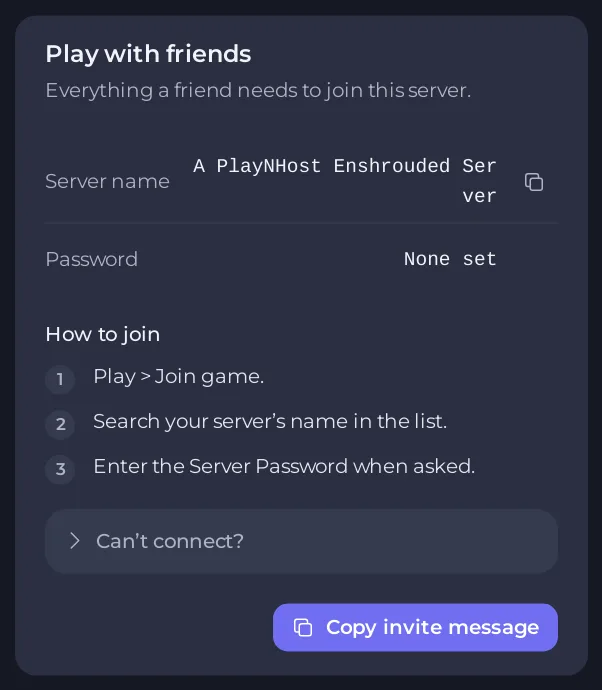
- Check that the Password row shows what you want. If it says None set, anyone who finds the server can join. If it says Hidden for your account, your role does not allow reading the password, so ask the server's owner.
- Click Copy invite message. The button says Copied.
- Paste it into a chat, an email or a Discord channel.
The message says "Join my Enshrouded server", tells your friend to look for your server's name in the server list, gives the password and lists the steps: Play, Join game, search the name, enter the password. Your friends do not need an address.
If you change the name or the password later, copy the message again. Names and passwords change when the server restarts. See How to change your Enshrouded server name and password.
What your friends need
- The Steam version of Enshrouded, on the same game version as the server. See Which platforms can join your Enshrouded server.
- A free player slot. See How to change player slots on your Enshrouded server.
If a friend cannot find the server, the Can’t connect? section on the same card lists the usual reasons, and its Ask support button opens a ticket that is already filled in.
Let a friend help run the server
Playing and running the server are different. The password lets a friend play. To let a friend restart the server, change settings or manage files, invite them from Team & Roles in the left menu. They get their own sign-in, and you choose what they can do. See How to invite friends and give them access.
To let a friend act as an admin inside the game, with the right to kick and ban, give them the Admin password instead. See How to become admin on your Enshrouded server.
Never share your panel password. Share the game password, or invite people to your team.





