%7B.s%7Banimation%3Ab%201.5s%20ease-out%20both%7D.d%7Banimation-delay%3A.16s%7D%7D%40keyframes%20b%7B0%25%7Bfill%3A%23F4F6FA%7D18%25%7Bfill%3A%23FFE08A%7D34%25%2C70%25%7Bfill%3A%23FF8A1F%7D80%25%7Bfill%3A%23FFE08A%7D100%25%7Bfill%3A%23FF8A1F%7D%7D%3C%2Fstyle%3E%3Cg%20transform%3D%22translate(143%20428.93)%20scale(3.885906)%22%3E%3Cg%20transform%3D%22translate(0%202)%22%20fill%3D%22%23706EF0%22%3E%3Cpath%20d%3D%22M0%200%20H48%20A40%2040%200%200%201%2048%2080%20V100%20H0%20Z%22%2F%3E%3Cpath%20transform%3D%22translate(91.75%200)%22%20d%3D%22M0%200%20L48%200%20L48%2050%20L76%2050%20L76%20100%20L0%20100%20Z%22%2F%3E%3Cpath%20transform%3D%22translate(173%200)%22%20d%3D%22M0%20100%20L58%20-4%20L116%20100%20Z%22%2F%3E%3Cpath%20transform%3D%22translate(264.25%200)%22%20d%3D%22M0%200%20L104%200%20L76%2050%20L76%20100%20L28%20100%20L28%2050%20Z%22%2F%3E%3Cg%20transform%3D%22translate(375%200)%22%3E%3Cpath%20d%3D%22M0%200%20L50%2038%20L50%200%20L100%200%20L100%20100%20L0%20100%20Z%22%20fill%3D%22%23F4F6FA%22%2F%3E%3Crect%20class%3D%22s%22%20x%3D%2247%22%20y%3D%2263%22%20width%3D%2219%22%20height%3D%2230%22%2F%3E%3Crect%20class%3D%22s%20d%22%20x%3D%2274%22%20y%3D%2263%22%20width%3D%2219%22%20height%3D%2230%22%2F%3E%3C%2Fg%3E%3Cpath%20transform%3D%22translate(484.75%200)%22%20d%3D%22M0%200%20L48%200%20L48%2037%20L52%2037%20L52%200%20L100%200%20L100%20100%20L52%20100%20L52%2063%20L48%2063%20L48%20100%20L0%20100%20Z%22%2F%3E%3Cpath%20transform%3D%22translate(588.5%200)%22%20d%3D%22M0%2050%20A53%2053%200%201%200%20106%2050%20A53%2053%200%201%200%200%2050%20Z%22%2F%3E%3Cpath%20transform%3D%22translate(698.25%200)%22%20d%3D%22M25%200%20H102%20V50%20H77%20A25%2025%200%200%201%2077%20100%20H0%20V50%20H25%20A25%2025%200%200%201%2025%200%20Z%22%2F%3E%3Cpath%20transform%3D%22translate(804%200)%22%20d%3D%22M0%200%20L90%200%20L90%2050%20L69%2050%20L69%20100%20L21%20100%20L21%2050%20L0%2050%20Z%22%2F%3E%3C%2Fg%3E%3C%2Fg%3E%3C%2Fsvg%3E)


Your server restarts early every morning with the Daily restart schedule. Switch it off or replace it with your own on the Quick Tasks page, under Schedules.
What the Daily restart does
New Enshrouded servers get a schedule called Daily restart. It restarts the server early every morning, only while the server is running, so the server picks up the latest game update: updates install when the server starts. The world is saved before the server stops. The time differs a little from server to server, so that many servers do not restart in the same minute.
If your server was set up a while ago, it may not have this schedule. On Quick Tasks, under Schedules, look for Daily restart in the Ready-made for Enshrouded list and click Add. You can also build your own with the steps below.
See it or switch it off
- Open your server in the panel and click Quick Tasks in the left menu.
- Find Daily restart under Schedules.
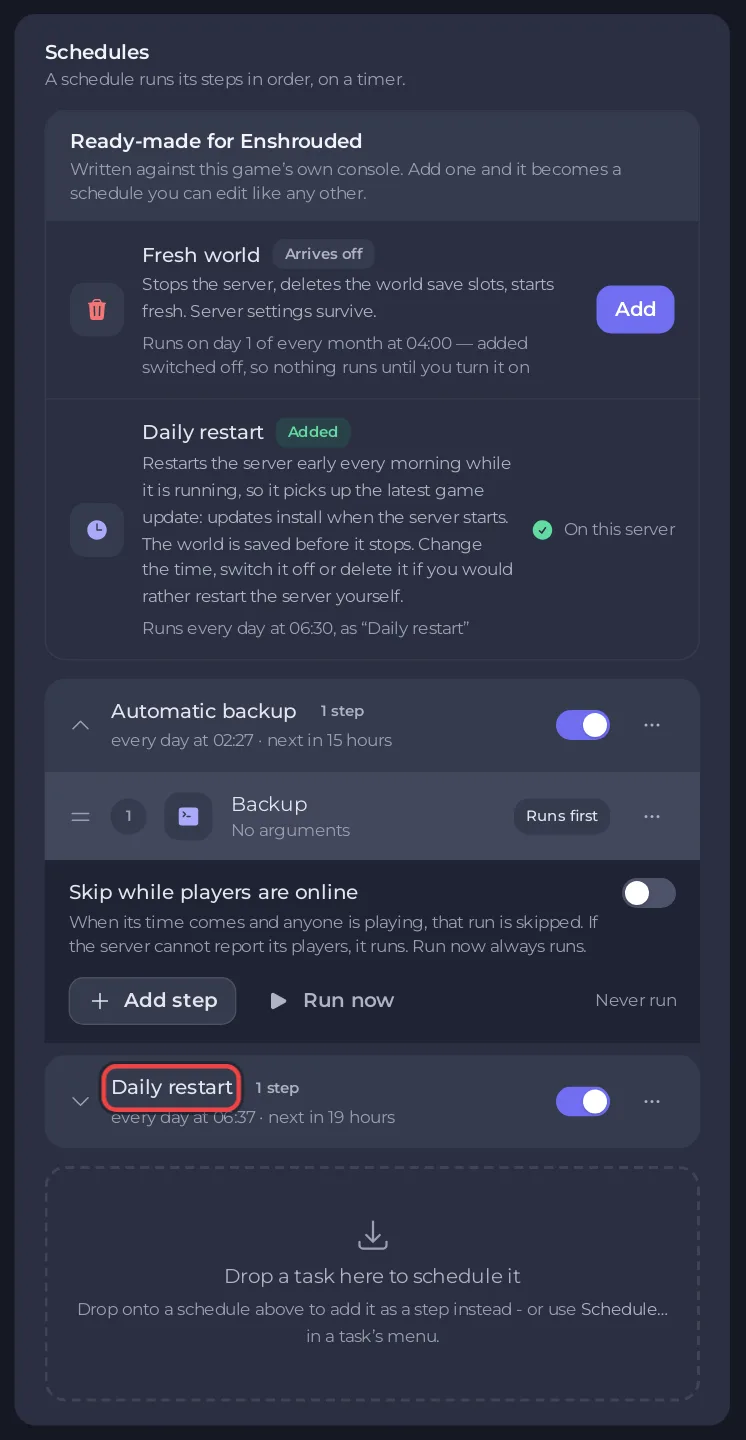
- To turn it off, use its switch. Open the row and click Run now to test it. The Quick Tasks page cannot change the time of a schedule that exists: for another time, build your own restart schedule as below and switch Daily restart off.
If you switch it off, restart the server yourself after each game update: see How to update your Enshrouded server.
Build your own restart schedule
- On Quick Tasks, under All tasks, open Default tasks and find Send Restart.
- Open its menu and choose Schedule….
- Give the schedule a Name, then click Next step.
- Choose Repeats, set How often to Every day, and set the time under At. The window says what time it is where you are.
- Keep Enabled on and click Schedule.
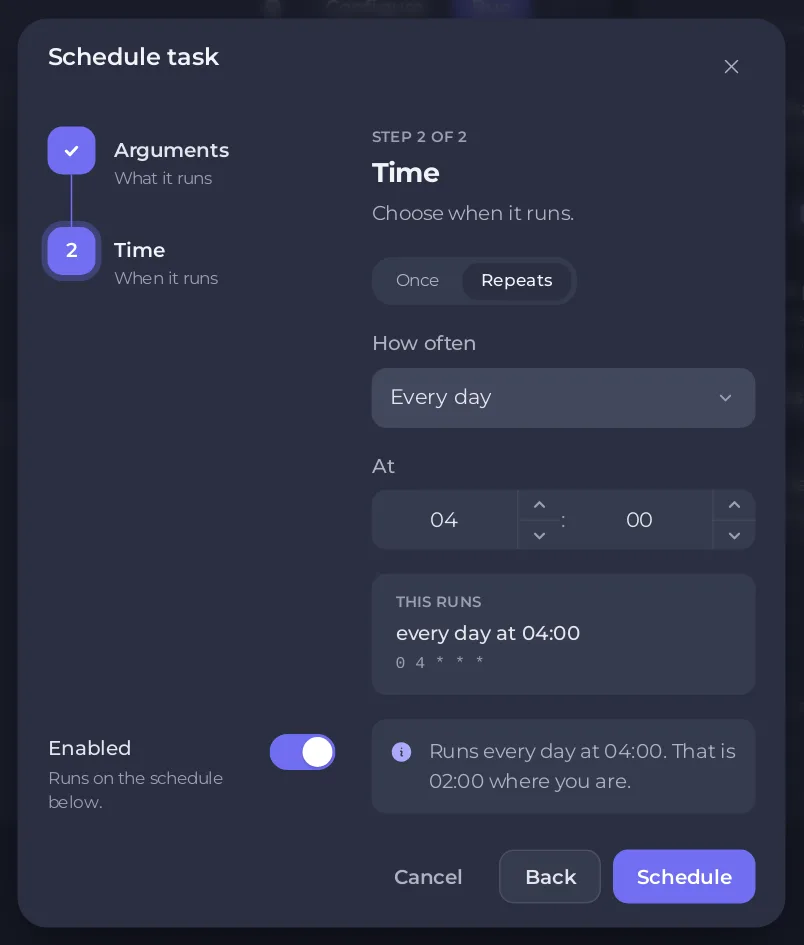
Warn your players before the time: a restart disconnects them for a short while.
Ideas
- A backup before the restart: schedule Backup Server a few minutes before your restart schedule, as its own schedule.
- A quieter hour: build your own restart schedule for an hour when nobody plays, and switch Daily restart off.
See How to schedule tasks and automatic backups for every part of the page. To start a fresh world on a timer, see How to start a fresh Enshrouded world.





