

A Core Keeper server on PlayNHost has no join password to set. The Steam Game ID works as the key: Steam players need it to join. Share it only with your group, give the server a new Game ID if it gets out, and kick or ban anyone who should stay out.
How do I keep strangers out?
- Copy the Game ID from the Steam Game ID row on Overview (the Join button on the server card copies it too) and send it to your friends directly, never in a public channel.
- Hide the Steam Game ID row when you stream or post a screenshot of the panel.
- If the code got out, give the server a new Game ID under Settings, Game Settings, Show advanced (2) and restart. The old code stops working: How to change the Game ID of your Core Keeper server.
- Kick or ban a player who already got in, as an admin in the game: How to kick and ban players on your Core Keeper server.
- Lower your player slots to the size of your group: How to change player slots on your Core Keeper server.
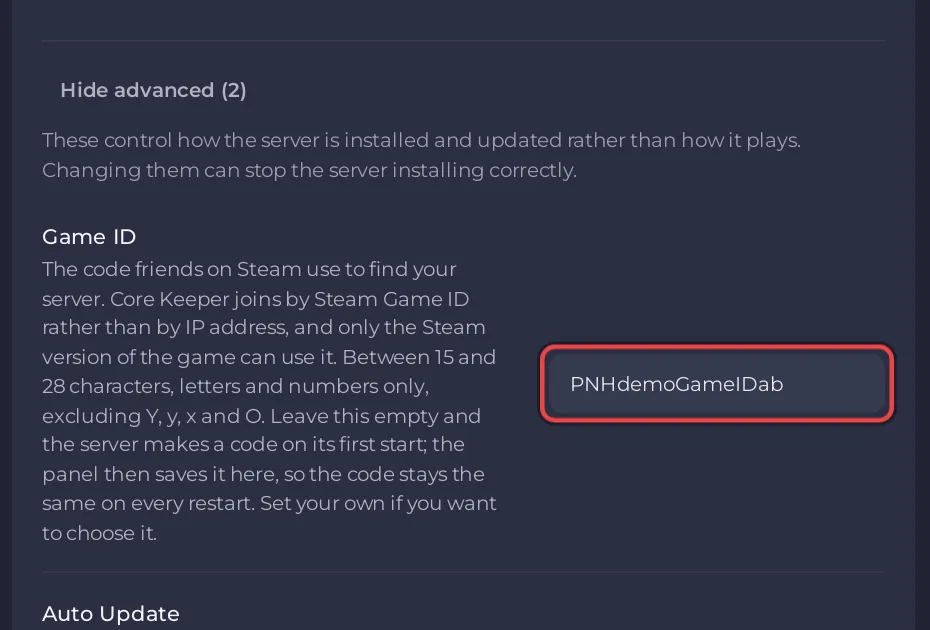
Where to find the code: How to find your Core Keeper Game ID.
Can someone join by the server address instead?
Since patch 1.1.2.3 (August 2025), a Core Keeper dedicated server can also be joined by IP, port and a password the server makes. On a PlayNHost server that password is made new at every start and the panel does not show it, so the address on Overview alone does not let anyone in.
Can visitors look around without touching anything?
Yes, with guest mode. Pugstorm added it in the Paws & Claws update (0.6.0): it is switched on from the pause menu in the game, and while it is on "any non-admin player in the game cannot interact with the world", but can still move around and look. Only admins keep full control: How to become admin on your Core Keeper server.
Does the Game ID give access to the panel?
No. The Game ID lets people play. It does not let anyone into the panel. To let a friend help run the server, invite them in Team & Roles: How to let a friend help run your Core Keeper server.


