

To let a friend help run your Core Keeper server on PlayNHost, invite them from Team & Roles and give them a role with the permissions their tasks need. Playing on the server needs only the Game ID. Running it in the panel needs a role.
How do I invite someone to the panel?
- Open your server in the panel.
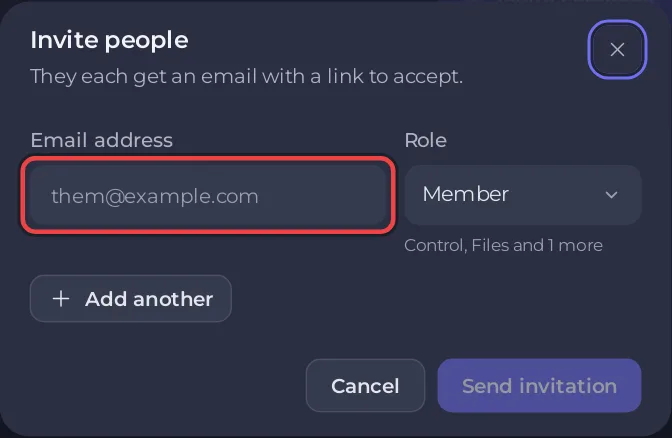
- On a computer, click Invite people at the top of the server page. It opens Team & Roles with the Invite people window. You can also click Team & Roles in the left menu: while nobody else has access yet, it shows an Invite someone button that opens the same window.
- Enter their Email address.
- Choose a Role.
- Click Send invitation. Your friend gets an email with a link to accept.
The built-in roles and every step are in How to invite friends and give them access.
Which permission does each Core Keeper task need?
On the Roles tab you tick permissions in areas such as Control, Files, Backups, Settings and Schedules.
| Task | Permissions it needs |
|---|---|
| Start, stop, restart the server | Control: Start, Stop, Restart |
| See the Console | Control: Use the console |
| See the Steam Game ID row on Overview | Settings: View startup |
| Change Game Settings: world options, Game ID, Auto Update | Settings: View startup and Change startup |
| Change the player slots with Edit slots | Settings: Rename server (without it, Edit slots is hidden) |
| Upload or download worlds, add or remove mods | Files: Browse files, Read contents, Create and upload, Edit and rename, Delete, plus Compress and extract to unzip a mod |
| Make, download and restore backups | Backups: View backups, Create, Download, Restore |
| Add or change schedules on Quick Tasks | Schedules: View schedules, Create, Edit |
Deleting files, World Reset and restoring backups can lose a world, so give those only to people you trust.
Does a panel role make my friend admin in Core Keeper?
No. A panel role is not the same as being admin in the game. Admin in the game comes from the server's own admin list, and an admin promotes other players from the pause menu: How to become admin on your Core Keeper server. Being admin in the game gives nothing in the panel.
What else should I know about panel access?
- Your friend gets their own sign-in. Never share your panel password.
- Webhooks and My plan are for the server's owner only.
- To remove access, open Team & Roles and remove the person.
- To see who did what, use Activity: How to see what happened on your server.
- Friends who only play need the Game ID and nothing else: How to invite friends to your Core Keeper server.


