

When players cannot join your ARK: Survival Ascended server, the most likely cause is a game update: their game updated itself and the server is still on the old build. Click Restart: the server installs the newest build as it starts. If that is not it, check that it finished starting, the password, and the mods, in that order.
1. The server is on an older build
ARK patches often, and players' games update by themselves. The server installs updates when it starts, which the Daily restart does every morning.
Fix: click Restart and wait for Online. See How to update your ARK: Survival Ascended server. If Auto Update is off under Show advanced in Game Settings, switch it on first.
2. The server has not finished starting
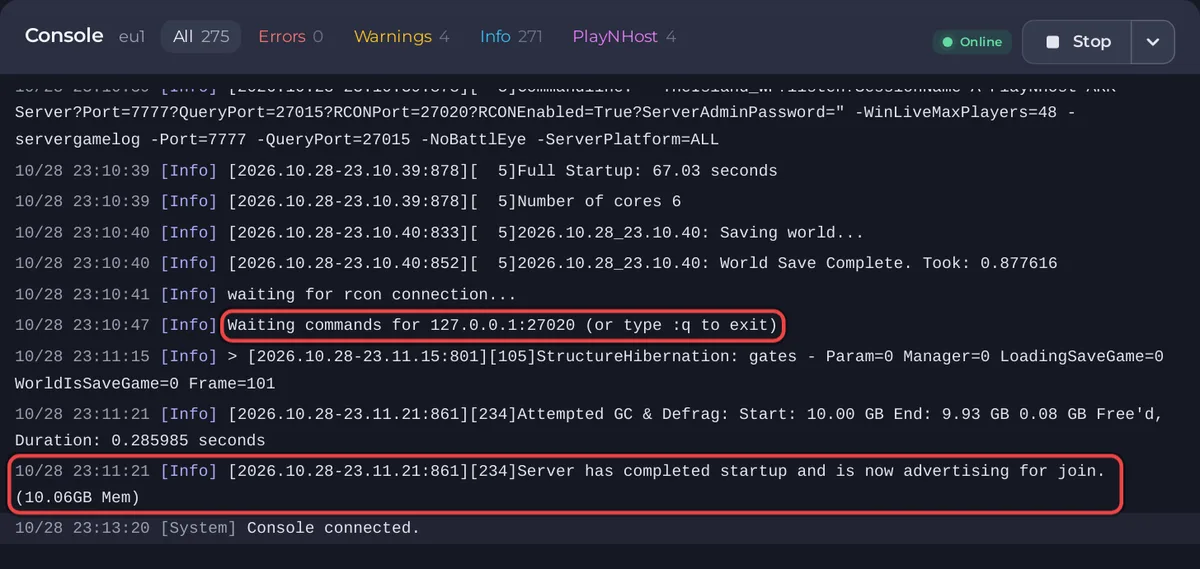
The badge turns Online at Waiting commands for 127.0.0.1:, and the server shows in the list a little later, at Server has completed startup and is now advertising for join.
Fix: open the Console and wait for that line. The first start after a reinstall, an update or a new mod takes longer.
3. The wrong game
ARK: Survival Evolved and ARK: Survival Ascended are different games. An Evolved player cannot join an Ascended server.
4. The password
If a Server Password is set in Game Settings, players must type it exactly as it is set. See How to change your ARK: Survival Ascended server name and password.
5. The server is full
The Active players card shows how many are on out of your slots. See How to change player slots on your ARK: Survival Ascended server.
6. Mods and console players
Xbox and PlayStation players can only load mods marked for every platform on CurseForge. Take out mods that are not, or test without them. See Which platforms can join your ARK: Survival Ascended server.
7. BattlEye
If you switched on BattlEye Anti-Cheat, switch it off and restart. The panel warns that when BattlEye does not come up, players are blocked from joining.
8. A banned player
A player you banned cannot join until you lift it with Bans on the Active players card: How to kick, ban and unban players on your ARK: Survival Ascended server.
Cannot find the server in the list
Join by address on PC with open and the Server Address, or see Your ARK: Survival Ascended server does not show in the server list. The join steps: How to join your ARK: Survival Ascended server.


