

To kick or ban a player on your ARK: Survival Ascended server, open the menu at the end of their row on the Active players card on Overview and choose Kick or Ban. To lift a ban, click Bans on the same card and type the player's EOS ID. The server must be running for all three.
Kick or ban a player who is on
- Open your server in the panel. On Overview, find the player on the Active players card.
- Click the menu button at the end of their row and choose Kick or Ban.
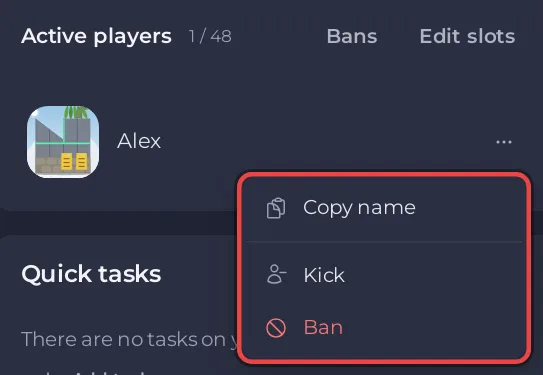
Read the window and confirm:
- Kick player: it asks whether to kick the player and says
They can rejoin straight away. - Ban player:
The game bans their player ID. You can lift it under Bans on this card while the server is running, and the ban's entry in the Activity log shows the ID.
- Kick player: it asks whether to kick the player and says
- A message confirms
KickedorBannedand the name.
The panel looks up the player's ID from the game's own list and sends ARK's KickPlayer or BanPlayer command with it. A ban lasts until you lift it.
Find a banned player's ID
ARK: Survival Ascended identifies players by their EOS ID, a 32 character code of letters and numbers. The panel does not read ARK's ban list, so keep the ID:
- A ban made from the panel: open Activity in the left menu. The ban's entry shows the ID.
- A player who is online: an admin in the game can type
cheat ListPlayers, which lists every player on with their ID. - The player themselves: they can type
whoamiin the game console, as the ARK wiki explains.
Lift a ban
- Make sure the server is Online.
- On the Active players card, click Bans.
- The Unban a player window says:
The panel does not read ARK's ban list, so type the player's ID: the EOS ID on Survival Ascended, the Steam ID on Survival Evolved. A ban made from this card shows the ID in the Activity log. The server must be running.
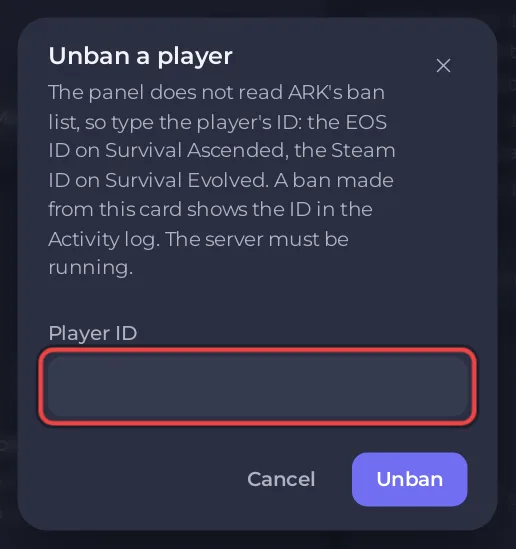
- Paste the ID in Player ID and click Unban.
- The message
The server accepted it. The player with this ID can join again.confirms it.
From the Console
You can type the same commands yourself in the Console tab, without cheat: KickPlayer <EOS ID>, BanPlayer <EOS ID> and UnbanPlayer <EOS ID>. See How to use the Console on your ARK: Survival Ascended server.
If something is missing
- No row menu or no Bans button: your role needs Use the console for kick and ban, and also Read contents and Create and upload for Bans. Ask the owner: How to let a friend help run your ARK: Survival Ascended server.
- The card says No answer from the server: the server is starting or stopped, or the admin password changed without a restart: The ARK: Survival Ascended players card says No answer from the server.


