

Your ARK: Survival Ascended server updates itself: with Auto Update on, which it is by default, every start asks Steam for the newest ARK build and installs it. The Daily restart each morning makes sure that happens. Right after a patch, click Restart and your server is on the new build in a few minutes.
Update right after a patch
- Open your server in the panel and click Restart.
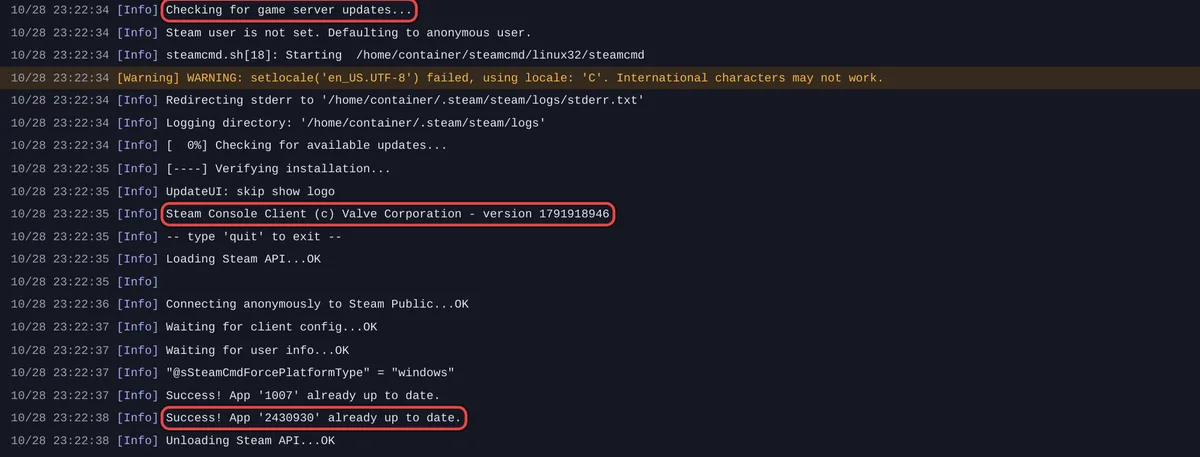
- Watch the Console. A download shows progress lines. With nothing new, it says
Success! App '2430930' already up to date. - Wait for Online. The game prints
ARK Version:and the version number as it loads.
Why it matters
Players' games update themselves on Steam, Xbox and PlayStation. A server still on the old build turns them away until it restarts. That is the most common reason friends cannot join on patch day.
Auto Update
Auto Update is in Game Settings on the Settings tab, under Show advanced. The panel says: Check for a game update each time the server starts. Turn this off only if you need to stay on a specific build for mod compatibility.
With it off, the server keeps the build it has. Players who updated their game cannot join until you switch it back on and restart. There is no setting to pick an older ARK build: off only means "do not update".
Mods after an update
Mods also update at every start. If a mod breaks after an ARK patch, its author usually needs to update it. Take its ID out of Mod IDs until then: How to add mods to your ARK: Survival Ascended server.
Good to know
- The Daily restart and how to make it wait for an empty server: How to restart your ARK: Survival Ascended server on a schedule.
- If an update stops with
Out of disk part-way through an update, free space in Files: ARK: Survival Ascended server problems and fixes. - Players still cannot join after the update: Players cannot join your ARK: Survival Ascended server.


