

An ARK: Survival Ascended server on PlayNHost shows in the game's unofficial server list, not in Steam's own server browser, because Ascended lists through Epic. Search for the Server Name from Game Settings, not the name on the panel's Overview card, and wait until the Console says is now advertising for join.
Check, in this order
- The server has finished starting. In the Console, look for
Server has completed startup and is now advertising for join.Until then it is not in the list. - You are in the unofficial list. Player-run servers are listed with the unofficial servers in the game, not with official ones.
- You search for the right name. The list shows Server Name from Settings, Game Settings. The Server Name on the Overview card is only the panel's label.
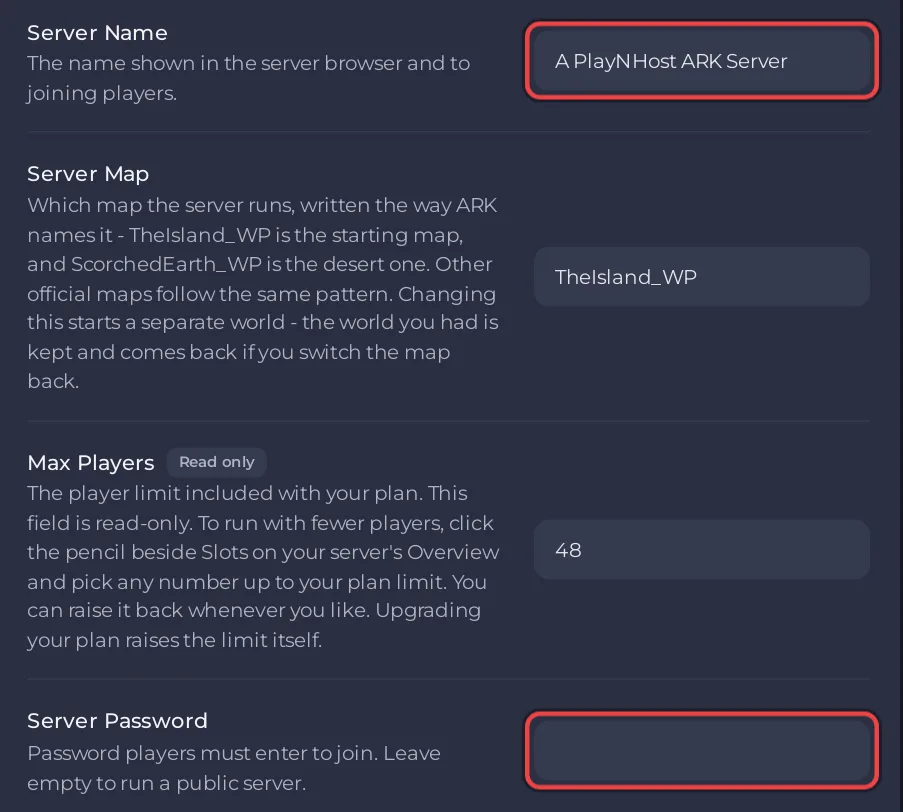
- Filters. If you set a Server Password, make sure the game's filters do not hide password-protected servers.
- The game version. After an ARK patch, players on the new build cannot join a server still on the old one. Restart the server to update it: How to update your ARK: Survival Ascended server.
Join without the list
On PC, press ~ in the game and type open and the Server Address from Overview, for example open 203.0.113.10:7777 with your own address. The ARK wiki describes this command. See How to join your ARK: Survival Ascended server.
Good to know
- The panel's own help on Game Settings says it too:
Ascended lists through Epic rather than Steam, so find your server under the unofficial list in game. - Console players: How to join your ARK: Survival Ascended server from Xbox or PlayStation.


