

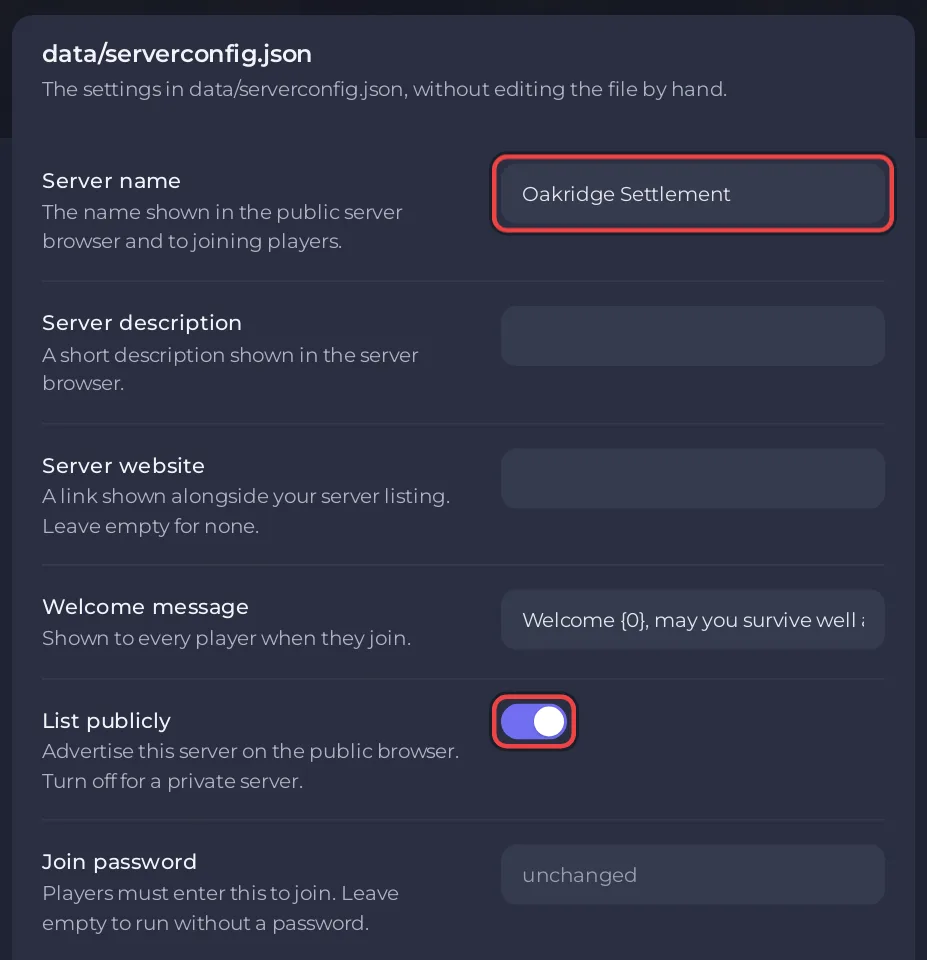
To change the name of a Vintage Story server on PlayNHost, open Settings, click serverconfig.json under Config files, type the new Server name and click Save & restart. The same card holds the Server description, Server website, Welcome message and the List publicly switch that puts the server in the game's public server list.
How do I change the name and description?
- Open your server in the panel and click the Settings tab.
- Under Config files on the left, click serverconfig.json. If you see No config files yet, start the server once and come back.
- Type the new Server name. Vintage Story accepts 4 to 80 characters.
- Optional: fill in Server description and Welcome message. In the welcome message,
{0}is replaced by the name of the player who joins. Server website is sent with the listing, but the official config page says the game does not use it yet. - To show the server in the in-game public server list, switch on List publicly.
- Click Save & restart. The server restarts with the new name.
Is this the same as the name in the panel?
No. The Server Name at the top of the Overview page, with its pencil, is the name of the server in your PlayNHost panel only. Players never see it. The Server name in the serverconfig.json card is the one the game shows in the public server list.
In each player's own Multiplayer list, the server keeps the name that player typed when they added it. The official dedicated server guide says that name does not have to match yours. See How to rename your server and change player slots for the panel name.
Should I list my server publicly?
List it if you want new players to find it. Leave List publicly off for a server only for friends, and share the address yourself: How to invite friends to your Vintage Story server. Vintage Story only lists a server that has a name set (Vintage Story server config). A listed server with a join password or the whitelist on still keeps strangers out.
Why did my new name not show?
- You clicked Save only: the name applies on the next start. Restart the server from the Console tab.
- The name has fewer than 4 characters. Vintage Story asks for 4 to 80.
- Your friends look at their own Multiplayer list, which shows the name they typed when they added the server, not yours.


