%7B.s%7Banimation%3Ab%201.5s%20ease-out%20both%7D.d%7Banimation-delay%3A.16s%7D%7D%40keyframes%20b%7B0%25%7Bfill%3A%23F4F6FA%7D18%25%7Bfill%3A%23FFE08A%7D34%25%2C70%25%7Bfill%3A%23FF8A1F%7D80%25%7Bfill%3A%23FFE08A%7D100%25%7Bfill%3A%23FF8A1F%7D%7D%3C%2Fstyle%3E%3Cg%20transform%3D%22translate(143%20428.93)%20scale(3.885906)%22%3E%3Cg%20transform%3D%22translate(0%202)%22%20fill%3D%22%23706EF0%22%3E%3Cpath%20d%3D%22M0%200%20H48%20A40%2040%200%200%201%2048%2080%20V100%20H0%20Z%22%2F%3E%3Cpath%20transform%3D%22translate(91.75%200)%22%20d%3D%22M0%200%20L48%200%20L48%2050%20L76%2050%20L76%20100%20L0%20100%20Z%22%2F%3E%3Cpath%20transform%3D%22translate(173%200)%22%20d%3D%22M0%20100%20L58%20-4%20L116%20100%20Z%22%2F%3E%3Cpath%20transform%3D%22translate(264.25%200)%22%20d%3D%22M0%200%20L104%200%20L76%2050%20L76%20100%20L28%20100%20L28%2050%20Z%22%2F%3E%3Cg%20transform%3D%22translate(375%200)%22%3E%3Cpath%20d%3D%22M0%200%20L50%2038%20L50%200%20L100%200%20L100%20100%20L0%20100%20Z%22%20fill%3D%22%23F4F6FA%22%2F%3E%3Crect%20class%3D%22s%22%20x%3D%2247%22%20y%3D%2263%22%20width%3D%2219%22%20height%3D%2230%22%2F%3E%3Crect%20class%3D%22s%20d%22%20x%3D%2274%22%20y%3D%2263%22%20width%3D%2219%22%20height%3D%2230%22%2F%3E%3C%2Fg%3E%3Cpath%20transform%3D%22translate(484.75%200)%22%20d%3D%22M0%200%20L48%200%20L48%2037%20L52%2037%20L52%200%20L100%200%20L100%20100%20L52%20100%20L52%2063%20L48%2063%20L48%20100%20L0%20100%20Z%22%2F%3E%3Cpath%20transform%3D%22translate(588.5%200)%22%20d%3D%22M0%2050%20A53%2053%200%201%200%20106%2050%20A53%2053%200%201%200%200%2050%20Z%22%2F%3E%3Cpath%20transform%3D%22translate(698.25%200)%22%20d%3D%22M25%200%20H102%20V50%20H77%20A25%2025%200%200%201%2077%20100%20H0%20V50%20H25%20A25%2025%200%200%201%2025%200%20Z%22%2F%3E%3Cpath%20transform%3D%22translate(804%200)%22%20d%3D%22M0%200%20L90%200%20L90%2050%20L69%2050%20L69%20100%20L21%20100%20L21%2050%20L0%2050%20Z%22%2F%3E%3C%2Fg%3E%3C%2Fg%3E%3C%2Fsvg%3E)


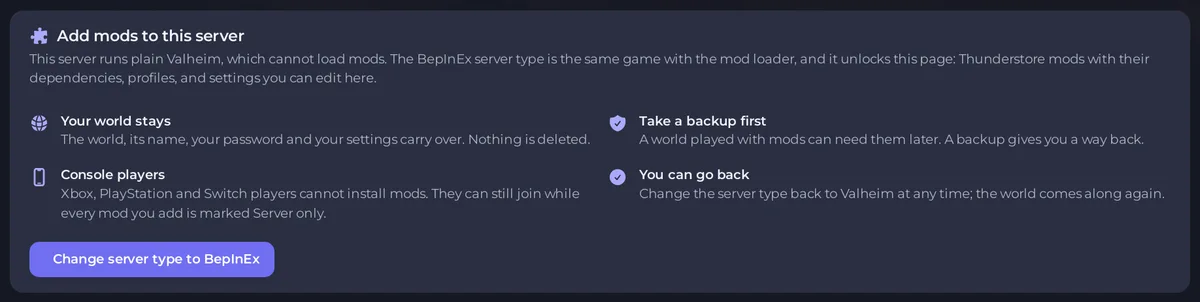
Mods do nothing when the server is the plain Valheim type, because it has no mod loader: the Mods page then shows Add mods to this server. They also do nothing until the server restarts after a change. If the Console says the mod loader is missing, the server stays offline until the loader is installed again.
Mods do nothing
- Check the server type. Open the Modding tab. Add mods to this server means the plain type: click Change server type to BepInEx. See How to switch your Valheim server to BepInEx or Valheim Plus.
- Restart. The side card On this server says Changes wait for a restart until you click Apply and restart.
- Read the states. On Your mods, each mod shows Loaded or a reason. See How to check that your Valheim mods loaded.
- Mods you uploaded yourself must be in
BepInEx/plugins/in Files. The Mods page does not list them. - Check the version. A game update can break a mod until its author updates it: How to update mods on your Valheim server.
The Console line [playnhost] mods: BepInEx is not installed on this server, so mods cannot load. means the mod list is there but the server type has no loader, for example after a switch back to plain Valheim.
The Console says the mod loader is missing
On the modded server types the server checks for its loader before it starts. If a file is missing, for example after a download failed during the install, it prints one of these messages and stays offline instead of starting as plain Valheim:
The BepInEx mod loader is missing from this server, so mods would not load. Reinstall the server to download it again.Valheim Plus is missing from this server, so it would start as plain Valheim. Reinstall the server to download it again.
Fix it
- Make a backup. See How to back up and restore your Valheim world.
- Open a ticket and ask support to reinstall the server so the loader is downloaded again. Include the Console message and your server name.
Your worlds, the admin, ban and allow lists, and your mod list are not touched by a reinstall.
The server stops after you add a mod
Switch the newest mod off on the Mods page with Switch off, keep on the list, then Apply and restart: How to remove mods or go back to plain Valheim. General steps: How to fix a server that will not start.





