%7B.s%7Banimation%3Ab%201.5s%20ease-out%20both%7D.d%7Banimation-delay%3A.16s%7D%7D%40keyframes%20b%7B0%25%7Bfill%3A%23F4F6FA%7D18%25%7Bfill%3A%23FFE08A%7D34%25%2C70%25%7Bfill%3A%23FF8A1F%7D80%25%7Bfill%3A%23FFE08A%7D100%25%7Bfill%3A%23FF8A1F%7D%7D%3C%2Fstyle%3E%3Cg%20transform%3D%22translate(143%20428.93)%20scale(3.885906)%22%3E%3Cg%20transform%3D%22translate(0%202)%22%20fill%3D%22%23706EF0%22%3E%3Cpath%20d%3D%22M0%200%20H48%20A40%2040%200%200%201%2048%2080%20V100%20H0%20Z%22%2F%3E%3Cpath%20transform%3D%22translate(91.75%200)%22%20d%3D%22M0%200%20L48%200%20L48%2050%20L76%2050%20L76%20100%20L0%20100%20Z%22%2F%3E%3Cpath%20transform%3D%22translate(173%200)%22%20d%3D%22M0%20100%20L58%20-4%20L116%20100%20Z%22%2F%3E%3Cpath%20transform%3D%22translate(264.25%200)%22%20d%3D%22M0%200%20L104%200%20L76%2050%20L76%20100%20L28%20100%20L28%2050%20Z%22%2F%3E%3Cg%20transform%3D%22translate(375%200)%22%3E%3Cpath%20d%3D%22M0%200%20L50%2038%20L50%200%20L100%200%20L100%20100%20L0%20100%20Z%22%20fill%3D%22%23F4F6FA%22%2F%3E%3Crect%20class%3D%22s%22%20x%3D%2247%22%20y%3D%2263%22%20width%3D%2219%22%20height%3D%2230%22%2F%3E%3Crect%20class%3D%22s%20d%22%20x%3D%2274%22%20y%3D%2263%22%20width%3D%2219%22%20height%3D%2230%22%2F%3E%3C%2Fg%3E%3Cpath%20transform%3D%22translate(484.75%200)%22%20d%3D%22M0%200%20L48%200%20L48%2037%20L52%2037%20L52%200%20L100%200%20L100%20100%20L52%20100%20L52%2063%20L48%2063%20L48%20100%20L0%20100%20Z%22%2F%3E%3Cpath%20transform%3D%22translate(588.5%200)%22%20d%3D%22M0%2050%20A53%2053%200%201%200%20106%2050%20A53%2053%200%201%200%200%2050%20Z%22%2F%3E%3Cpath%20transform%3D%22translate(698.25%200)%22%20d%3D%22M25%200%20H102%20V50%20H77%20A25%2025%200%200%201%2077%20100%20H0%20V50%20H25%20A25%2025%200%200%201%2025%200%20Z%22%2F%3E%3Cpath%20transform%3D%22translate(804%200)%22%20d%3D%22M0%200%20L90%200%20L90%2050%20L69%2050%20L69%20100%20L21%20100%20L21%2050%20L0%2050%20Z%22%2F%3E%3C%2Fg%3E%3C%2Fg%3E%3C%2Fsvg%3E)


Open the Modding tab. Each mod on Your mods shows Loaded, or a red line that says why it did not load. The side card On this server shows Last start with how many loaded and failed. The Console shows the same story line by line.
On the Mods page
- Open your server in the panel and click the Modding tab.
Look at the side card On this server:
- State: Changes wait for a restart, In place since a time, or Nothing applied yet.
- Last start: for example
5 loaded, 0 failed, with the BepInEx and Valheim versions.
- On Your mods, each row shows its state: Loaded, Installs at the next start, Switched off, or a reason in red.
When mods failed at the last start, a red banner says how many, Each one says why on its row below. The server runs without them. The Overview page shows the same with See why on the Mods page.
The reasons
| The row says | What to do |
|---|---|
| A mod it needs did not load | Fix that mod first; this one follows. |
| A file it needs is missing | Usually a dependency that is not installed. Remove the mod and add it again so its dependencies come with it. |
| Another mod on the list is incompatible with it | Remove one of the two. |
| Not built for this Valheim version | Wait for an update, or look for Update to on its row. |
| Could not be installed at start | The download or the check failed. Restart once; if it stays, remove the mod. |
| It stopped with an error | Read the mod's page or remove it. |
| BepInEx did not load it | Read the reason; often a version problem. |
More: Valheim mod did not load on your server.
In the Console
- Click Console, then the filter Since last start.
- Search for
playnhost] modsto see the install lines, for example5 on the list: 5 to add, 0 to update, 0 to removeandready: 5 mods in place. - Search for
Chainloaderto see BepInEx:Chainloader startup completemeans BepInEx ran.
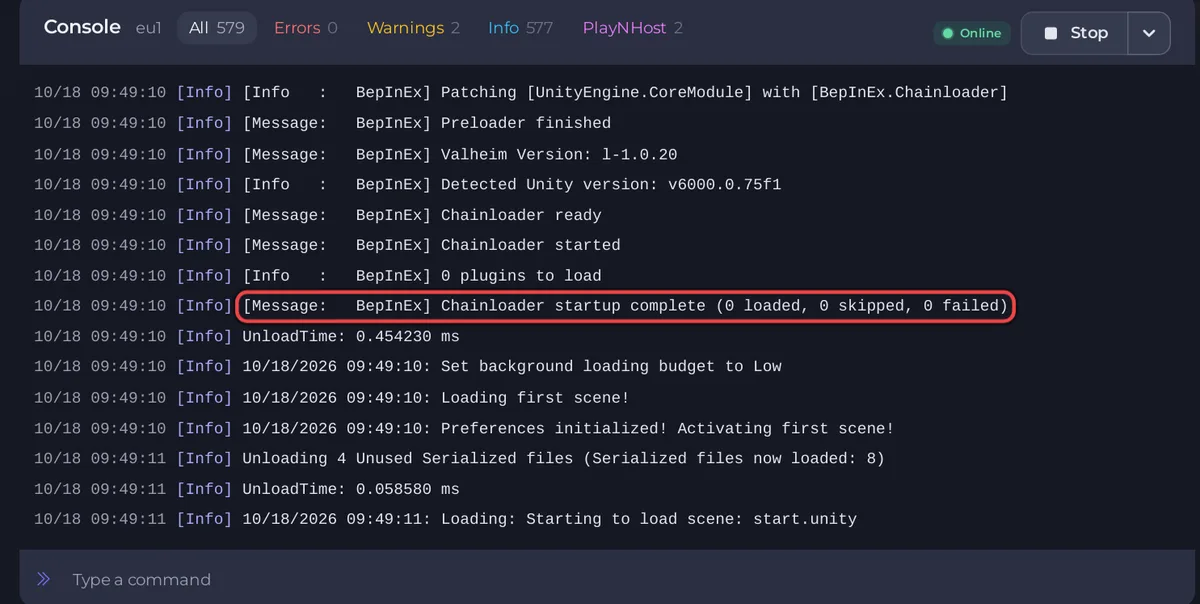
On the Valheim Plus Mod type you also see Loading [Valheim Plus ...] and ValheimPlus [...] is loaded.
The full BepInEx log is the file BepInEx/LogOutput.log in Files. The page reads its reasons from it.
No BepInEx lines at all
The server is the plain Valheim type, or the loader is missing: Valheim mods do nothing or the mod loader is missing.





