

To restart a The Bus server on a schedule on PlayNHost, open Quick Tasks, open the menu of Send Restart, click Schedule…, choose Repeats, Every day and a time, then click Schedule. With Auto Update on, each scheduled restart also installs a waiting The Bus update.
How do I schedule a daily restart?
- Open your server in the panel and click Quick Tasks in the left menu.
- Under All tasks, find Send Restart ("Gracefully restarts the server container."). Type
restartin Search if you do not see it. - Click the three-dot menu on its row (More options for Send Restart) and click Schedule….
- In Schedule task, type a Name, for example
Daily restart, and click Next step. - Click Repeats, set How often to Every day and pick a time in At. The line below reads back the schedule, for example "Runs every day at 05:00", with the time zone.
- Leave Enabled on and click Schedule. The panel confirms "Created the schedule" with its name.
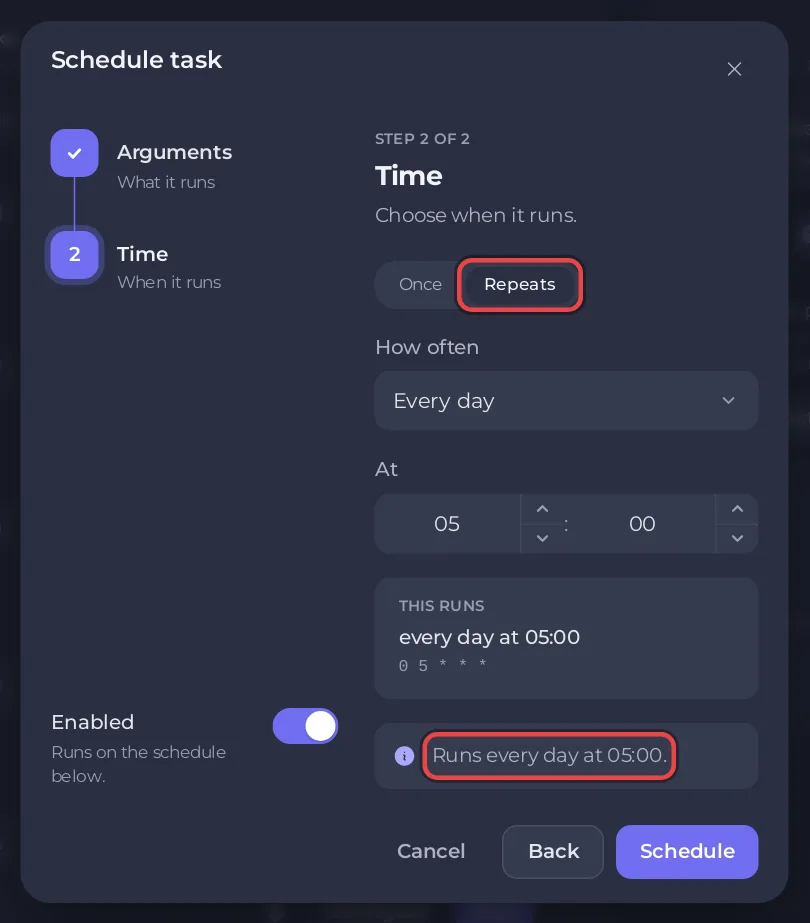
Pick a time when nobody drives on your server. A restart disconnects everyone for the few minutes it takes.
Can it skip the restart while people are playing?
The schedule has a Skip while players are online switch. The panel's hint explains: "When its time comes and anyone is playing, that run is skipped. If the server cannot report its players, it runs." The panel has no player reader made for The Bus, so it may not know who is on, and then the restart runs anyway. Choose a quiet hour as well.
How do I change the time?
The time of a schedule cannot be edited on Quick Tasks. Delete the schedule with Delete schedule and create a new one with the new time. To pause it without deleting it, switch it off.
Is there a ready-made The Bus task?
No. The Bus has no game-specific Quick Tasks, because commands sent to the Console do not reach a Linux The Bus server. The general tasks work: Send Restart, Send Stop, Send Start and Backup Server. More about schedules: How to schedule tasks and automatic backups.
Related: How to update your The Bus server and How to back up and restore your The Bus server.


