%7B.s%7Banimation%3Ab%201.5s%20ease-out%20both%7D.d%7Banimation-delay%3A.16s%7D%7D%40keyframes%20b%7B0%25%7Bfill%3A%23F4F6FA%7D18%25%7Bfill%3A%23FFE08A%7D34%25%2C70%25%7Bfill%3A%23FF8A1F%7D80%25%7Bfill%3A%23FFE08A%7D100%25%7Bfill%3A%23FF8A1F%7D%7D%3C%2Fstyle%3E%3Cg%20transform%3D%22translate(143%20428.93)%20scale(3.885906)%22%3E%3Cg%20transform%3D%22translate(0%202)%22%20fill%3D%22%23706EF0%22%3E%3Cpath%20d%3D%22M0%200%20H48%20A40%2040%200%200%201%2048%2080%20V100%20H0%20Z%22%2F%3E%3Cpath%20transform%3D%22translate(91.75%200)%22%20d%3D%22M0%200%20L48%200%20L48%2050%20L76%2050%20L76%20100%20L0%20100%20Z%22%2F%3E%3Cpath%20transform%3D%22translate(173%200)%22%20d%3D%22M0%20100%20L58%20-4%20L116%20100%20Z%22%2F%3E%3Cpath%20transform%3D%22translate(264.25%200)%22%20d%3D%22M0%200%20L104%200%20L76%2050%20L76%20100%20L28%20100%20L28%2050%20Z%22%2F%3E%3Cg%20transform%3D%22translate(375%200)%22%3E%3Cpath%20d%3D%22M0%200%20L50%2038%20L50%200%20L100%200%20L100%20100%20L0%20100%20Z%22%20fill%3D%22%23F4F6FA%22%2F%3E%3Crect%20class%3D%22s%22%20x%3D%2247%22%20y%3D%2263%22%20width%3D%2219%22%20height%3D%2230%22%2F%3E%3Crect%20class%3D%22s%20d%22%20x%3D%2274%22%20y%3D%2263%22%20width%3D%2219%22%20height%3D%2230%22%2F%3E%3C%2Fg%3E%3Cpath%20transform%3D%22translate(484.75%200)%22%20d%3D%22M0%200%20L48%200%20L48%2037%20L52%2037%20L52%200%20L100%200%20L100%20100%20L52%20100%20L52%2063%20L48%2063%20L48%20100%20L0%20100%20Z%22%2F%3E%3Cpath%20transform%3D%22translate(588.5%200)%22%20d%3D%22M0%2050%20A53%2053%200%201%200%20106%2050%20A53%2053%200%201%200%200%2050%20Z%22%2F%3E%3Cpath%20transform%3D%22translate(698.25%200)%22%20d%3D%22M25%200%20H102%20V50%20H77%20A25%2025%200%200%201%2077%20100%20H0%20V50%20H25%20A25%2025%200%200%201%2025%200%20Z%22%2F%3E%3Cpath%20transform%3D%22translate(804%200)%22%20d%3D%22M0%200%20L90%200%20L90%2050%20L69%2050%20L69%20100%20L21%20100%20L21%2050%20L0%2050%20Z%22%2F%3E%3C%2Fg%3E%3C%2Fg%3E%3C%2Fsvg%3E)


Open Settings, Game Settings, type a password in Password (Terraria Vanilla) or Server Password (TShock and tModLoader), and restart the server. Players then type it when they join. Leave the field empty to run a public server that anyone with the address can join.
Set the password
- Open your server in the panel and click the Settings tab.
- Click Game Settings in the Server Settings card.
- Type the password in Password or Server Password, then click outside the field or press Enter.
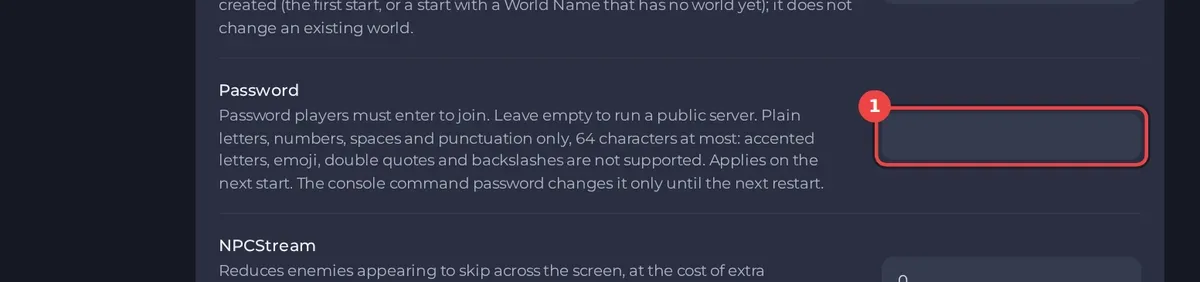
- Click Restart now in the banner, or restart the server yourself. The new password applies from the next start.
To make the server public again, empty the field and restart.
What the password may contain
| Server type | Field | Rules |
|---|---|---|
| Terraria Vanilla | Password | Plain letters, numbers, spaces and punctuation, 64 characters at most. No accented letters, emoji, double quotes or backslashes. |
| TShock | Server Password | No double quotes or backslashes, 20 characters at most. |
| tModLoader | Server Password | No double quotes or backslashes, 20 characters at most. |
If the panel refuses a password, it says why: The panel will not save your Terraria world name or password.
Share it
The Play with friends card on Overview shows the password in its Password row, and Copy invite message puts it in the invite. Someone on your team without the View startup permission sees Hidden for your account, and their invite says It has a password: ask me for it. See How to invite friends to your Terraria server.
Good to know
- On Terraria Vanilla, the Console command
passwordfollowed by a new password changes it only until the next restart. The panel setting wins at every start. - The password has to match exactly, capitals included.
- On TShock you can also make every player log in to their own account, or allow only listed addresses: How to change TShock settings on your Terraria server and How to use a whitelist on your TShock server.
- A password keeps strangers out. To remove someone who is already in, see How to kick or ban a player on your Terraria server.





