%7B.s%7Banimation%3Ab%201.5s%20ease-out%20both%7D.d%7Banimation-delay%3A.16s%7D%7D%40keyframes%20b%7B0%25%7Bfill%3A%23F4F6FA%7D18%25%7Bfill%3A%23FFE08A%7D34%25%2C70%25%7Bfill%3A%23FF8A1F%7D80%25%7Bfill%3A%23FFE08A%7D100%25%7Bfill%3A%23FF8A1F%7D%7D%3C%2Fstyle%3E%3Cg%20transform%3D%22translate(143%20428.93)%20scale(3.885906)%22%3E%3Cg%20transform%3D%22translate(0%202)%22%20fill%3D%22%23706EF0%22%3E%3Cpath%20d%3D%22M0%200%20H48%20A40%2040%200%200%201%2048%2080%20V100%20H0%20Z%22%2F%3E%3Cpath%20transform%3D%22translate(91.75%200)%22%20d%3D%22M0%200%20L48%200%20L48%2050%20L76%2050%20L76%20100%20L0%20100%20Z%22%2F%3E%3Cpath%20transform%3D%22translate(173%200)%22%20d%3D%22M0%20100%20L58%20-4%20L116%20100%20Z%22%2F%3E%3Cpath%20transform%3D%22translate(264.25%200)%22%20d%3D%22M0%200%20L104%200%20L76%2050%20L76%20100%20L28%20100%20L28%2050%20Z%22%2F%3E%3Cg%20transform%3D%22translate(375%200)%22%3E%3Cpath%20d%3D%22M0%200%20L50%2038%20L50%200%20L100%200%20L100%20100%20L0%20100%20Z%22%20fill%3D%22%23F4F6FA%22%2F%3E%3Crect%20class%3D%22s%22%20x%3D%2247%22%20y%3D%2263%22%20width%3D%2219%22%20height%3D%2230%22%2F%3E%3Crect%20class%3D%22s%20d%22%20x%3D%2274%22%20y%3D%2263%22%20width%3D%2219%22%20height%3D%2230%22%2F%3E%3C%2Fg%3E%3Cpath%20transform%3D%22translate(484.75%200)%22%20d%3D%22M0%200%20L48%200%20L48%2037%20L52%2037%20L52%200%20L100%200%20L100%20100%20L52%20100%20L52%2063%20L48%2063%20L48%20100%20L0%20100%20Z%22%2F%3E%3Cpath%20transform%3D%22translate(588.5%200)%22%20d%3D%22M0%2050%20A53%2053%200%201%200%20106%2050%20A53%2053%200%201%200%200%2050%20Z%22%2F%3E%3Cpath%20transform%3D%22translate(698.25%200)%22%20d%3D%22M25%200%20H102%20V50%20H77%20A25%2025%200%200%201%2077%20100%20H0%20V50%20H25%20A25%2025%200%200%201%2025%200%20Z%22%2F%3E%3Cpath%20transform%3D%22translate(804%200)%22%20d%3D%22M0%200%20L90%200%20L90%2050%20L69%2050%20L69%20100%20L21%20100%20L21%2050%20L0%2050%20Z%22%2F%3E%3C%2Fg%3E%3C%2Fg%3E%3C%2Fsvg%3E)


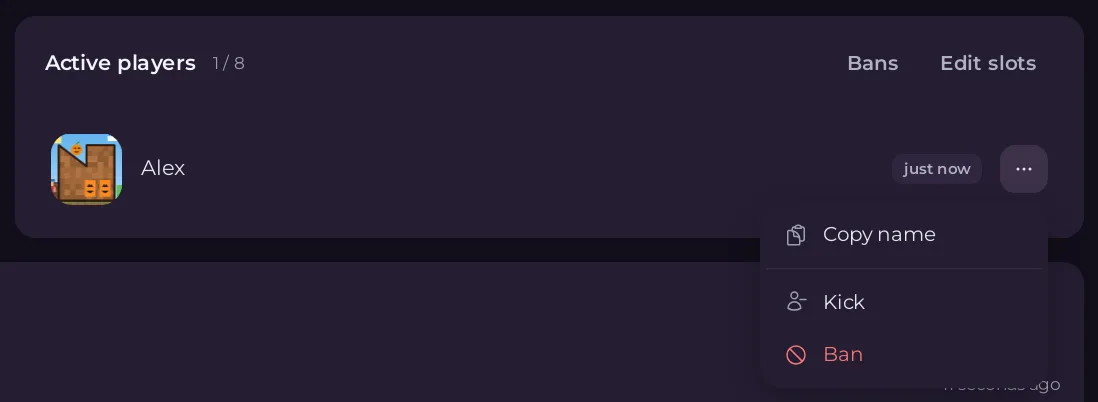
Open the Overview page, click ... on the player's row in Active players, and choose Kick or Ban. A kicked player can rejoin straight away. A banned player cannot rejoin until you lift the ban under Bans on the same card. On Terraria Vanilla and tModLoader a ban blocks the player's internet address.
Kick a player
- Open your server in the panel. On Overview, find the player on the Active players card.
- Click ... at the end of their row and choose Kick.
- The window Kick player asks
Kickand the namefrom this server? They can rejoin straight away. - Click Kick. A message says
Kickedand the name.
Ban a player
- Click ... on their row and choose Ban.
Read the window Ban player:
- Terraria Vanilla and tModLoader:
This blocks their internet address, so everyone on the same home network is blocked too. You can lift it under Bans. - TShock:
TShock blocks their name, their device and, unless you turned it off, their internet address. You can lift it under Bans while the server is running.
- Terraria Vanilla and tModLoader:

- Click Ban. A message says
Bannedand the name.
The ban lasts across restarts. To lift it: How to unban a player on your Terraria server.
When the panel refuses
Another player on the server has the same name apart from capital letters, and Terraria would remove both.Terraria matches names without regard to capitals, so the panel waits until one of them has left. Use the Console if you must act now.- On TShock:
Another player on the server has this name, or a name that starts with it, and TShock could act on the wrong one. Use the console. The server did not say who is on in time. Check it is running and try again.- No menu on a row: the player's name has characters the panel cannot send safely. Use the Console.
From the Console
- Terraria Vanilla and tModLoader:
kickand the player's name, orbanand the name. - TShock:
kickand the name, orban addand the name. TShock's console runs its own commands.
Who can do it
Kick and ban need the Use the console permission. Ask the server owner if the menu is missing: How to let a friend help run your Terraria server.
Good to know
- Everyone on the same home connection shares one address, so a Terraria ban blocks all of them.
- To keep strangers out in the first place, set a password: How to set a password on your Terraria server.
- On Terraria Vanilla, Anti-cheat kicks players who send impossible actions: Terraria server settings: every option explained.





