%7B.s%7Banimation%3Ab%201.5s%20ease-out%20both%7D.d%7Banimation-delay%3A.16s%7D%7D%40keyframes%20b%7B0%25%7Bfill%3A%23F4F6FA%7D18%25%7Bfill%3A%23FFE08A%7D34%25%2C70%25%7Bfill%3A%23FF8A1F%7D80%25%7Bfill%3A%23FFE08A%7D100%25%7Bfill%3A%23FF8A1F%7D%7D%3C%2Fstyle%3E%3Cg%20transform%3D%22translate(143%20428.93)%20scale(3.885906)%22%3E%3Cg%20transform%3D%22translate(0%202)%22%20fill%3D%22%23706EF0%22%3E%3Cpath%20d%3D%22M0%200%20H48%20A40%2040%200%200%201%2048%2080%20V100%20H0%20Z%22%2F%3E%3Cpath%20transform%3D%22translate(91.75%200)%22%20d%3D%22M0%200%20L48%200%20L48%2050%20L76%2050%20L76%20100%20L0%20100%20Z%22%2F%3E%3Cpath%20transform%3D%22translate(173%200)%22%20d%3D%22M0%20100%20L58%20-4%20L116%20100%20Z%22%2F%3E%3Cpath%20transform%3D%22translate(264.25%200)%22%20d%3D%22M0%200%20L104%200%20L76%2050%20L76%20100%20L28%20100%20L28%2050%20Z%22%2F%3E%3Cg%20transform%3D%22translate(375%200)%22%3E%3Cpath%20d%3D%22M0%200%20L50%2038%20L50%200%20L100%200%20L100%20100%20L0%20100%20Z%22%20fill%3D%22%23F4F6FA%22%2F%3E%3Crect%20class%3D%22s%22%20x%3D%2247%22%20y%3D%2263%22%20width%3D%2219%22%20height%3D%2230%22%2F%3E%3Crect%20class%3D%22s%20d%22%20x%3D%2274%22%20y%3D%2263%22%20width%3D%2219%22%20height%3D%2230%22%2F%3E%3C%2Fg%3E%3Cpath%20transform%3D%22translate(484.75%200)%22%20d%3D%22M0%200%20L48%200%20L48%2037%20L52%2037%20L52%200%20L100%200%20L100%20100%20L52%20100%20L52%2063%20L48%2063%20L48%20100%20L0%20100%20Z%22%2F%3E%3Cpath%20transform%3D%22translate(588.5%200)%22%20d%3D%22M0%2050%20A53%2053%200%201%200%20106%2050%20A53%2053%200%201%200%200%2050%20Z%22%2F%3E%3Cpath%20transform%3D%22translate(698.25%200)%22%20d%3D%22M25%200%20H102%20V50%20H77%20A25%2025%200%200%201%2077%20100%20H0%20V50%20H25%20A25%2025%200%200%201%2025%200%20Z%22%2F%3E%3Cpath%20transform%3D%22translate(804%200)%22%20d%3D%22M0%200%20L90%200%20L90%2050%20L69%2050%20L69%20100%20L21%20100%20L21%2050%20L0%2050%20Z%22%2F%3E%3C%2Fg%3E%3C%2Fg%3E%3C%2Fsvg%3E)


On your server's Overview page, click Bans on the Active players card, then Unban next to the player's name. The ban is lifted straight away, with no restart. On Terraria Vanilla and tModLoader this works even while the server is stopped. On TShock the server must be running.
Lift a ban
- Open your server in the panel. You land on Overview.
- On the Active players card, click Bans.
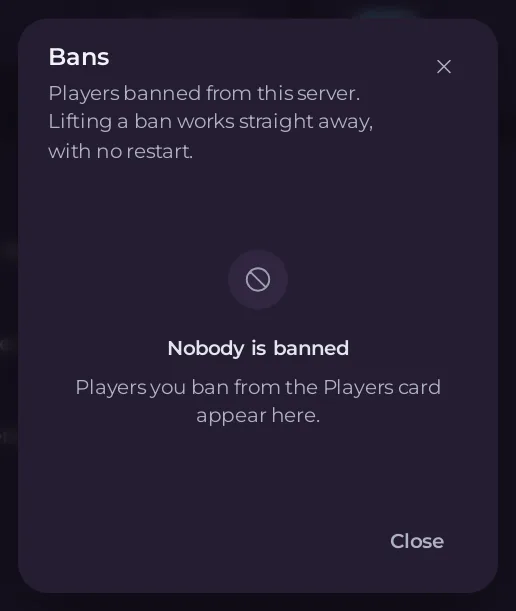
- The window Bans lists the banned players by name. Click Unban next to the name.
- A message says
Unbannedand the name, andThey can join again, unless their address is also banned under another name.
Nobody is banned means the list is empty.
Terraria Vanilla and tModLoader
A Terraria ban is a name and an internet address, kept in banlist.txt at the top of Files. The Bans list shows each name, with a count of addresses when one name was banned from more than one. Unban removes every ban under that name.
If two players on the same home connection were both banned, their address is on the list twice. Lifting one name leaves the address blocked under the other name, so lift both.
A ban someone added to banlist.txt by hand has no name the panel can show. The window then says the ban was added by hand: edit banlist.txt in Files to change it, deleting the address line and the //name line above it.
TShock
TShock keeps its bans in its own database, as numbered tickets. The Bans list groups them by player name and lifts them all with Unban. Start the server first: Start the server to lift a TShock ban. TShock changes its bans only while it runs.
A TShock ban made in game on a player who was not logged in may have no name. The window then says to type ban list in the Console and ban del followed by each of its numbers.
Messages you may see
The ban list could not be read just now. Try again in a moment.Try again. If it stays, openbanlist.txtin Files instead.banlist.txt is too large to edit here. Open it under Files instead.Someone else is changing the ban list. Try again in a moment.- On TShock:
Sent to TShock, but its ban list has not changed yet. Open Bans again in a moment.
Who can do it
The Bans button needs Use the console and the file permission Read contents. Unban also needs Create and upload. See How to let a friend help run your Terraria server.
Good to know
- On tModLoader with Language set to anything but English, the Active players card does not show, so neither does Bans. Lift a ban in
banlist.txtin Files instead, or set Language to English. - Ban someone: How to kick or ban a player on your Terraria server.





