

A new Sven Co-op server on PlayNHost has no restart schedule. Build one on Quick Tasks: take Send Restart from Default tasks, choose Schedule…, and set a time each day. Each start checks Steam for a newer Sven Co-op build, so a daily restart also keeps the server up to date.
Why restart on a schedule?
- Every start checks Steam for a newer game build and installs it, so players on the newest version can always join.
- A start applies saved Game Settings, such as a new Server Name or Password.
- A start reads
svencoop/admins.txtagain, with any admins you added.
The only ready-made schedule on a Sven Co-op server is the nightly Automatic backup: How to back up and restore your Sven Co-op server.
Build a daily restart
- Open your server in the panel and click Quick Tasks in the left menu.
- Under All tasks, open Default tasks and find Send Restart. It says
Gracefully restarts the server container. - Open its menu and choose Schedule….
- Give the schedule a Name, for example
Daily restart, then click Next step. - Choose Repeats, set How often to Every day, and set the time under At. The time is panel time. If your computer is in another time zone, the window adds when that is where you are.
- Keep Enabled on and click Schedule.
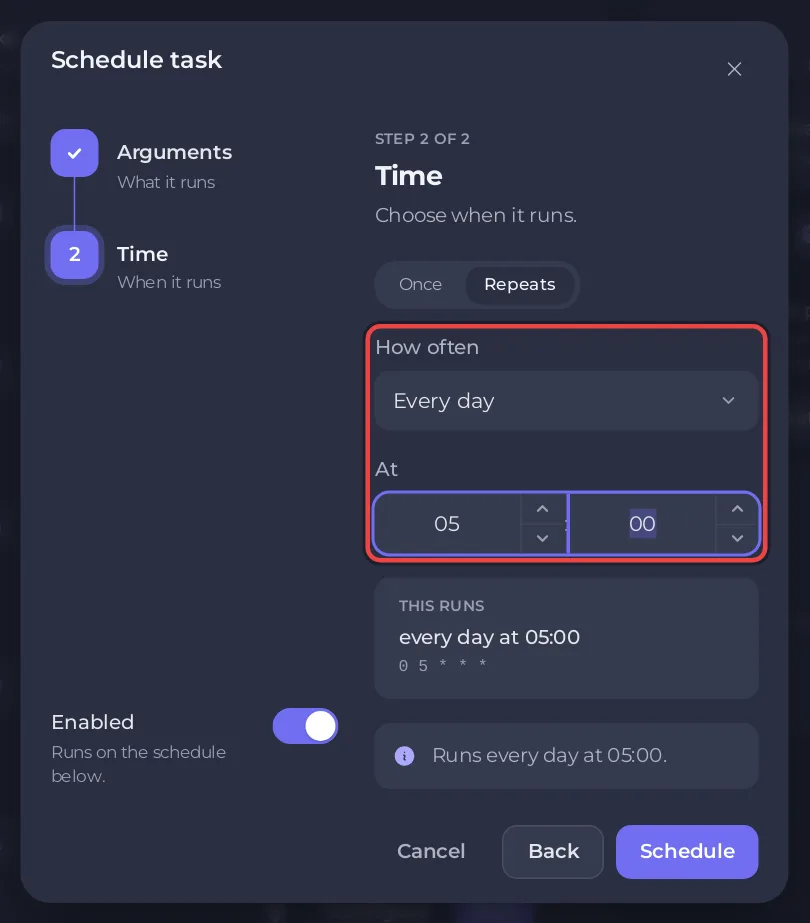
The new schedule appears under Schedules. Players are disconnected while the server restarts, and the map starts again from Default Map. There is no world to save on a Sven Co-op server, so nothing else is lost.
How do I skip a restart while people play?
Open the schedule and switch on Skip while players are online. A list appears under it, When players are online:
- Skip that run: a run that comes while anyone is playing is skipped, and the next one is tried at its own time.
- A wait such as
Wait up to 2 hours for the server to empty: the panel looks again every 5 minutes, restarts as soon as the game reports nobody on, and restarts anyway when the wait is over.
The panel's own note says: If the server cannot report its players, it runs. Run now always runs.
How do I test, switch off or delete it?
- On Quick Tasks, find your schedule under Schedules.
- Use its switch to turn it off or on.
- Open the schedule's menu and choose Run now to test it. This restarts the server right away. Choose Delete schedule to remove it.
The Quick Tasks page cannot change the time of a schedule that exists. For another time, build a new schedule and switch the old one off.
Can I change the map on a timer instead?
Yes. Schedule the Change Map task the same way: open its menu, choose Schedule…, give the step its Map name, for example sc_tetris1, and pick the time. It loads that map without a restart. See How to change the map on your Sven Co-op server.
How do I warn players first?
The schedule does not tell players. Before the time, type say and your message in the Console tab, for example say The server restarts in 5 minutes. say is in the official command list, but the Sven Co-op team does not document how to type it, so check the first time that players see the message. Every part of the page: How to schedule tasks and automatic backups.


