

To invite friends to a Space Station 14 server on PlayNHost, copy the Server Address from the Overview page and send it to them with the port included. Each friend opens the Space Station 14 launcher, clicks Direct connect to server and pastes it. With the default settings, each friend needs a free Space Station 14 account.
How do I send my friends the address?
- Open your server in the panel and make sure the badge says Online.
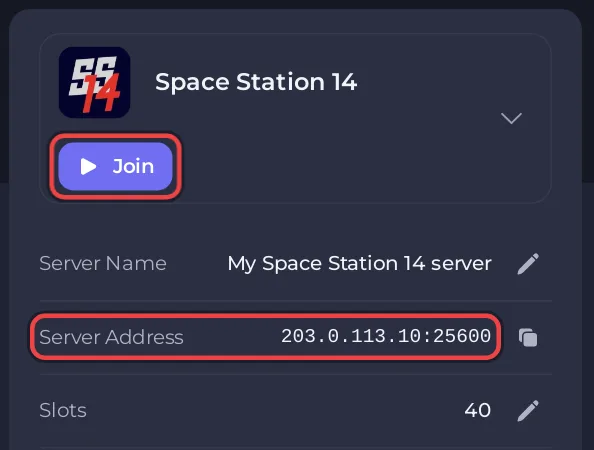
- On the Overview page, click the copy icon next to Server Address, or click Join at the top of the card. Both copy the address, for example
203.0.113.10:25600. - Paste it into your chat with friends, together with the three steps below.
A message you can copy and fill in:
Join my Space Station 14 server:
1. Get the free launcher from spacestation14.com and make an account.
2. In the launcher, on Home, click "Direct connect to server".
3. Paste this address and click Connect: 203.0.113.10:25600
The full join guide for your friends: How to join your Space Station 14 server.
Does a friend need to buy anything?
No. Space Station 14 is free: the official FAQ answers "Is the game free?" with "Yes, and it will always be." Friends need the launcher and, while Authentication is 1, a Space Station 14 account. The account is free too.
Can I keep strangers out?
A new server is not on the public server list, so only people with the address find it. To go further, turn on the whitelist and add your friends by username: How to control who can join your Space Station 14 server.
How many friends can join?
As many as Slots on the Overview page allows. The panel sets the game's own limit, soft_max_players, to the same number before every start: How to change the player limit on your Space Station 14 server.
How do I let a friend manage the server in the panel?
Give them their own panel access in Team & Roles. They sign in with their own PlayNHost account, and you choose what they can do, for example only the Console and Files.
- In the left menu, click Team & Roles.
- Click Invite someone, or Invite people at the top of the page.
- Type your friend's email address, pick a Role, and send the invitation.
- Your friend opens the email and accepts.
Panel access is separate from admin in the game. To make a friend an admin on the station, see How to become admin on your Space Station 14 server. More about roles: How to invite friends and give them access.


