

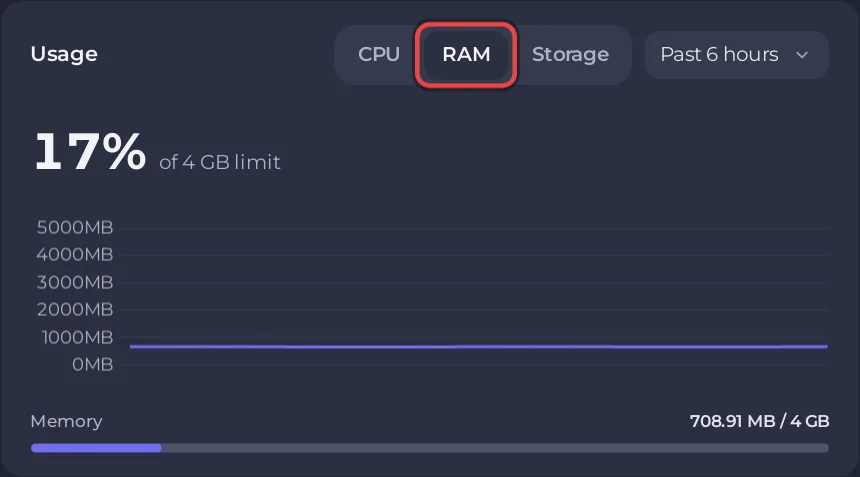
An empty Space Station 14 server used about 700 MB of memory in PlayNHost's test, measured in the first 90 seconds after a start. Players and a busy round add to that. Watch the RAM graph on your server's Overview page during a full round: that tells you more than any general figure.
What did PlayNHost measure?
On a new PlayNHost server with the official build and nobody online, memory stayed at about 700 MB for the 90 seconds after the server was ready. PlayNHost has not measured a server over many hours or with a full station, so measure your own during a busy round.
What do the official servers run on?
The Space Wizards publish the hardware of their own servers in their infrastructure reference. Their machine "Lizard", which they call "our most loaded server", has 16 GB of RAM and a 6-core Ryzen 5 5600X, and runs two game servers. The page does not say how much memory each game server uses.
How do I check my own server's memory?
- Open your server in the panel. On Overview, find the Usage card.
- Click the RAM tab and choose Live (30 minutes), Past 6 hours or Past day.
- Look at it during a full round, and over a whole day to see whether it keeps rising.
More about the graphs: How to read your server's usage graphs.
What happens if it runs out?
If the system stops your server because it needed more memory than its plan gives, the Overview page shows a card, This server ran out of memory, with the buttons Add more memory and See the usage. If the card never appears, your server has enough.
How do I keep memory and CPU use down?
- Set the tick rate to 30. A new PlayNHost server starts at
60. The official config file says "30 is what most servers on the hub use and going higher has minimal effect", and the official hosting guide says 30 "reduces server, client and network load dramatically". Change Server tickrate under Settings, Game Settings: Space Station 14 server settings reference. - Restart once a day at a quiet hour if the graph keeps rising over a day: How to restart your Space Station 14 server every day.
- Keep the player limit to your community's size: How to change the player limit on your Space Station 14 server.


