

To restart a Space Station 14 server every day on PlayNHost, open Quick Tasks, choose Schedule… in the menu of Send Restart, pick Repeats, Every day and a time, and click Schedule. A restart ends the round being played, so choose an hour when nobody plays. A new server has no restart schedule.
How do I schedule a daily restart?
- Open your server in the panel and click Quick Tasks in the left menu.
- Under All tasks, open Default tasks and find Send Restart.
- Open its menu and choose Schedule….
- Give the schedule a Name, for example
Daily restart, and click Next step. - Choose Repeats, set How often to Every day, and set the time under At.
- Keep Enabled on and click Schedule.
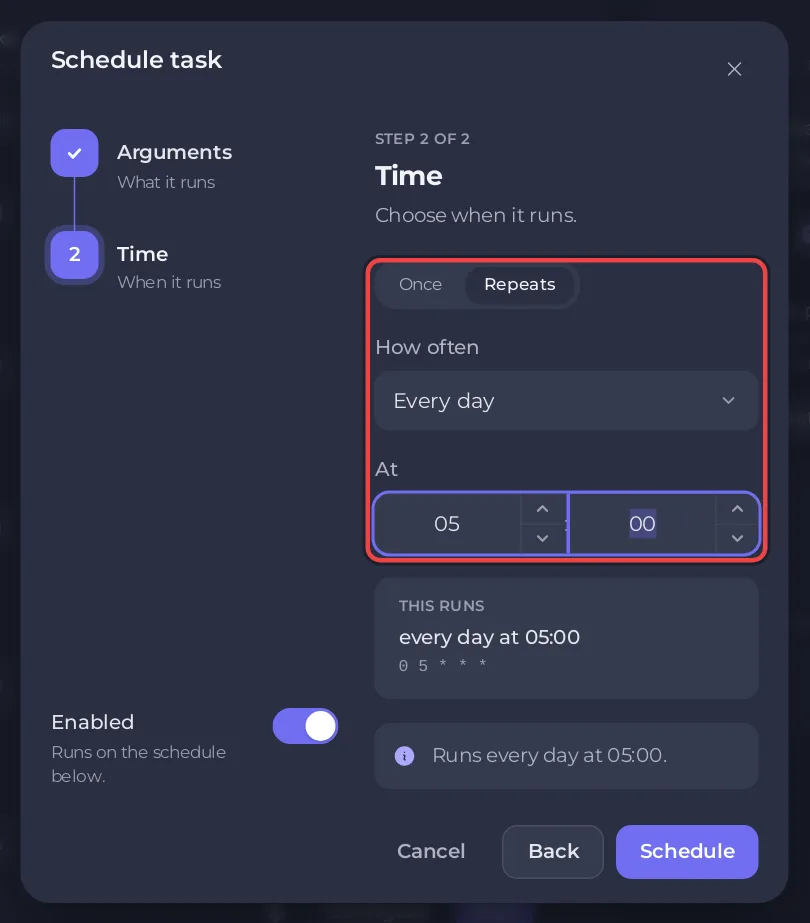
The schedule appears under Schedules. Send Restart stops the server the way the Stop button does, which Space Station 14 handles as a normal shutdown, and starts it again. Players are disconnected until the Console shows the Server Version ... -> Ready line again, about 20 seconds in PlayNHost's tests.
Why restart a Space Station 14 server every day?
A restart applies any change you made to the Settings page or to server_config.toml at an hour you choose, instead of in the middle of a round. It also starts the server process fresh: PlayNHost measured about 700 MB of memory on an empty server in the first 90 seconds after a start. If the RAM graph on the Overview page keeps rising over a day, a daily restart brings it back to that starting point.
What happens to the round and to saved data?
The round in progress ends: rounds live in the server's memory. Saved data such as characters and playtime is in the server's database in the data folder, so it is still there after the restart.
Can the restart wait until nobody is playing?
Not on Space Station 14. The schedule option Skip while players are online needs the server to report its players, and the panel cannot read a Space Station 14 player list. The panel's own hint says: "If the server cannot report its players, it runs." Pick an hour with no rounds instead.
How do I tell players when the restart happens?
The schedule does not warn anyone. Put the time in your message of the day: under [chat] in server_config.toml, set for example motd = "Daily restart at 05:00 UTC", save and restart. Players see it when they connect: How to change your Space Station 14 server name and description.
How do I switch it off, test it or delete it?
- On Quick Tasks, find the schedule under Schedules.
- Use its switch to turn it off or on.
- Open its menu and choose Run now to test it, which restarts the server at once, or Delete schedule to remove it.
Quick Tasks cannot change the time of a schedule that exists. For another time, create a new schedule and delete or switch off the old one. More about schedules: How to schedule tasks and automatic backups. Memory and plan size: How much RAM does a Space Station 14 server need?


