

To start a new world on a Sons of the Forest server on PlayNHost, set Save Slot in Settings to a number you have not used and restart: the server generates a fresh island and keeps the old one in its own slot. To delete every island instead, run World Reset on Quick Tasks. Pick the Difficulty first, because it only applies to new worlds.
Keep the old island: use a new save slot
- Open your server in the panel, click the Settings tab, then Game Settings.
- Choose the Difficulty for the new island.
- Set Save Slot to a number from 1 to 30 that you have not used yet.
- Click Restart now. The server generates a new island, which takes a few minutes.
- Wait for
#DSL Dedicated server loaded.in the Console, then join.
Endnight's dedicated server guide explains why this works: in its "continue" save mode, the server creates a new save on the save slot if there is none, and loads the save if there is one. Your old island waits in its slot. Set Save Slot back to its number to play it again: How to switch between worlds on your Sons of the Forest server.
Wipe everything: run World Reset
World Reset deletes the island and everything built on it so the next start generates a new one. It deletes every save slot, and the game's own backup archives, in serverconfig/Saves/DedicatedServer/Multiplayer. Your settings and ownerswhitelist.txt are kept.
- Click Quick Tasks in the left menu and open Default tasks.
- Find World Reset and click Run.
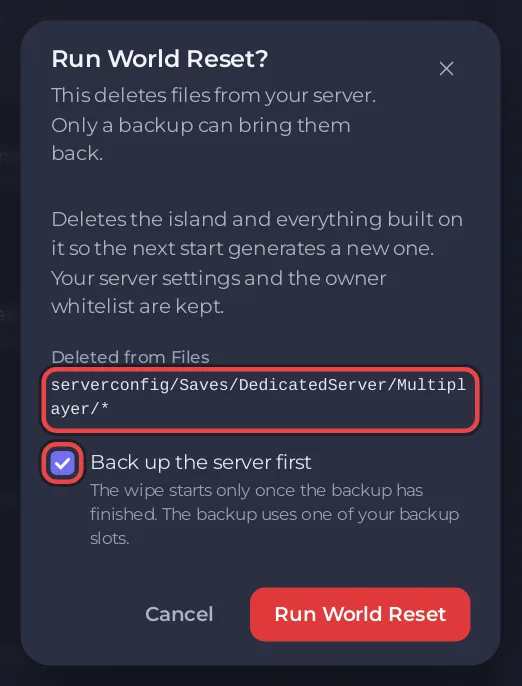
- Read the window Run World Reset?. Under Deleted from Files it lists
serverconfig/Saves/DedicatedServer/Multiplayer/*. - Keep Back up the server first ticked. The wipe starts only once the backup has finished, and the backup uses one of your backup slots.
- Click Run World Reset. The server stops, the saves are deleted 30 seconds later, and the server starts again with a new island. A World reset schedule, switched off, stays on Quick Tasks as the record of the run.
If your plan has no backup slots, the window says "Your plan has no backup slots, so this runs without a backup." Download your save first in that case: How to download your Sons of the Forest save.
Wipe on a schedule
Some groups start over every month. On Quick Tasks, in the ready-made schedules for your game, World reset stops the server at 04:00 panel time on the 1st of each month, deletes every save and starts it again. It takes no backup first. Click Add next to it. It arrives switched off, so switch it on when you want it to run. The general guide covers schedules: How to schedule tasks and automatic backups.


