

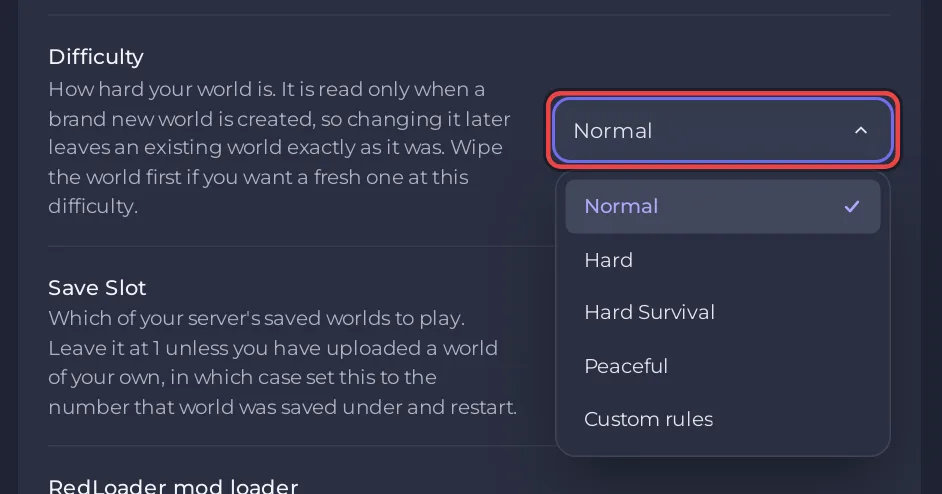
To choose the difficulty of a Sons of the Forest server on PlayNHost, pick it in Settings, Game Settings, Difficulty. The game reads it only when a new world is created, so an island that already exists keeps the difficulty it was made with. To play at another difficulty, start a new world in an empty save slot.
Pick the difficulty for a new world
- Open your server in the panel, click the Settings tab, then Game Settings.
- Choose Normal, Hard, Hard Survival, Peaceful or Custom rules under Difficulty. The panel saves it at once.
- Set Save Slot to a number you have not used yet, from 1 to 30. Your current island stays in its own slot.
- Click Restart now. The server generates a new island at the new difficulty, which takes a few minutes.
- Wait for
#DSL Dedicated server loaded.in the Console, then join.
Endnight's dedicated server guide says the setting "sets the difficulty game mode when creating a new save" and is ignored when an existing save is loaded. That is why changing it on a running island changes nothing.
To go back to your first island later, set Save Slot back to its number and restart: How to switch between worlds on your Sons of the Forest server. To replace the island instead of keeping it, use World Reset: How to start a new world on your Sons of the Forest server.
What does Custom rules change?
With Custom rules, the game builds the new world from the custom game mode settings in serverconfig/dedicatedserver.cfg, which Endnight's guide calls CustomGameModeSettings. The panel has no fields for them. You edit them in Files:
- Stop the server and wait for Offline.
- Click the Files tab, open
serverconfig, thendedicatedserver.cfg. - Find the custom game mode block and change the values you want. Write each value in the same style as the ones already there (for example
"Normal"), and keep the quotes and commas exactly as they are, because the file is JSON. - Click Save content, choose Custom rules under Difficulty, set an unused Save Slot, and start the server.
The settings Endnight documents include:
| Setting | Values |
|---|---|
GameSetting.Vail.EnemySpawn | true, false |
GameSetting.Vail.EnemyHealth, EnemyDamage, EnemyArmour, EnemyAggression, AnimalSpawnRate | low, normal, high |
GameSetting.Environment.StartingSeason | spring, summer, autumn, winter |
GameSetting.Environment.SeasonLength, DayLength | short, default, long, realistic |
GameSetting.Environment.PrecipitationFrequency | low, default, high |
GameSetting.Survival.ConsumableEffects | normal, hard |
GameSetting.Survival.PlayerStatsDamage, ColdPenalties | off, normal, hard |
GameSetting.Survival.ReducedFoodInContainers, SingleUseContainers | true, false |
If the server does not start after an edit, a missing quote or comma is the usual cause. Restore the file from a backup, or ask support.
Is there a creative mode?
Endnight's guide lists a creative value, but the panel's Difficulty list offers Normal, Hard, Hard Survival, Peaceful and Custom rules only.


