

The Worlds page in the left menu of a PlayNHost Satisfactory server does what you would otherwise open the game's Server Manager for: it shows which session is running and every save, newest first, and lets you Save now, Load a save, delete one, start a New game, Upload a save and download any save. Most of it needs the server running.
Open the page
- Open your server in the panel.
- Click Worlds in the left menu.
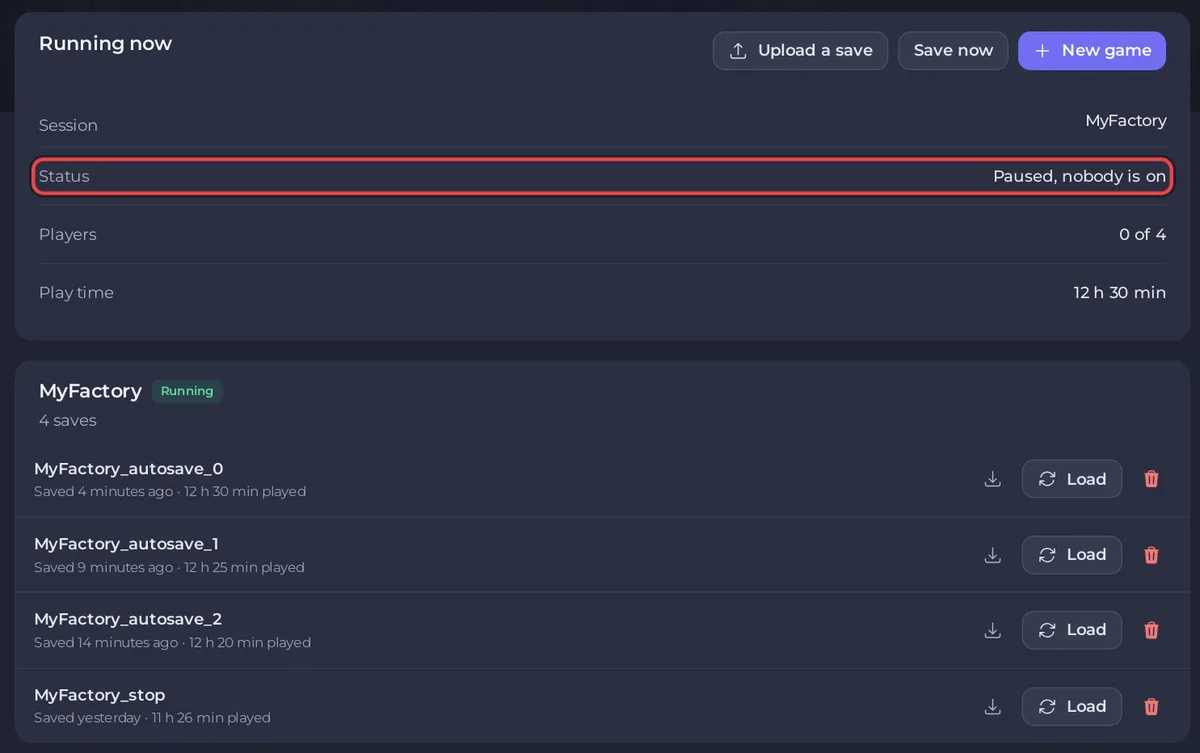
While the server runs
The Running now card shows:
- Session: the name of the session being played, or No game loaded.
- Status: Running, Paused, nobody is on, or Waiting for a game.
- Players: who is connected out of your player limit, for example
2 of 4. - Play time of the session.
Its buttons:
- Save now writes a save straight away, named after the session and the time in UTC.
- New game starts a new world. Give it a Session name and a Starting location, then click Start new game. Players are disconnected while it loads. See How to start a new world on your Satisfactory server.
- Upload a save brings in a .sav from your PC: How to upload your own Satisfactory world.
Below it, every session has a card with its saves. The running one has a Running badge. Each save row shows when it was saved, the play time and Modded if mods were used, and has three controls:
- The download icon saves the .sav to your PC: How to download your Satisfactory save.
- Load switches the server to that save. The window that asks Load with the save's name warns that anything built since the running game last saved is lost, so click Save now first if you want to keep it. Click Load this save. Players are disconnected while the world loads, which takes a minute or two.
- The bin icon deletes the save after you confirm Delete save. This cannot be undone unless a backup holds it.
The page asks the game again every 30 seconds, so it shows what the server really holds.
While the server is off
The page says Start the server to manage its saves, and a Save files card lists the .sav files in the save folder. With the server off you can still download any of them and Upload a save. Loading, saving and new games need the server running.
Who can do what
Opening the page needs file access. Each button needs its own permission: Save now needs the console, Load and New game need restart, deleting needs file deletion, uploading needs file creation and downloading needs file reading. Give helpers what they need on Team & Roles: How to invite friends and give them access.
If the page says the game did not answer
The card The game did not answer appears while the world is still loading, right after a start or a load. Wait a minute and click Try again. If it says The server refused its admin password, see How to become admin on your Satisfactory server.


