

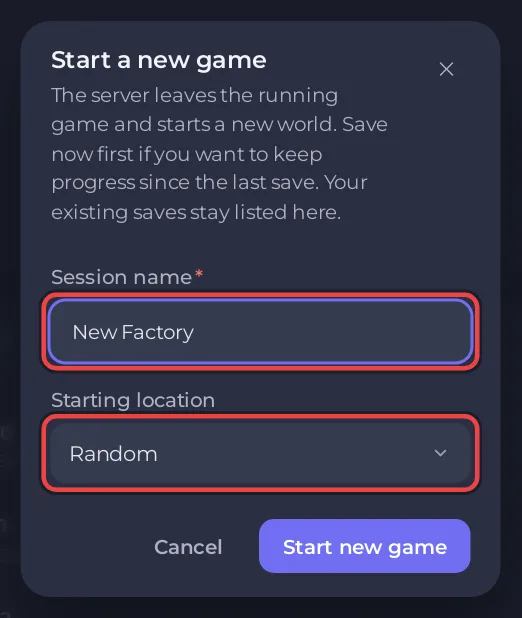
To start a new world on your PlayNHost Satisfactory server, open Worlds, click New game, give the session a name and a starting location, and click Start new game. Your old saves stay on the server. To delete every save and start from nothing, run World Reset on the Quick Tasks page instead.
Start a new game and keep the old one
- Open your server in the panel and click Worlds in the left menu. The server must be running.
- Click Save now if you want to keep the latest progress of the running world.
- Click New game on the Running now card.
- Type a Session name: 1 to 64 characters, without slashes, line breaks or any of
: * ? " < > |. - Pick a Starting location: Grass Fields, Rocky Desert, Northern Forest, Dune Desert, or Random to let the game choose.
- Click Start new game. Players are disconnected while the new world loads.
The new world follows Skip The Tutorial in Settings (on by default, so the HUB is already built). Your old world stays listed under its own session: click Load on its newest save to go back.
Delete every save and start fresh
World Reset deletes all saves and autosaves in the save folder, then starts the server, which makes a new game by itself when Start A New Game Automatically is on. The server name and admin password are kept, and so are your mods and blueprints.
- Click Quick Tasks in the left menu.
- Under Default tasks, find World Reset and click Run.
- Read the window Run World Reset?. It lists what is Deleted from Files. Keep Back up the server first ticked.
- Click Run World Reset. The panel stops the server, deletes the saves and starts it again. The Console shows each step.
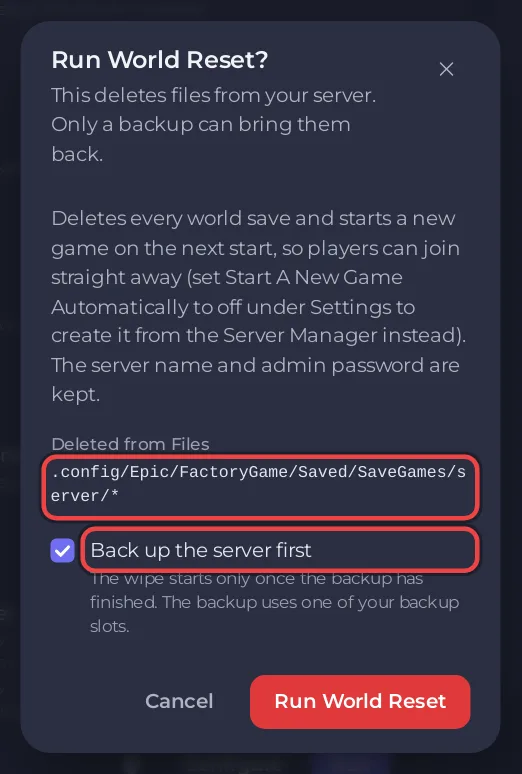
The new world takes the server's name as its session name and the Starting Location from Settings. To build the first world yourself from the game's Server Manager, switch Start A New Game Automatically off before you run the reset.
A reset cannot be undone except from a backup: How to back up and restore your Satisfactory world.
Reset on a schedule
A ready-made World reset schedule waits under Ready-made for Satisfactory on Quick Tasks. Add it and it becomes one of your Schedules: at 04:00 on the 1st of each month it stops the server, deletes every save and starts a new game. It arrives switched off; switch it on only if your group wants a fresh world every month. Schedule times cannot be changed afterwards on Quick Tasks: for another time, build a new schedule. See How to schedule tasks and automatic backups.


