%7B.s%7Banimation%3Ab%201.5s%20ease-out%20both%7D.d%7Banimation-delay%3A.16s%7D%7D%40keyframes%20b%7B0%25%7Bfill%3A%23F4F6FA%7D18%25%7Bfill%3A%23FFE08A%7D34%25%2C70%25%7Bfill%3A%23FF8A1F%7D80%25%7Bfill%3A%23FFE08A%7D100%25%7Bfill%3A%23FF8A1F%7D%7D%3C%2Fstyle%3E%3Cg%20transform%3D%22translate(143%20428.93)%20scale(3.885906)%22%3E%3Cg%20transform%3D%22translate(0%202)%22%20fill%3D%22%23706EF0%22%3E%3Cpath%20d%3D%22M0%200%20H48%20A40%2040%200%200%201%2048%2080%20V100%20H0%20Z%22%2F%3E%3Cpath%20transform%3D%22translate(91.75%200)%22%20d%3D%22M0%200%20L48%200%20L48%2050%20L76%2050%20L76%20100%20L0%20100%20Z%22%2F%3E%3Cpath%20transform%3D%22translate(173%200)%22%20d%3D%22M0%20100%20L58%20-4%20L116%20100%20Z%22%2F%3E%3Cpath%20transform%3D%22translate(264.25%200)%22%20d%3D%22M0%200%20L104%200%20L76%2050%20L76%20100%20L28%20100%20L28%2050%20Z%22%2F%3E%3Cg%20transform%3D%22translate(375%200)%22%3E%3Cpath%20d%3D%22M0%200%20L50%2038%20L50%200%20L100%200%20L100%20100%20L0%20100%20Z%22%20fill%3D%22%23F4F6FA%22%2F%3E%3Crect%20class%3D%22s%22%20x%3D%2247%22%20y%3D%2263%22%20width%3D%2219%22%20height%3D%2230%22%2F%3E%3Crect%20class%3D%22s%20d%22%20x%3D%2274%22%20y%3D%2263%22%20width%3D%2219%22%20height%3D%2230%22%2F%3E%3C%2Fg%3E%3Cpath%20transform%3D%22translate(484.75%200)%22%20d%3D%22M0%200%20L48%200%20L48%2037%20L52%2037%20L52%200%20L100%200%20L100%20100%20L52%20100%20L52%2063%20L48%2063%20L48%20100%20L0%20100%20Z%22%2F%3E%3Cpath%20transform%3D%22translate(588.5%200)%22%20d%3D%22M0%2050%20A53%2053%200%201%200%20106%2050%20A53%2053%200%201%200%200%2050%20Z%22%2F%3E%3Cpath%20transform%3D%22translate(698.25%200)%22%20d%3D%22M25%200%20H102%20V50%20H77%20A25%2025%200%200%201%2077%20100%20H0%20V50%20H25%20A25%2025%200%200%201%2025%200%20Z%22%2F%3E%3Cpath%20transform%3D%22translate(804%200)%22%20d%3D%22M0%200%20L90%200%20L90%2050%20L69%2050%20L69%20100%20L21%20100%20L21%2050%20L0%2050%20Z%22%2F%3E%3C%2Fg%3E%3C%2Fg%3E%3C%2Fsvg%3E)


The gameplay rules of your Rust server are in the Gameplay group of Server Settings (server.cfg), on the Settings tab. Change a switch or a number, click Save & restart, and the new rules apply when the server is back.
Open the Gameplay group
- Open your server in the panel and click the Settings tab.
- In the left card, under Config files, click Server Settings (server.cfg).
- Scroll to the Gameplay group.
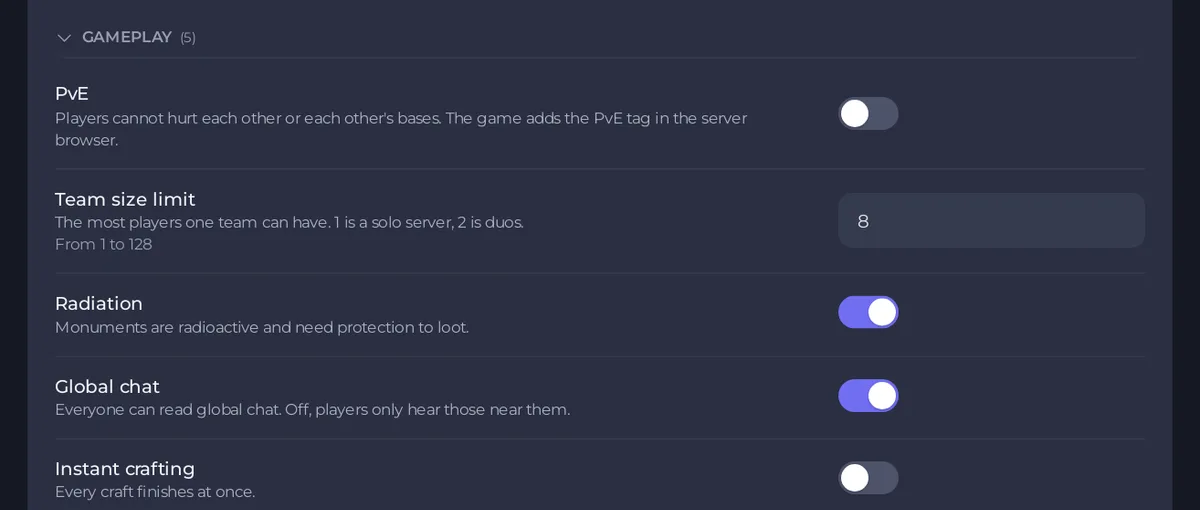
- Change what you want. The page counts your unsaved changes.
- Click Save & restart. Or click Save only, and the page says
Saved. Changes take effect the next time the server starts.
The options
| Option | What the panel says | Default |
|---|---|---|
| PvE | Players cannot hurt each other or each other's bases. The game adds the PvE tag in the server browser. | off |
| Team size limit | The most players one team can have. 1 is a solo server, 2 is duos. From 1 to 128. | 8 |
| Radiation | Monuments are radioactive and need protection to loot. | on |
| Global chat | Everyone can read global chat. Off, players only hear those near them. | on |
| Instant crafting | Every craft finishes at once. | off |
Two of them have their own guide: How to make your Rust server PvE and How to set a team size limit on your Rust server.
Turn off radiation
Switch Radiation off and save. Players can then loot monuments without protection against radiation. Switch it back on to make monuments dangerous again.
Make chat local
Switch Global chat off and save. Players then only hear those near them.
Instant crafting
Switch Instant crafting on and save. Every craft finishes at once. Tell players in the server's description: How to change your Rust server name and description.
Good to know
- These options are written to
server/rust/cfg/server.cfg, which Rust reads when it starts. A wipe never changes them: How to wipe your Rust server. - Revert throws away the changes you have not saved.
- If your choices change the feel of the server, pick browser tags that say so: How to set server browser tags and server.cfg options on your Rust server.
- Bases have their own group: How to change decay and upkeep on your Rust server.





