

To restart a Quake Live server on a schedule on PlayNHost, open Quick Tasks, choose Schedule… in the menu of Send Restart, and set it to repeat every day at the time you want. Turn on Skip while players are online so the restart does not cut a match short. Quake Live has no world to save, so a restart loses nothing but the current round.
How do I schedule the restart?
- Open your server in the panel and click Quick Tasks in the left menu.
- Under All tasks, open the menu of Send Restart ("Gracefully restarts the server container.") and choose Schedule….
- The Schedule task window opens on Arguments. Send Restart needs nothing filled in. Give the schedule a Name, for example
Daily restart, and click Next step. - On Time, choose Repeats, then Every day, and pick the time under At, for example 06:00. Under the time, the window confirms when it runs.
- Leave Enabled on and click Schedule. The new schedule appears under Schedules.
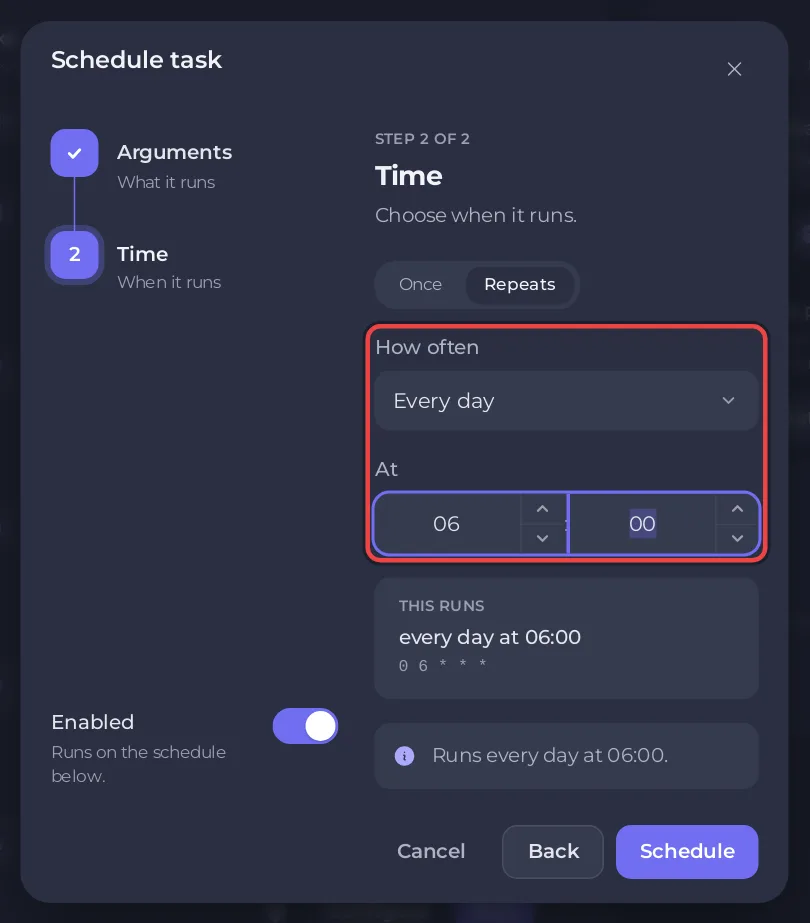
The restart stops Quake Live with its quit command and starts it again. Each start also loads the Workshop items in your list and every Game Settings value you saved since the last start.
How do I keep the restart out of a running match?
On the schedule card, turn on Skip while players are online. The panel explains it: "When its time comes and anyone is playing, that run is skipped. If the server cannot report its players, it runs. Run now always runs."
With it on, When players are online offers two choices:
- Skip that run: no restart that day if someone is playing.
- Wait up to a set time for the server to empty: the panel "looks again every 5 minutes, runs as soon as the game reports nobody on, and runs anyway when the wait is over."
Can I schedule a match restart instead?
Yes. Choose Schedule… in the menu of Restart Match the same way. It sends map_restart at the time you set, which starts a fresh round on the current map without restarting the server. The server must be Online at that time: How to restart a match on your Quake Live server.
What can I change later?
Each schedule card has a switch to turn it off, and a menu with Edit schedule…, Run now and Delete schedule. The time of an existing schedule cannot be changed: for another time, make a new schedule and delete or switch off the old one.
A new server also has an Automatic backup schedule when your plan has backup slots. Its time can be changed on the Backups page: How to back up and restore your Quake Live server. The general guide: How to schedule tasks and automatic backups.


