%7B.s%7Banimation%3Ab%201.5s%20ease-out%20both%7D.d%7Banimation-delay%3A.16s%7D%7D%40keyframes%20b%7B0%25%7Bfill%3A%23F4F6FA%7D18%25%7Bfill%3A%23FFE08A%7D34%25%2C70%25%7Bfill%3A%23FF8A1F%7D80%25%7Bfill%3A%23FFE08A%7D100%25%7Bfill%3A%23FF8A1F%7D%7D%3C%2Fstyle%3E%3Cg%20transform%3D%22translate(143%20428.93)%20scale(3.885906)%22%3E%3Cg%20transform%3D%22translate(0%202)%22%20fill%3D%22%23706EF0%22%3E%3Cpath%20d%3D%22M0%200%20H48%20A40%2040%200%200%201%2048%2080%20V100%20H0%20Z%22%2F%3E%3Cpath%20transform%3D%22translate(91.75%200)%22%20d%3D%22M0%200%20L48%200%20L48%2050%20L76%2050%20L76%20100%20L0%20100%20Z%22%2F%3E%3Cpath%20transform%3D%22translate(173%200)%22%20d%3D%22M0%20100%20L58%20-4%20L116%20100%20Z%22%2F%3E%3Cpath%20transform%3D%22translate(264.25%200)%22%20d%3D%22M0%200%20L104%200%20L76%2050%20L76%20100%20L28%20100%20L28%2050%20Z%22%2F%3E%3Cg%20transform%3D%22translate(375%200)%22%3E%3Cpath%20d%3D%22M0%200%20L50%2038%20L50%200%20L100%200%20L100%20100%20L0%20100%20Z%22%20fill%3D%22%23F4F6FA%22%2F%3E%3Crect%20class%3D%22s%22%20x%3D%2247%22%20y%3D%2263%22%20width%3D%2219%22%20height%3D%2230%22%2F%3E%3Crect%20class%3D%22s%20d%22%20x%3D%2274%22%20y%3D%2263%22%20width%3D%2219%22%20height%3D%2230%22%2F%3E%3C%2Fg%3E%3Cpath%20transform%3D%22translate(484.75%200)%22%20d%3D%22M0%200%20L48%200%20L48%2037%20L52%2037%20L52%200%20L100%200%20L100%20100%20L52%20100%20L52%2063%20L48%2063%20L48%20100%20L0%20100%20Z%22%2F%3E%3Cpath%20transform%3D%22translate(588.5%200)%22%20d%3D%22M0%2050%20A53%2053%200%201%200%20106%2050%20A53%2053%200%201%200%200%2050%20Z%22%2F%3E%3Cpath%20transform%3D%22translate(698.25%200)%22%20d%3D%22M25%200%20H102%20V50%20H77%20A25%2025%200%200%201%2077%20100%20H0%20V50%20H25%20A25%2025%200%200%201%2025%200%20Z%22%2F%3E%3Cpath%20transform%3D%22translate(804%200)%22%20d%3D%22M0%200%20L90%200%20L90%2050%20L69%2050%20L69%20100%20L21%20100%20L21%2050%20L0%2050%20Z%22%2F%3E%3C%2Fg%3E%3C%2Fg%3E%3C%2Fsvg%3E)


The Play with friends card on your Overview page has the IP, the port and the steps your friends need. Click Copy invite message, paste it into your chat, and add the join password yourself, because the message does not carry it. If a friend should help run the server, give them their own access instead of your password.
Send the invite message
- Open your server in the panel. The Play with friends card is on the Overview page.
- Check the two rows. IP and Port are what players type in the game.
- Click Copy invite message at the bottom of the card. The button says Copied for a moment.
- Paste the message into your chat. It reads like this:
Join my Project Zomboid server: IP <ip>, port <port>
How to join: followed by three numbered steps.
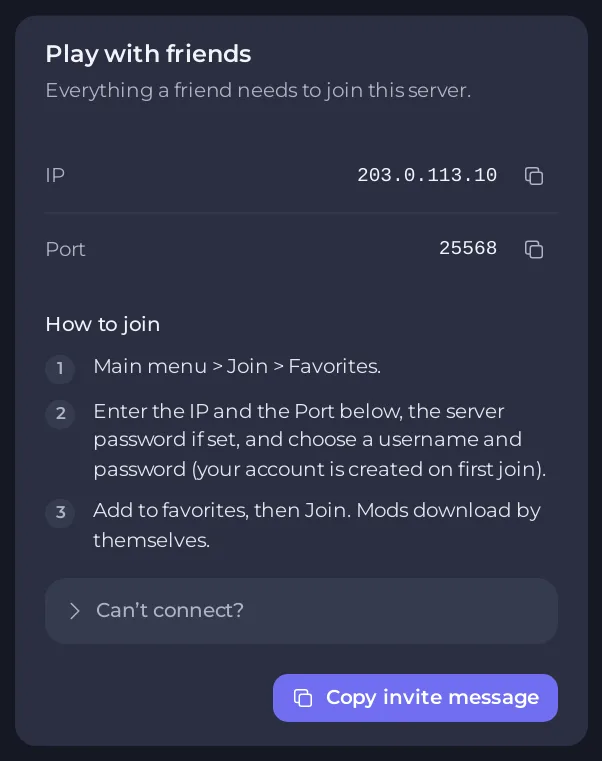
The three steps are the ones friends follow in the game: Main menu > Join > Favorites, then the IP and the port, then add to favorites and join. Mods download by themselves.
Tell them the password
If you set a Join password, the card does not show it and the message does not contain it. Send it separately, and tell friends it has to match exactly, capitals included: How to set a join password on your Project Zomboid server.
Tell them the build and the mods
Friends need the same build and the same mods as the server. The card's Can’t connect? list says so too. Tell them which branch to pick in Steam: How to choose Build 41 or Build 42 for your Project Zomboid server.
If a friend cannot connect
Click Can’t connect? on the card. It lists four reasons: the server is still starting, the game version is different, the password is different, or the mods are different. Ask support opens a ticket with the details filled in. More checks are in Players cannot join your Project Zomboid server.
Let a friend help run the server
Do not share your account password. Invite them from Team & Roles in the left menu and give them a role. Co-owner, Moderator and Member are built in, and you can make your own. See How to invite friends and give them access to your server. A friend who should be admin inside the game needs an access level as well: How to set access levels on your Project Zomboid server.
Keep your server for your friends only
- Set a join password before you invite anyone.
- Turn off Anyone can make an account so only players you add can join: How to run a whitelist-only Project Zomboid server.
- Hide it from the in-game list: How to make your Project Zomboid server public or private.





