%7B.s%7Banimation%3Ab%201.5s%20ease-out%20both%7D.d%7Banimation-delay%3A.16s%7D%7D%40keyframes%20b%7B0%25%7Bfill%3A%23F4F6FA%7D18%25%7Bfill%3A%23FFE08A%7D34%25%2C70%25%7Bfill%3A%23FF8A1F%7D80%25%7Bfill%3A%23FFE08A%7D100%25%7Bfill%3A%23FF8A1F%7D%7D%3C%2Fstyle%3E%3Cg%20transform%3D%22translate(143%20428.93)%20scale(3.885906)%22%3E%3Cg%20transform%3D%22translate(0%202)%22%20fill%3D%22%23706EF0%22%3E%3Cpath%20d%3D%22M0%200%20H48%20A40%2040%200%200%201%2048%2080%20V100%20H0%20Z%22%2F%3E%3Cpath%20transform%3D%22translate(91.75%200)%22%20d%3D%22M0%200%20L48%200%20L48%2050%20L76%2050%20L76%20100%20L0%20100%20Z%22%2F%3E%3Cpath%20transform%3D%22translate(173%200)%22%20d%3D%22M0%20100%20L58%20-4%20L116%20100%20Z%22%2F%3E%3Cpath%20transform%3D%22translate(264.25%200)%22%20d%3D%22M0%200%20L104%200%20L76%2050%20L76%20100%20L28%20100%20L28%2050%20Z%22%2F%3E%3Cg%20transform%3D%22translate(375%200)%22%3E%3Cpath%20d%3D%22M0%200%20L50%2038%20L50%200%20L100%200%20L100%20100%20L0%20100%20Z%22%20fill%3D%22%23F4F6FA%22%2F%3E%3Crect%20class%3D%22s%22%20x%3D%2247%22%20y%3D%2263%22%20width%3D%2219%22%20height%3D%2230%22%2F%3E%3Crect%20class%3D%22s%20d%22%20x%3D%2274%22%20y%3D%2263%22%20width%3D%2219%22%20height%3D%2230%22%2F%3E%3C%2Fg%3E%3Cpath%20transform%3D%22translate(484.75%200)%22%20d%3D%22M0%200%20L48%200%20L48%2037%20L52%2037%20L52%200%20L100%200%20L100%20100%20L52%20100%20L52%2063%20L48%2063%20L48%20100%20L0%20100%20Z%22%2F%3E%3Cpath%20transform%3D%22translate(588.5%200)%22%20d%3D%22M0%2050%20A53%2053%200%201%200%20106%2050%20A53%2053%200%201%200%200%2050%20Z%22%2F%3E%3Cpath%20transform%3D%22translate(698.25%200)%22%20d%3D%22M25%200%20H102%20V50%20H77%20A25%2025%200%200%201%2077%20100%20H0%20V50%20H25%20A25%2025%200%200%201%2025%200%20Z%22%2F%3E%3Cpath%20transform%3D%22translate(804%200)%22%20d%3D%22M0%200%20L90%200%20L90%2050%20L69%2050%20L69%20100%20L21%20100%20L21%2050%20L0%2050%20Z%22%2F%3E%3C%2Fg%3E%3C%2Fg%3E%3C%2Fsvg%3E)


The admin account of a Project Zomboid server is created from the Admin Username and Admin Password under Settings, then Game Settings. To change the password in a way that always works, use the game's command: type setpassword "admin" "NewPassword" in the panel Console, or /setpassword "admin" "NewPassword" in the game's chat as the admin. Use your own admin username in place of admin.
Change the admin password
You need the server to be running, and the panel Console or a logged-in admin.
In the panel: open your server, click the Console tab and type, with no slash:
`` setpassword "admin" "NewPassword" ``
In the game: log in as the admin, open the chat and type:
`` /setpassword "admin" "NewPassword" ``
Use a password without double quotes or backslashes. The panel's own Admin Password field takes 6 to 32 characters, so stay within that. Log in with the new password from then on. See How to use the Console on your Project Zomboid server.
What the two settings do
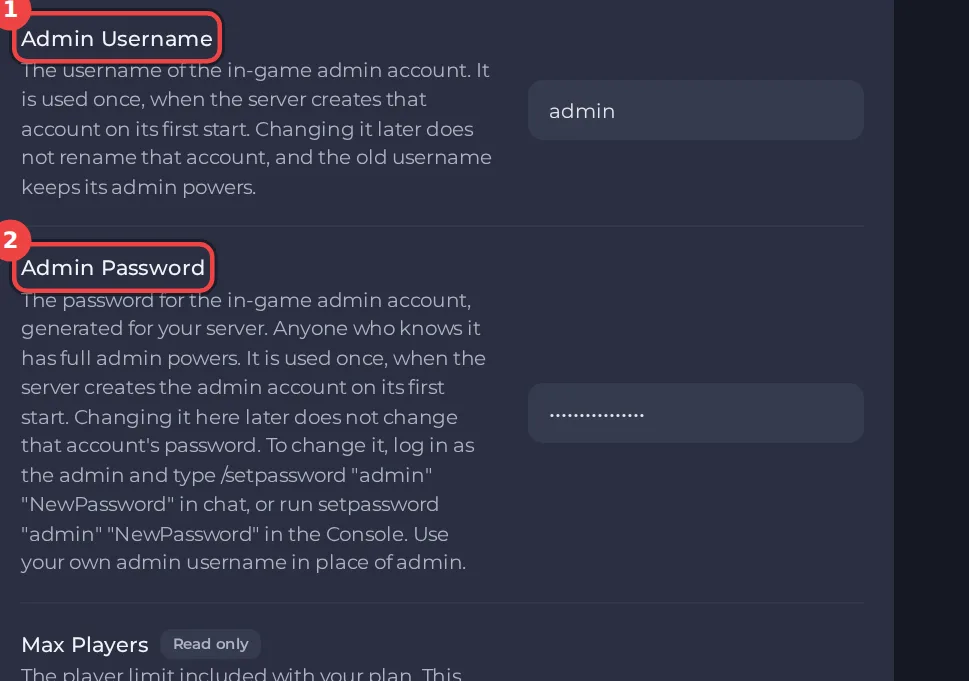
- The panel passes Admin Username and Admin Password to the game at every start. The game uses them to create the default admin account when it does not exist yet. The panel's own help says that changing them later does not change an account that already exists, and that a new username does not rename the account: the old username keeps its admin powers.
- So change the password with
setpassword, and treat the Admin Password row as the password the server was made with. - If you change the row and then restart, try the new password. If the old one still works, the account was not changed, and
setpasswordis the way.
Give someone else admin rights
Use the player's menu on the Active players card, or the setaccesslevel command: How to set access levels on your Project Zomboid server and How to become admin on your Project Zomboid server.
Locked out
If you do not know the admin password any more and no other admin can log in, open a ticket and tell us the server name. Do not send passwords in a ticket. More: You cannot log in as admin on your Project Zomboid server.
Keep the other passwords safe too
The RCON Password lets the panel and other tools run admin commands on your server: How to change the RCON password of your Project Zomboid server. Anyone who has the admin password has full control of the world, so only share it with people you trust.





