%7B.s%7Banimation%3Ab%201.5s%20ease-out%20both%7D.d%7Banimation-delay%3A.16s%7D%7D%40keyframes%20b%7B0%25%7Bfill%3A%23F4F6FA%7D18%25%7Bfill%3A%23FFE08A%7D34%25%2C70%25%7Bfill%3A%23FF8A1F%7D80%25%7Bfill%3A%23FFE08A%7D100%25%7Bfill%3A%23FF8A1F%7D%7D%3C%2Fstyle%3E%3Cg%20transform%3D%22translate(143%20428.93)%20scale(3.885906)%22%3E%3Cg%20transform%3D%22translate(0%202)%22%20fill%3D%22%23706EF0%22%3E%3Cpath%20d%3D%22M0%200%20H48%20A40%2040%200%200%201%2048%2080%20V100%20H0%20Z%22%2F%3E%3Cpath%20transform%3D%22translate(91.75%200)%22%20d%3D%22M0%200%20L48%200%20L48%2050%20L76%2050%20L76%20100%20L0%20100%20Z%22%2F%3E%3Cpath%20transform%3D%22translate(173%200)%22%20d%3D%22M0%20100%20L58%20-4%20L116%20100%20Z%22%2F%3E%3Cpath%20transform%3D%22translate(264.25%200)%22%20d%3D%22M0%200%20L104%200%20L76%2050%20L76%20100%20L28%20100%20L28%2050%20Z%22%2F%3E%3Cg%20transform%3D%22translate(375%200)%22%3E%3Cpath%20d%3D%22M0%200%20L50%2038%20L50%200%20L100%200%20L100%20100%20L0%20100%20Z%22%20fill%3D%22%23F4F6FA%22%2F%3E%3Crect%20class%3D%22s%22%20x%3D%2247%22%20y%3D%2263%22%20width%3D%2219%22%20height%3D%2230%22%2F%3E%3Crect%20class%3D%22s%20d%22%20x%3D%2274%22%20y%3D%2263%22%20width%3D%2219%22%20height%3D%2230%22%2F%3E%3C%2Fg%3E%3Cpath%20transform%3D%22translate(484.75%200)%22%20d%3D%22M0%200%20L48%200%20L48%2037%20L52%2037%20L52%200%20L100%200%20L100%20100%20L52%20100%20L52%2063%20L48%2063%20L48%20100%20L0%20100%20Z%22%2F%3E%3Cpath%20transform%3D%22translate(588.5%200)%22%20d%3D%22M0%2050%20A53%2053%200%201%200%20106%2050%20A53%2053%200%201%200%200%2050%20Z%22%2F%3E%3Cpath%20transform%3D%22translate(698.25%200)%22%20d%3D%22M25%200%20H102%20V50%20H77%20A25%2025%200%200%201%2077%20100%20H0%20V50%20H25%20A25%2025%200%200%201%2025%200%20Z%22%2F%3E%3Cpath%20transform%3D%22translate(804%200)%22%20d%3D%22M0%200%20L90%200%20L90%2050%20L69%2050%20L69%20100%20L21%20100%20L21%2050%20L0%2050%20Z%22%2F%3E%3C%2Fg%3E%3C%2Fg%3E%3C%2Fsvg%3E)


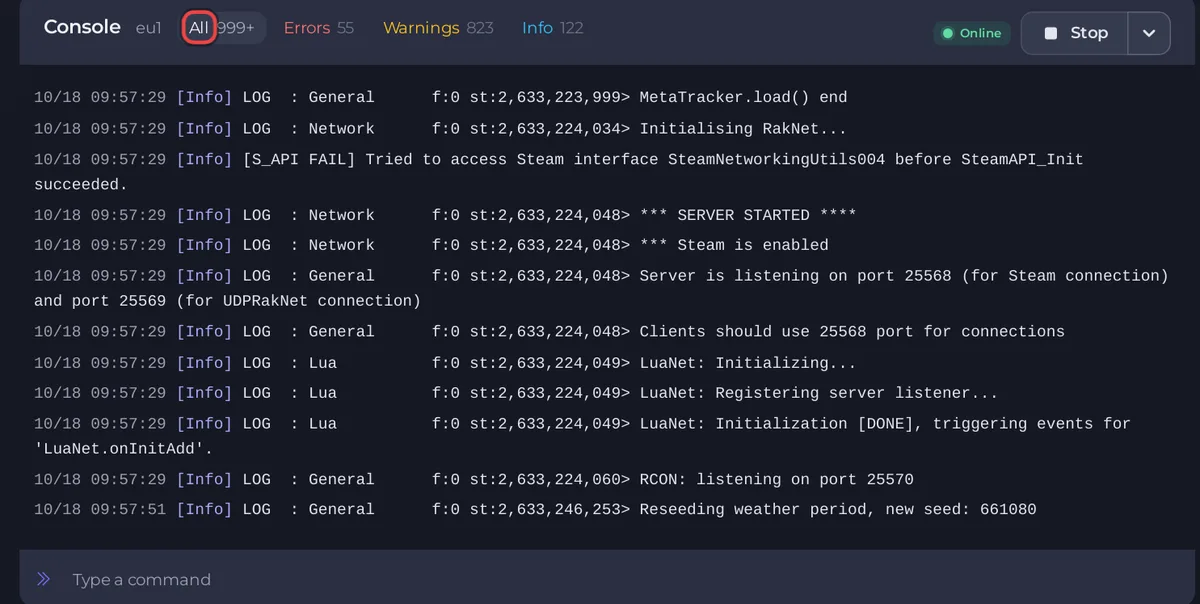
The Console tab shows what the Project Zomboid server prints, live. Use it to see when the server is ready, to check that mods and your world loaded, and to type commands. Commands are typed without a slash. To send the log to support, use Share log on the Overview page's Console card.
Open it
- Open your server in the panel and click the Console tab.
- The big box is the output. Under it is the box Type a command. Start, Restart and Stop are at the top.
Lines worth knowing
| Line | Meaning |
|---|---|
[playnhost] MaxPlayers=..., [playnhost] PVP=... ZombiePopulation=... | The panel's settings applied at the start. |
[playnhost] Workshop Items verified and applied: ... and [playnhost] Mods=... | The mods the server will download and switch on. |
pnh-workshop-check: WARNING item ... failed to download | A Workshop item could not be downloaded and was dropped: Your Project Zomboid mods do nothing. |
*** SERVER STARTED **** | The server is ready. |
Server is listening on port ... | The ports in use: Project Zomboid server ports and address explained. |
RCON: listening on port ... | The panel can read the player list and run player actions. |
command entered via server console (System.in): "..." | The game received a command you typed. |
mod "..." overrides ... | A mod loaded. |
required mod "..." not found | A mod needs another mod that is missing. |
Many ERROR and WARN lines on a healthy start are normal: Project Zomboid console lines that look like errors but are normal.
Filters and search
The buttons above the output narrow what you see: All, Errors, Warnings and Info. PlayNHost (the panel's own status lines) and Since last start appear once the output holds a start of the server. The Players, Chat and Commands filters do not appear for Project Zomboid, because they only recognise other games' lines.
The Console tab has no search box. To search, open the Overview page and click the magnifier on its Console card: the box Search output... finds a word in the log, for example mod or world.
Send a command
- Click Type a command, type a command without a slash, and press Enter. For example
playersorsave. - The game prints
command entered via server console (System.in): "players"and then its answer.
The commands that work are in Project Zomboid admin commands that work. The server must be running to take a command.
Share the log
On the Overview page, open the ... menu (More console actions) of the Console card: Share log makes a link, Download log saves the output, and Clear Log empties the box. Anyone with the link can read a shared log, and logs often contain player IP addresses, so use Hide IP addresses when you share it. Give the link to support, with the last 50 to 100 lines: What to include in a ticket.
General Console guide: How to use the console and run commands.





