

The Console tab of a PlayNHost Palworld server shows everything the server prints and sends what you type to the game. Palworld has no console of its own, so the panel passes each line to the game over its remote console, using your Admin Password. Type info, save or showplayers and the game answers below.
Send a command
- Open your server in the panel and click the Console tab. The server must be Online.
- Type a command, without a slash, and press Enter.
- The game's answer appears after a line that contains
RCON executed the command.
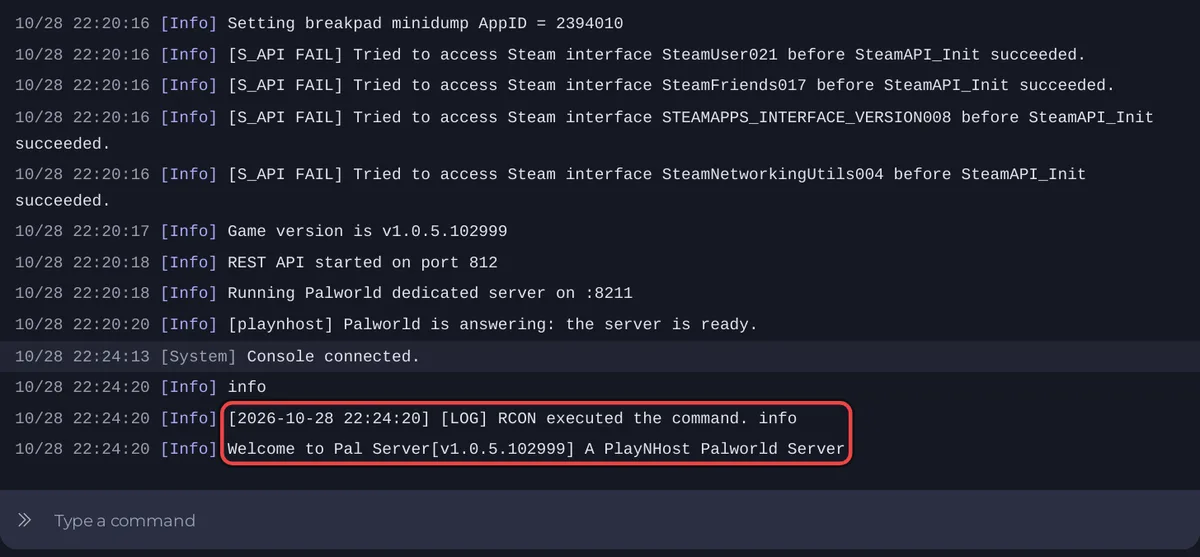
Commands and their answers
| Type | The game answers |
|---|---|
info | Welcome to Pal Server[v1.0.5.102999] and your server name, with your own version number |
save | Complete Save |
showplayers | A list that starts with name,playeruid,steamid, then one line per player |
broadcast and a message | Shows the whole message to everyone in the game |
| Anything the game does not know | Unknown command |
These answers were recorded on Palworld 1.0.5 in October 2026. The other commands are in Pocketpair's command list, such as KickPlayer, BanPlayer and UnBanPlayer with the player's ID. The Active players card does kicks and bans without commands: How to see, kick, ban and unban players on your Palworld server.
Do not stop the server from the Console
Use Stop or Restart at the top of the page instead of typing shutdown or doexit. The panel's Stop saves the world first and tells players: How to stop your Palworld server without losing progress.
What the start lines mean
Checking for game server updates...: the server asks Steam for a Palworld update.- Lines starting
Updating key:: the panel's settings going into the game's file. Passwords show as(hidden). Running Palworld dedicated server on: ready for players.- Lines starting
[playnhost]come from the panel's own tools, for example[playnhost] Palworld is answering: the server is ready.or a warning about a world with its own settings.
Some normal lines look like errors: Palworld console lines that look like errors but are normal.
If commands do nothing
The Console sends commands with the Admin Password the server started with, so a new password counts from the next restart, for the game and the Console alike. Commands sent before the server is ready get no answer: Console commands do nothing on your Palworld server. The general guide: How to use the console and run commands.


