

To message every player on a Palworld server, open the Console tab and type broadcast followed by your message, for example broadcast Restart in 10 minutes. Players see the whole message in the game. To send one on a timer, use Announce to Players on Quick Tasks.
From the Console
- Open your server in the panel and click the Console tab. The server must be Online.
- Type
broadcastand a space, then your message. - Press Enter.
Palworld's own remote console cuts a broadcast at the first space, so the panel sends broadcast messages a different way that keeps the whole sentence. You do not have to do anything for that.
From Quick Tasks
- Click Quick Tasks in the left menu.
- Find Announce to Players under All tasks and click Run.
- The window Configure task opens, because the task needs a Message. Type your message and click Save task.
- Click the Your tasks filter above the list. Your Announce to Players is there with your message. Click Run on it to send the message.
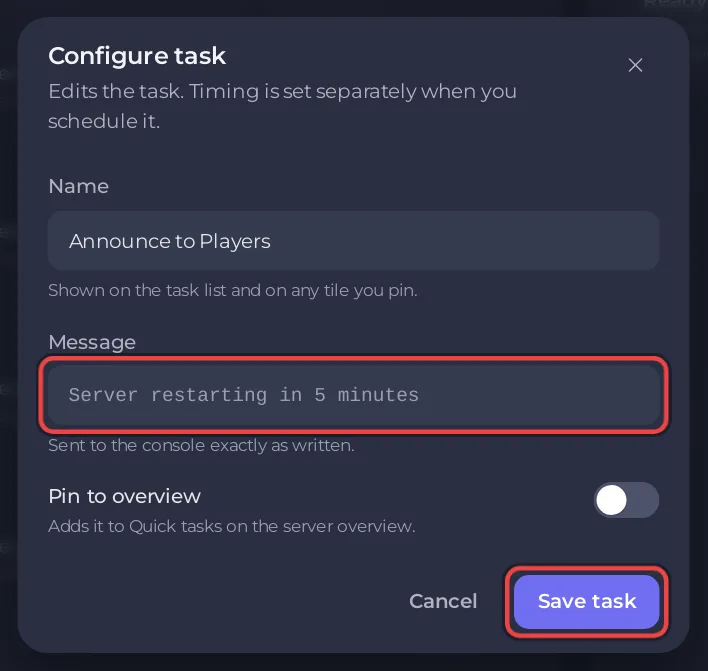
Save task only keeps your message. Nothing is sent until you click Run under the Your tasks filter. Run under Default tasks always opens Configure task again, so use Your tasks each time.
The message can be up to 200 characters. Line breaks and other control characters are removed.
On a timer
To send a message at a set time, put Announce to Players on a schedule with Schedule… in the task's menu: How to use Quick Tasks on your Palworld server. The ready-made restarts already warn players by themselves (10, 5 and 1 minutes before for Daily restart, 5 and 1 minutes before for Restart every 6 hours): How to restart your Palworld server with warnings.
In the game
An admin can type /Broadcast and the message after pressing Enter: How to become admin on your Palworld server.


