

To start a Palworld server over with a new world, open Quick Tasks in the left menu and click Run on World Reset. Keep Back up the server first switched on and click Run World Reset. The panel stops the server, deletes every world and starts it again with a fresh one. Settings, bans and the whitelist stay.
Run World Reset
- Open your server in the panel and click Quick Tasks in the left menu.
- Under All tasks, find World Reset. Its description: "Deletes the world save so the next start begins a fresh world. Your settings in PalWorldSettings.ini are kept."
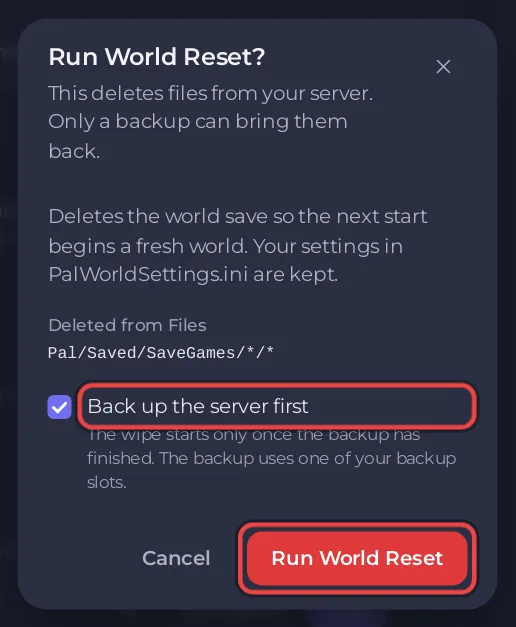
- Click Run. The window Run World Reset? says "This deletes files from your server. Only a backup can bring them back." and lists the folders under Deleted from Files.
- Leave Back up the server first on: "The wipe starts only once the backup has finished. The backup uses one of your backup slots."
- Click Run World Reset.
The reset runs as the ready-made schedule World reset, step by step, and the Console shows each step: the server stops, the worlds are deleted 90 seconds after the start of the run, and the server starts again 60 seconds after the delete. The delete happens only once the server says Offline: from the 90 second mark the panel looks every 15 seconds. If the server is still not Offline 10 minutes later, nothing is deleted, the wipe step fails and the panel sends you a notification, "World reset" did not run on <server>. It runs the same whether the server was running or stopped, and the server is running when it ends.
What is deleted and what stays
| Deleted | Kept |
|---|---|
Every world on the server in Pal/Saved/SaveGames/0/, not only the loaded one | Gameplay Settings and Game Settings |
| Every character and Pal in those worlds | The ban list (banlist.txt) |
| Palworld's own snapshots of those worlds | The panel's whitelist |
| Your backups |
To keep an old world and still start fresh, download it first: How to download your Palworld world.
Undo a reset
Restore the backup the reset made, from Backups: How to back up and restore your Palworld world. Without a backup, a reset cannot be undone.
How do I reset the world on a schedule?
Ready-made for Palworld on Quick Tasks has a World reset schedule for the 1st of every month at 04:00. It stops the server, waits for Offline, deletes every world and starts it again. It arrives switched off.
- Under Schedules, click Add next to World reset.
- Switch it on if you want monthly wipes.
For your own day and hour, open the menu of World Reset under All tasks, choose Schedule…, type a Name, click Next step, choose Once or Repeats and the time, and click Schedule. That adds the same ready-made reset (stop, wipe, start) with the name, time and switch you chose. The time of a schedule cannot be changed after it is made: make a new one and delete the old one.
A scheduled run makes no backup by itself, so check your plan has an Automatic backup: How to use Quick Tasks on your Palworld server.
Your new world may need new rules: How to set up your Palworld server with a preset.


