

To download a Palworld world from PlayNHost, open Backups, open the menu Actions for a backup and choose Download. A Palworld backup leaves out the game's own files, so it is small and holds every world, the settings and the ban list. To take only one world, download its folder from Pal/Saved/SaveGames/0/ under Files.
Download a backup
- Open your server in the panel and click Backups in the left menu.
- For a fresh copy, stop the server, click Start backup and wait for it to finish.
- Open the menu Actions for the backup and choose Download.
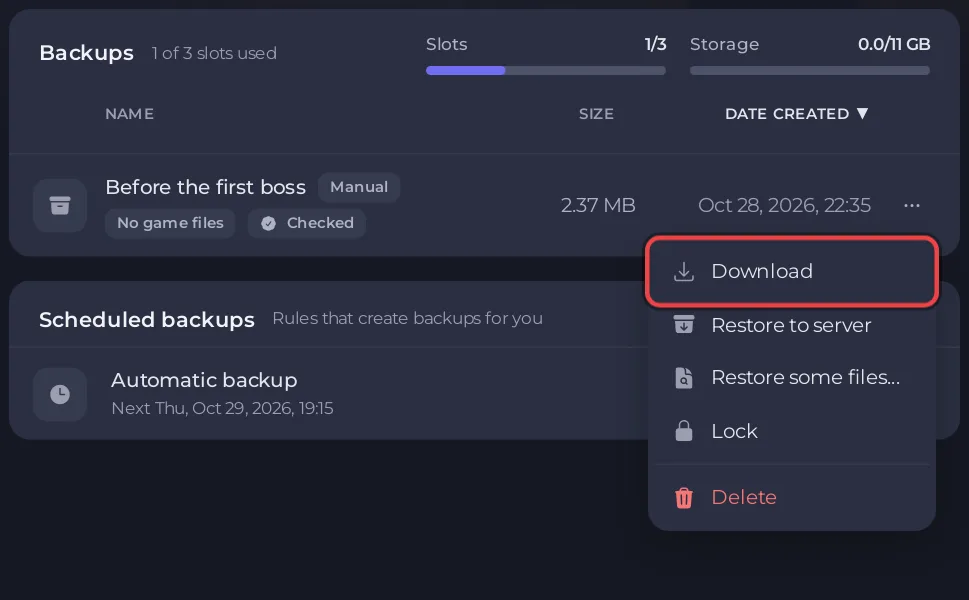
The backup is an archive of the whole server without Palworld's own game files. Inside it, your worlds are in Pal/Saved/SaveGames/0/.
Download one world from Files
- Stop the server, so the world on disk is complete. The Stop button saves first: How to stop your Palworld server without losing progress.
- Open the Files tab and go to
Pal/Saved/SaveGames/0/. - Each world is a folder named with 32 letters and numbers. The Worlds page shows which one is Loaded.
- Compress the folder into an archive in the file manager, then download the archive.
How to use the file manager or SFTP: How to upload, edit and manage your server files and How to connect to your server files with SFTP.
What is in a world folder
Level.sav: the world itself.LevelMeta.sav: part of every world folder, next toLevel.sav.Players: one.savfile per character.backup: Palworld's own snapshots of the world.WorldOption.sav, only in worlds made in single-player or co-op.
Play it at home or on another server
A world downloaded from a dedicated server can go back onto any Palworld server, including another PlayNHost one: How to upload your own Palworld world. Your server's settings are in Pal/Saved/Config/LinuxServer/PalWorldSettings.ini.


