

To change what players lose when they die on a Palworld server, open Settings, Gameplay Settings and set Death penalty under More settings. None keeps everything, Item (the default) drops all items except equipment, ItemAndEquipment drops all items, and All also drops the Pals in the party. Save and restart.
Change the death penalty
- Open your server in the panel, click the Settings tab, then Gameplay Settings under Config files.
- Type
deathin the search box at the top, or scroll to the More settings group. - Pick a value in Death penalty.
- Click Save & restart, or Save only to apply it at the next start.
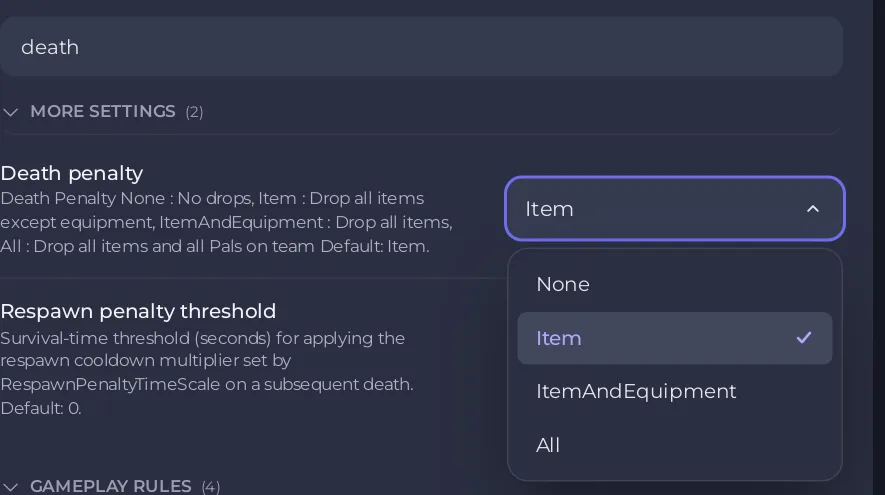
The four choices
| Value | What a player drops on death |
|---|---|
| None | Nothing |
| Item | All items except equipment (Palworld's default) |
| ItemAndEquipment | All items, equipment included |
| All | All items and all Pals in the party |
Settings that go with it
- Other guilds can loot what a dead player drops (in Gameplay rules): lets other guilds pick up the drop, used on PvP servers.
- Respawn block time (seconds): how long before a player can respawn, 5 seconds by default.
- Lose Pals on death and Hardcore: for one-life servers: How to turn on hardcore mode on your Palworld server.
Each preset sets it too: Casual sets Death penalty to None, the PvP preset sets it to ItemAndEquipment and Hardcore sets it to All: How to set up your Palworld server with a preset.
If players still drop items after the restart, the world has its own settings file: Palworld Gameplay Settings changes do nothing.


