

When a Palworld server's Gameplay Settings do nothing in the game, the world most likely has a WorldOption.sav: worlds from single-player or co-op carry their own settings in it, and Palworld then ignores the page. Worlds marks such a world Own settings. Delete the file with the server stopped, or import the world again.
Check for Own settings
- Open your server in the panel and click Worlds in the left menu.
- Look at the world marked Loaded. If it also says Own settings, the world has a
WorldOption.sav: "This world has a WorldOption.sav, so Palworld uses the settings saved in it and ignores the Gameplay Settings page."
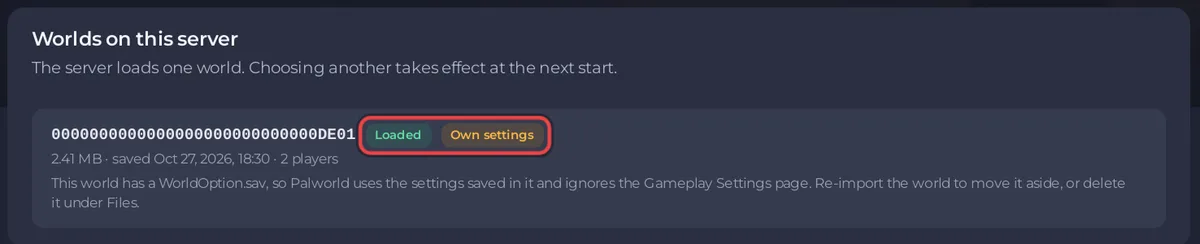
The Console says so at every start too, with a line that starts [playnhost] WARNING and names the file. That line checks every world on the server, not only the loaded one, and it still calls the page "the Config page": it means Gameplay Settings.
Fix it
Either of these:
- Delete the file. Stop the server. In Files, open
Pal/Saved/SaveGames/0/, then the world's folder (its ID is on the Worlds page), and deleteWorldOption.sav. Start the server. Download the file first if you may want it back. - Import the world again. Download the world, then upload it on the Worlds page with Keep the world's own settings off. The import moves
WorldOption.savaside into the world's.pnh-removedfolder: How to upload your own Palworld world.
Your Gameplay Settings then apply from the next start.
Other causes
- No restart. Save only applies the change at the next start. Click Save & restart, or restart the server.
- The setting is not on this page. The server name, passwords, player limit and crossplay are under Game Settings, because the panel writes them at every start. A change to those keys in
PalWorldSettings.iniby hand is overwritten: How to set up your Palworld server. - A setting Palworld does not use on its own. Some settings work together, for example Reset a guild after this long with nobody online (hours) is ignored while Reset guilds nobody plays in is off: Palworld server settings: every option explained.
- Difficulty. Leave Difficulty on None to use your own values. Its description: "Difficulty preset. Leave as None to use the individual settings."


