

To kick or ban a player on an open.mp server on PlayNHost, type players in the Console to get the player's ID, then kick or ban and that ID, for example kick 3. Bans are saved by IP address in bans.json, so they last after a restart. To unban, type unbanip and the player's IP address.
Kick or ban a player
- Open your server in the panel and click Console in the left menu.
- Type
playersand press Enter. open.mp lists everyone online underID,Name,PingandIP. - Type
kickand the ID, for examplekick 3. The Console answers with the name, ID and IP andhas been kicked. - To keep them out, type
banand the ID instead, for exampleban 3. The answer ends withhas been banned.
In the game, a logged-in admin types the same with /rcon in front: /rcon kick 3, /rcon ban 3. See How to become admin on your open.mp server.
Write down the IP that players shows before you ban. You need it to unban the player later.
Ban an IP address
Type banip and the address, for example banip 203.0.113.25. The Console answers IP 203.0.113.25 has been banned. and the ban is written to bans.json. open.mp's server guide says banip also accepts wildcards for range bans.
Unban a player
- Click Console and type
unbanipand the IP address, for exampleunbanip 203.0.113.25. - Press Enter. The Console prints nothing, but the ban is gone from
bans.jsonand the player can join again.
If you do not know the IP, open bans.json to find it.
Where are bans kept?
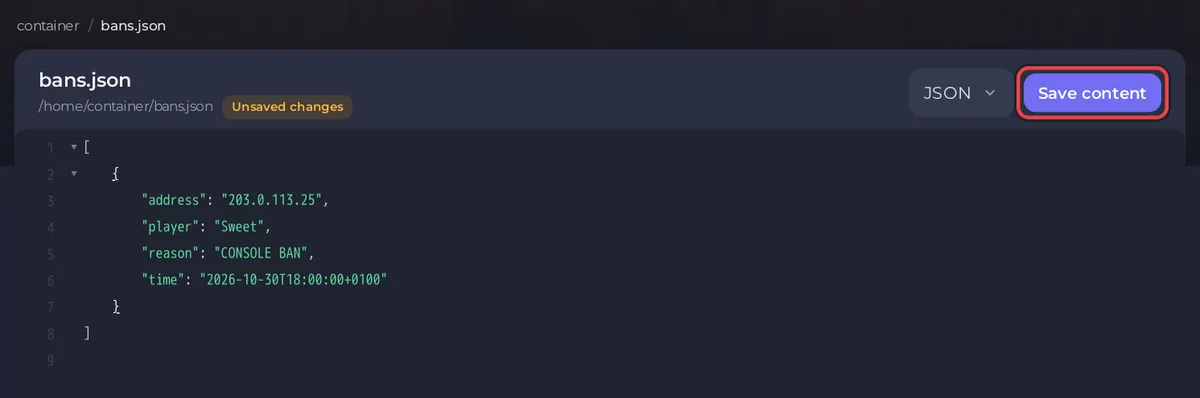
In bans.json in the main folder of your server. Each ban has the address, the player name, the reason and the time. A ban from the Console has the reason CONSOLE BAN.
To remove several bans at once:
- Click Files in the left menu and click
bans.json. - Delete the entries you want to remove. Keep the square brackets and the commas between entries; an empty list is
[]. - Click Save content.
- In the Console, type
reloadbans. open.mp answersBanlist reloded.(with that spelling) and reads the file again.
Without reloadbans, open.mp keeps the old list until the next restart.
Can I make the server private instead?
open.mp has no whitelist. To let only your friends in, set a join password: How to change your open.mp server name, password and player slots. Many gamemodes and admin filterscripts also have their own kick and ban commands with reasons and time limits; those keep their own lists.
Questions people ask
Does a ban last after a restart? Yes. ban and banip save to bans.json, which open.mp reads at every start.
Can a banned player come back with another name? A ban is on the IP address, not the name, so a new name does not help them. A new IP address does.
Are bans kept in a backup? Yes. bans.json is a normal file in your server folder, and a backup holds the whole folder: How to back up and restore your open.mp server.


