

A PlayNHost Factorio server updates itself: with Factorio Version on latest and Auto-update server on (both defaults), every start checks factorio.com and installs a newer stable build before the game loads. A daily restart triggers that check every morning. Saves and mods are never touched by an update.
Update now
- Open your server in the panel and click Restart.
Open the Console and read the
[pnh-update]line:Factorio 2.1.24 (stable) is already installed. Nothing to download.The server is current.Downloading Factorio ...thenUpdated to Factorio ... (was ...). Saves and mods were not touched.It has updated.
- Wait for
Hosting game at. Players on the new version can join.
The server follows the build factorio.com lists as stable for headless servers (2.1.24 on 2 November 2026), which is what Factorio players' games update to, so server and players stay in step.
How do I see which version the server runs?
Type /version in the Console while it runs, or read the [pnh-update] line of the last start. Compare it with the version in your own game. Every player needs exactly the same version (Factorio wiki, Multiplayer).
Where are the update settings?
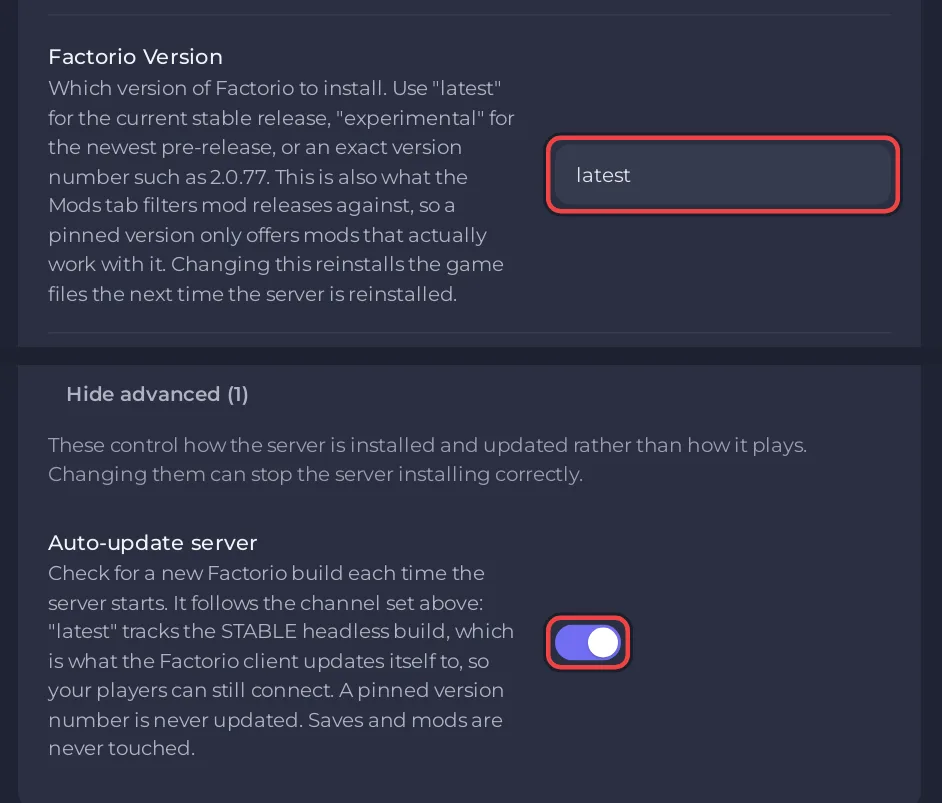
In Settings, Game Settings:
- Factorio Version:
latestfollows stable,experimentalfollows experimental, an exact number such as2.1.24holds that build. See How to switch your Factorio server to the experimental version. - Auto-update server: under Show advanced (1). On by default.
Stop updates or hold one version
Either way works, and both take effect at the next start:
- Switch Auto-update server off. The Console then says
[pnh-update] Automatic updates are off. Starting on the installed build. - Or set Factorio Version to the exact number the server runs now, for example
2.1.24. The Console then says[pnh-update] Factorio is pinned to 2.1.24, so it is left as installed.The Modding tab then offers mod releases for that version only.
A number does not download an older build: it only keeps the one that is installed. To go back to an older Factorio version, open a ticket.
Holding a version has a cost: players' games keep updating, and a player on a newer version cannot join an older server. Switch updates back on when your mods are ready.
Before a big update
Factorio 2.1 became stable on 23 October 2026. Wube's notes: 2.0 saves load in 2.1, but once updated, saves and blueprints cannot go back to 2.0, and some mods may not be ready yet (Friday Facts #449). Take a snapshot before a big update: How to roll back your Factorio world with a snapshot.
Related: How to restart your Factorio server on a schedule, How to update or remove mods on your Factorio server.


