

To roll back a Factorio world on PlayNHost, open Saves, find the snapshot from before the problem on the Snapshots card, click Make it a save, then Use this save on the copy and restart. A snapshot only exists if someone clicked Snapshot now earlier, so take one before every risky change.
Take a snapshot first
- Click Saves in the left menu.
- If the server is running, type
/server-savein the Console first, so the snapshot holds the latest progress. - Click Snapshot now. The panel says
Snapshot gamesave-20261102T193000Z.zip taken.(with your save's name and the time in UTC).
The newest 10 snapshots of each save are kept. When you take an 11th, the oldest is deleted and the message says so. Snapshots are only taken when you click: no schedule makes them. Good moments: before adding or updating mods, before a big redesign, before letting new players in.
Roll back
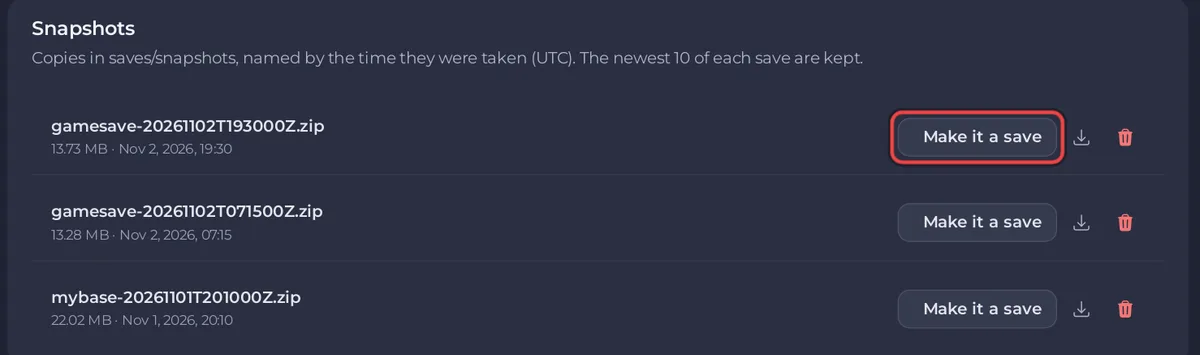
- On the Snapshots card, find the snapshot from before the problem. The name shows when it was taken in UTC, for example
gamesave-20261102T193000Z.zipis 2 November 2026, 19:30:00 UTC. - Click Make it a save. The panel says it is now one of your saves.
- In the Saves card, click Use this save on that copy and confirm.
- If the server is running, click Restart now on the restart notice: the server saves the current game, then loads the snapshot. If it is stopped, click Start.
The broken save stays in the list, untouched, in case you want something from it. Delete it when you are sure.
From now on the server loads the copy, for example gamesave-20261102T193000Z.zip, and its snapshots are named after it.
Snapshot or backup?
| Snapshot | Backup | |
|---|---|---|
| What it holds | One save file | The whole server: saves, mods, settings files |
| Where | saves/snapshots on the server | Backup storage, outside the server's files |
| How to bring back | Make it a save, then Use this save | Restore to server, which replaces files |
| Best for | Griefing, a mistake, a bad autosave | A broken mod set or a deleted folder |
Backups: How to back up and restore your Factorio world. The page itself: How to use the Saves page of your Factorio server.


