

A PlayNHost Factorio server already restarts itself every morning: a schedule named Daily restart restarts it between 06:30 and 07:00 Paris time while it is running, so it picks up the latest Factorio update. The game is saved as it stops. You can switch it off, delete it, or schedule your own restart on Quick Tasks.
Find the Daily restart
- Open your server in the panel and click Quick Tasks in the left menu.
- Find Daily restart under Schedules. Its row shows the exact time for your server.
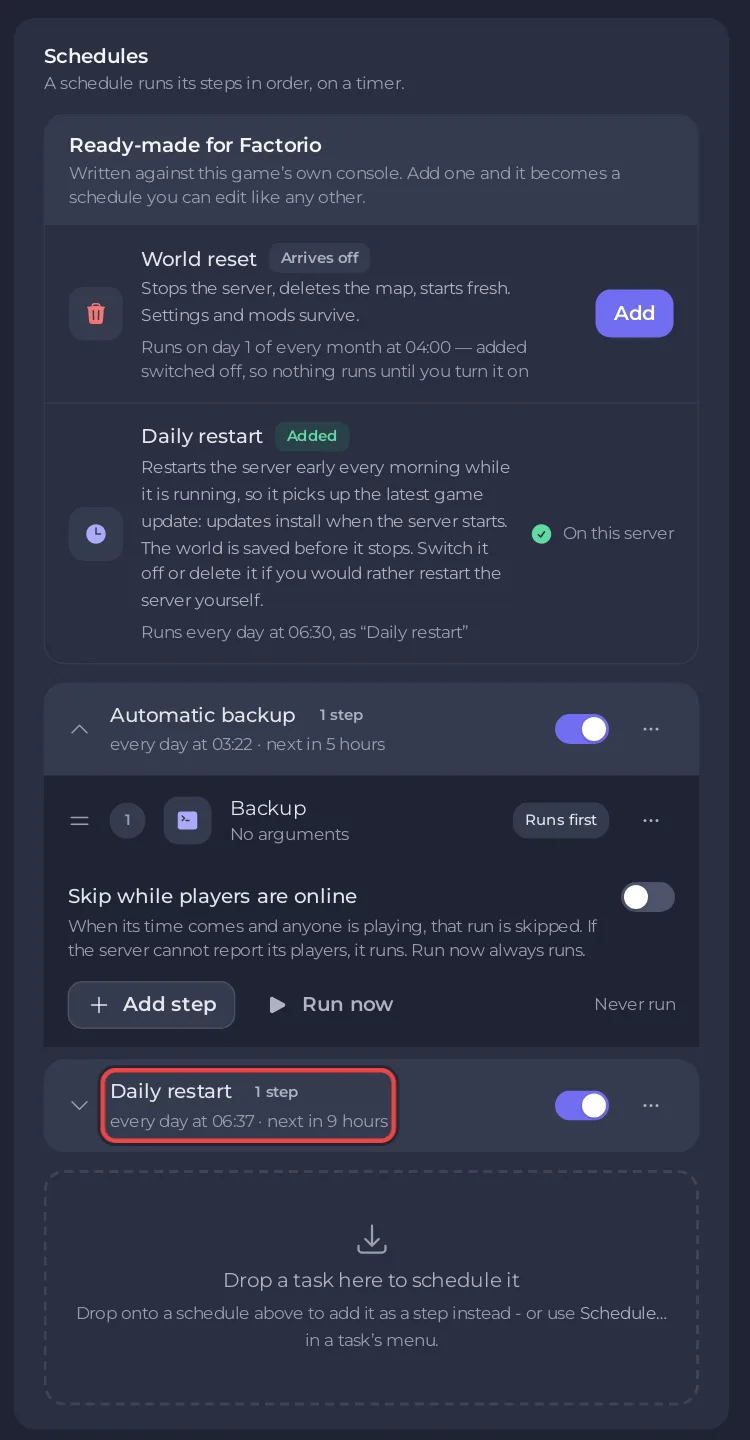
It runs only while the server is running, so a stopped server stays stopped.
Why keep it?
- Updates. The server installs Factorio updates when it starts. Players' games update by themselves, and a player on a newer version cannot join an older server. A daily restart closes that gap: How to update your Factorio server.
- No lost progress. A restart from the panel ends the game cleanly, and Factorio saves on exit (Factorio wiki, Multiplayer).
Switch it off or delete it
On Quick Tasks, switch the Daily restart schedule off, or delete it with Delete schedule. The server then only updates when you restart it yourself.
Restart at another time
Quick Tasks cannot change the time of a schedule that already exists. For another time, build a new schedule and switch the old one off:
- On Quick Tasks, open Default tasks and find Send Restart.
- Open its menu and choose Schedule….
- Give the schedule a Name, then click Next step.
- Choose Repeats, set How often to Every day, and set the time under At.
- Keep Enabled on and click Schedule.
- Switch Daily restart off, so the server does not restart twice a day.
The general guide walks through the schedule window: How to schedule tasks and automatic backups.
Related
- How to start a new world on your Factorio server (the monthly World reset schedule)
- How to change autosave and pause settings on your Factorio server


