%7B.s%7Banimation%3Ab%201.5s%20ease-out%20both%7D.d%7Banimation-delay%3A.16s%7D%7D%40keyframes%20b%7B0%25%7Bfill%3A%23F4F6FA%7D18%25%7Bfill%3A%23FFE08A%7D34%25%2C70%25%7Bfill%3A%23FF8A1F%7D80%25%7Bfill%3A%23FFE08A%7D100%25%7Bfill%3A%23FF8A1F%7D%7D%3C%2Fstyle%3E%3Cg%20transform%3D%22translate(143%20428.93)%20scale(3.885906)%22%3E%3Cg%20transform%3D%22translate(0%202)%22%20fill%3D%22%23706EF0%22%3E%3Cpath%20d%3D%22M0%200%20H48%20A40%2040%200%200%201%2048%2080%20V100%20H0%20Z%22%2F%3E%3Cpath%20transform%3D%22translate(91.75%200)%22%20d%3D%22M0%200%20L48%200%20L48%2050%20L76%2050%20L76%20100%20L0%20100%20Z%22%2F%3E%3Cpath%20transform%3D%22translate(173%200)%22%20d%3D%22M0%20100%20L58%20-4%20L116%20100%20Z%22%2F%3E%3Cpath%20transform%3D%22translate(264.25%200)%22%20d%3D%22M0%200%20L104%200%20L76%2050%20L76%20100%20L28%20100%20L28%2050%20Z%22%2F%3E%3Cg%20transform%3D%22translate(375%200)%22%3E%3Cpath%20d%3D%22M0%200%20L50%2038%20L50%200%20L100%200%20L100%20100%20L0%20100%20Z%22%20fill%3D%22%23F4F6FA%22%2F%3E%3Crect%20class%3D%22s%22%20x%3D%2247%22%20y%3D%2263%22%20width%3D%2219%22%20height%3D%2230%22%2F%3E%3Crect%20class%3D%22s%20d%22%20x%3D%2274%22%20y%3D%2263%22%20width%3D%2219%22%20height%3D%2230%22%2F%3E%3C%2Fg%3E%3Cpath%20transform%3D%22translate(484.75%200)%22%20d%3D%22M0%200%20L48%200%20L48%2037%20L52%2037%20L52%200%20L100%200%20L100%20100%20L52%20100%20L52%2063%20L48%2063%20L48%20100%20L0%20100%20Z%22%2F%3E%3Cpath%20transform%3D%22translate(588.5%200)%22%20d%3D%22M0%2050%20A53%2053%200%201%200%20106%2050%20A53%2053%200%201%200%200%2050%20Z%22%2F%3E%3Cpath%20transform%3D%22translate(698.25%200)%22%20d%3D%22M25%200%20H102%20V50%20H77%20A25%2025%200%200%201%2077%20100%20H0%20V50%20H25%20A25%2025%200%200%201%2025%200%20Z%22%2F%3E%3Cpath%20transform%3D%22translate(804%200)%22%20d%3D%22M0%200%20L90%200%20L90%2050%20L69%2050%20L69%20100%20L21%20100%20L21%2050%20L0%2050%20Z%22%2F%3E%3C%2Fg%3E%3C%2Fg%3E%3C%2Fsvg%3E)


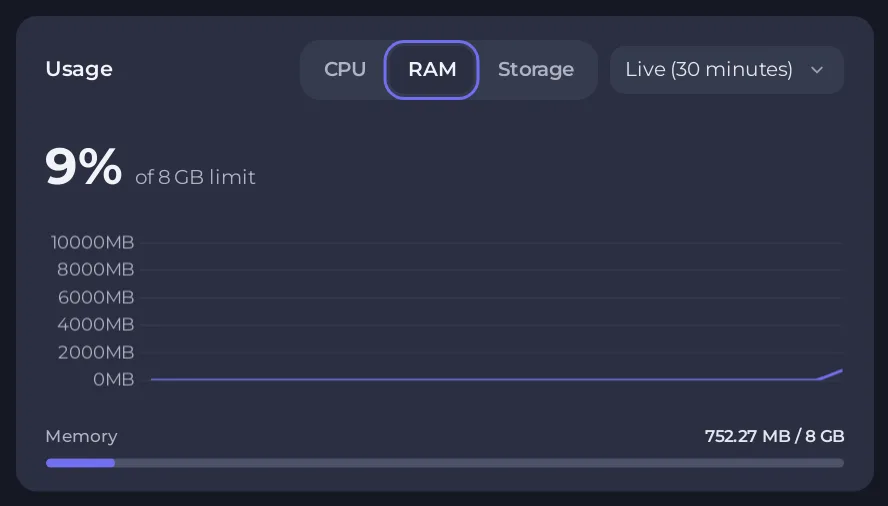
Check the Usage graphs on your server's Overview page while players are on. High CPU or RAM means the server is working too hard. Normal graphs with one player lagging usually mean that player's own connection.
Step 1: look at the graphs
- Open your server in the panel. You land on Overview.
- Scroll to Usage and choose CPU, then RAM. Look while players are online: an empty server always looks fine.
- Look for a card called Memory is running out on this server or Disk is running out on this server. It appears when the server went above 85% of its limit on several of the last days.
See How to read your server's usage graphs.
Step 2: what you can do
| You see | Try |
|---|---|
| RAM at your plan's limit | Lower the player slots, restart, or move to a bigger plan. Keen Games says a server uses about 4.4 GB when idle and up to about 100 MB more per player. See How much RAM does an Enshrouded server need. |
| CPU at its limit with many players | Lower the slots, or move to a bigger plan. Keen Games recommends a strong processor for 16 players. |
| Lag after days without a restart | Restart. The Daily restart schedule does this for you: How to restart your Enshrouded server on a schedule. |
| Lag when many enemies fight at once | Lower Number of enemies and Enemies attacking at once in Enemy settings. Keen Games fixed a server crash with a very large number of enemies in a 1.0 hotfix, so update the server. |
| Storage full | Delete what you do not need in Files. A full disk stops the world from saving. |
Keen Games also reworked the server performance warnings in 1.0 so they no longer trigger too soon.
To change your plan, open My plan in the left menu (owner only) and see How to change your plan or billing cycle.
Step 3: if the graphs look fine
The lag is probably between the player and the server. Keen Games suggests these steps on the player's computer:
- Clear the Steam download cache: Settings, Downloads, then the clear button.
- Flush DNS: open the Run window, type
cmd, then runipconfig /flushdns. - Try Google DNS,
8.8.8.8and8.8.4.4. Enshrouded uses only IPv4 for multiplayer. - Use a wired connection instead of Wi-Fi if you have high packet loss.
The panel's Location row on Overview shows where your server is. A player far from it has more delay.
If lag stays, open a ticket with the Console text and the time.





