%7B.s%7Banimation%3Ab%201.5s%20ease-out%20both%7D.d%7Banimation-delay%3A.16s%7D%7D%40keyframes%20b%7B0%25%7Bfill%3A%23F4F6FA%7D18%25%7Bfill%3A%23FFE08A%7D34%25%2C70%25%7Bfill%3A%23FF8A1F%7D80%25%7Bfill%3A%23FFE08A%7D100%25%7Bfill%3A%23FF8A1F%7D%7D%3C%2Fstyle%3E%3Cg%20transform%3D%22translate(143%20428.93)%20scale(3.885906)%22%3E%3Cg%20transform%3D%22translate(0%202)%22%20fill%3D%22%23706EF0%22%3E%3Cpath%20d%3D%22M0%200%20H48%20A40%2040%200%200%201%2048%2080%20V100%20H0%20Z%22%2F%3E%3Cpath%20transform%3D%22translate(91.75%200)%22%20d%3D%22M0%200%20L48%200%20L48%2050%20L76%2050%20L76%20100%20L0%20100%20Z%22%2F%3E%3Cpath%20transform%3D%22translate(173%200)%22%20d%3D%22M0%20100%20L58%20-4%20L116%20100%20Z%22%2F%3E%3Cpath%20transform%3D%22translate(264.25%200)%22%20d%3D%22M0%200%20L104%200%20L76%2050%20L76%20100%20L28%20100%20L28%2050%20Z%22%2F%3E%3Cg%20transform%3D%22translate(375%200)%22%3E%3Cpath%20d%3D%22M0%200%20L50%2038%20L50%200%20L100%200%20L100%20100%20L0%20100%20Z%22%20fill%3D%22%23F4F6FA%22%2F%3E%3Crect%20class%3D%22s%22%20x%3D%2247%22%20y%3D%2263%22%20width%3D%2219%22%20height%3D%2230%22%2F%3E%3Crect%20class%3D%22s%20d%22%20x%3D%2274%22%20y%3D%2263%22%20width%3D%2219%22%20height%3D%2230%22%2F%3E%3C%2Fg%3E%3Cpath%20transform%3D%22translate(484.75%200)%22%20d%3D%22M0%200%20L48%200%20L48%2037%20L52%2037%20L52%200%20L100%200%20L100%20100%20L52%20100%20L52%2063%20L48%2063%20L48%20100%20L0%20100%20Z%22%2F%3E%3Cpath%20transform%3D%22translate(588.5%200)%22%20d%3D%22M0%2050%20A53%2053%200%201%200%20106%2050%20A53%2053%200%201%200%200%2050%20Z%22%2F%3E%3Cpath%20transform%3D%22translate(698.25%200)%22%20d%3D%22M25%200%20H102%20V50%20H77%20A25%2025%200%200%201%2077%20100%20H0%20V50%20H25%20A25%2025%200%200%201%2025%200%20Z%22%2F%3E%3Cpath%20transform%3D%22translate(804%200)%22%20d%3D%22M0%200%20L90%200%20L90%2050%20L69%2050%20L69%20100%20L21%20100%20L21%2050%20L0%2050%20Z%22%2F%3E%3C%2Fg%3E%3C%2Fg%3E%3C%2Fsvg%3E)


An Enshrouded server plays one world at a time: the file world0.ksd in the savegame folder. To keep a world for later, move that file out of savegame, into a folder of your own. To play it again, move it back under the name world0.ksd.
Never leave a copy inside savegame. The game takes in every file whose name starts with world0.ksd in that folder. A renamed copy such as world0.ksd.old can be loaded instead of the world you wanted.
Keep the current world and start a new one
- Open your server in the panel and stop it. Wait until it says Offline.
- Make a backup with Files selected. See How to create, download and restore backups.
- Click the Files tab. In the main folder of the server, click Create Directory and name it, for example
my-worlds. Keep it outsidesavegame. - Open
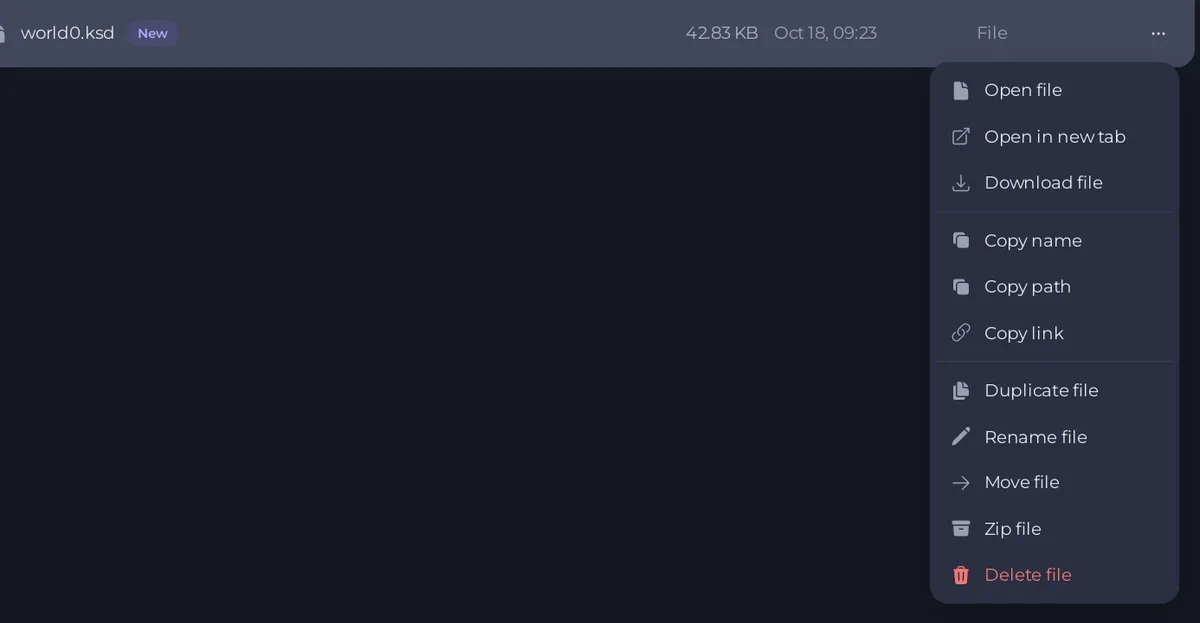
savegame. Click the ... menu ofworld0.ksdand choose Move file. Under New path, type the folder and a new name, relative tosavegame, for example../my-worlds/autumn-base.ksd, and click Move.
- Still in
savegame, delete thebackupfolder too. It holds the game's ten earlier copies of the world you just kept, and the Fresh World task deletes it as well, so the next start begins from nothing. Your kept file and your backup still hold that world. - Start the server. With no world in
savegame, the game makes a new one.
Go back to the kept world
- Stop the server and make a backup of the world you are leaving, if you want to keep it too. Then move its
world0.ksdout ofsavegameinto your folder, with a new name. - Open your folder, click the ... menu of the kept file, choose Move file and type
../savegame/world0.ksdunder New path. The name must be exactlyworld0.ksd. - Start the server and check it: How to check which world your Enshrouded server loaded.
Delete a world
If you only want a clean start, use How to start a fresh Enshrouded world. To delete a kept world, open the folder you put it in and use Delete file on it. This cannot be undone, except from a backup.
Good to know
- The game's ten earlier copies live in
savegame/backupand are replaced as the game saves. Right after a swap, the Earlier copies list on the Worlds page holds copies of the other world. Do not rewind to those. - Everyone who joins plays the world that is loaded. Tell your players before you swap.
- Keep a download of a world you cannot lose: use Download file on it, or a backup you lock. See How to back up and restore your Enshrouded world.
- The panel keeps the world from before your last rewind in a folder called
world-before-rewind, in the main folder. Do not move that folder if you may want to undo the rewind. See How to rewind your Enshrouded world.





