%7B.s%7Banimation%3Ab%201.5s%20ease-out%20both%7D.d%7Banimation-delay%3A.16s%7D%7D%40keyframes%20b%7B0%25%7Bfill%3A%23F4F6FA%7D18%25%7Bfill%3A%23FFE08A%7D34%25%2C70%25%7Bfill%3A%23FF8A1F%7D80%25%7Bfill%3A%23FFE08A%7D100%25%7Bfill%3A%23FF8A1F%7D%7D%3C%2Fstyle%3E%3Cg%20transform%3D%22translate(143%20428.93)%20scale(3.885906)%22%3E%3Cg%20transform%3D%22translate(0%202)%22%20fill%3D%22%23706EF0%22%3E%3Cpath%20d%3D%22M0%200%20H48%20A40%2040%200%200%201%2048%2080%20V100%20H0%20Z%22%2F%3E%3Cpath%20transform%3D%22translate(91.75%200)%22%20d%3D%22M0%200%20L48%200%20L48%2050%20L76%2050%20L76%20100%20L0%20100%20Z%22%2F%3E%3Cpath%20transform%3D%22translate(173%200)%22%20d%3D%22M0%20100%20L58%20-4%20L116%20100%20Z%22%2F%3E%3Cpath%20transform%3D%22translate(264.25%200)%22%20d%3D%22M0%200%20L104%200%20L76%2050%20L76%20100%20L28%20100%20L28%2050%20Z%22%2F%3E%3Cg%20transform%3D%22translate(375%200)%22%3E%3Cpath%20d%3D%22M0%200%20L50%2038%20L50%200%20L100%200%20L100%20100%20L0%20100%20Z%22%20fill%3D%22%23F4F6FA%22%2F%3E%3Crect%20class%3D%22s%22%20x%3D%2247%22%20y%3D%2263%22%20width%3D%2219%22%20height%3D%2230%22%2F%3E%3Crect%20class%3D%22s%20d%22%20x%3D%2274%22%20y%3D%2263%22%20width%3D%2219%22%20height%3D%2230%22%2F%3E%3C%2Fg%3E%3Cpath%20transform%3D%22translate(484.75%200)%22%20d%3D%22M0%200%20L48%200%20L48%2037%20L52%2037%20L52%200%20L100%200%20L100%20100%20L52%20100%20L52%2063%20L48%2063%20L48%20100%20L0%20100%20Z%22%2F%3E%3Cpath%20transform%3D%22translate(588.5%200)%22%20d%3D%22M0%2050%20A53%2053%200%201%200%20106%2050%20A53%2053%200%201%200%200%2050%20Z%22%2F%3E%3Cpath%20transform%3D%22translate(698.25%200)%22%20d%3D%22M25%200%20H102%20V50%20H77%20A25%2025%200%200%201%2077%20100%20H0%20V50%20H25%20A25%2025%200%200%201%2025%200%20Z%22%2F%3E%3Cpath%20transform%3D%22translate(804%200)%22%20d%3D%22M0%200%20L90%200%20L90%2050%20L69%2050%20L69%20100%20L21%20100%20L21%2050%20L0%2050%20Z%22%2F%3E%3C%2Fg%3E%3C%2Fg%3E%3C%2Fsvg%3E)


Click Maps in the left menu. Upload a map adds a .map file from your computer, and each map's row has a Start on this map button and small icon buttons to switch to it now, add a vote for it, download it or delete it.
Open the Maps page
Open your server in the panel and click Maps in the left menu. Maps on the server lists every .map file in data/maps. Players can vote for any of them in the game. The current start map has the badge Start map; maps that come with DDNet say Comes with DDNet.

Upload a map
- Click Upload a map and choose a
.mapfile, for example one you made in the DDNet editor. - The page says the map is uploaded and joins the vote list at the next start. It appears in the list.
The name must be a DDNet map name: a .map file whose name has no quotes, slashes or backslashes and is at most 58 bytes long (about 58 letters). A file with the same name as a map already on the server is refused: rename your file or delete the old map first. An uploaded map joins the vote list at the next start. To offer it straight away, use the raised-hand button (below).
While the server runs, it also makes a copy of each map for players on the older Teeworlds 0.7 client, by itself, within about half a minute. The row then shows the badge 0.7. A map uploaded while the server is stopped gets its copy at the next start.
What each row can do

| Button | What it does | Guide |
|---|---|---|
| Start on this map | The server starts on this map from its next start. | Start map |
| Arrows | Changes the running server to this map right away. | Switch map now |
| Raised hand | Adds a vote for this map, so players can vote for it in the game now. Maps that come with DDNet do not have it: they are in the vote list already. | Votes |
| Pencil | Only on a map saved by a DDNet client: gives it its plain name. | Long map names |
| Download arrow | Saves a copy of the file to your computer. | |
| Bin | Deletes the map file and its 0.7 copy. Records set on it stay in the records database. |
The arrows and raised-hand buttons show only while the server is running and once the map has its 0.7 badge. The start map's row has no Start on this map button and no bin.
Delete a map
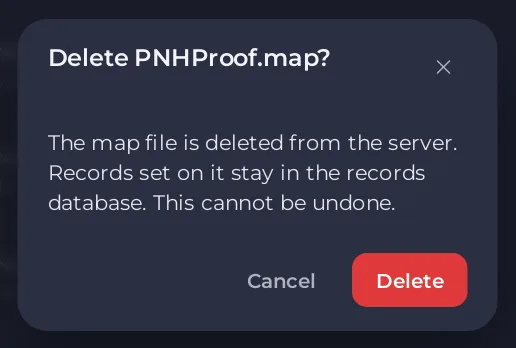
Click the bin on the map's row. A window titled Delete and the map's file name says the file is deleted from the server and that records set on it stay. Click Delete. Its 0.7 copy goes with it. This cannot be undone, so download the map first if you may want it again. The start map has no bin: choose another start map first.
Good to know
- Maps live in
data/mapsunder Files, and the 0.7 copies indata/maps7. Uploading on the Maps page is easier than Files, because it checks the name. - Your own map votes and settings can also go in
myServerconfig.cfg: How to add your own settings to your DDNet server. - A map with a long name ending in numbers came from a DDNet client: A DDNet map on your server has a long name with numbers.
- Back up your maps with the rest of the server: How to back up and restore your DDNet server.





