

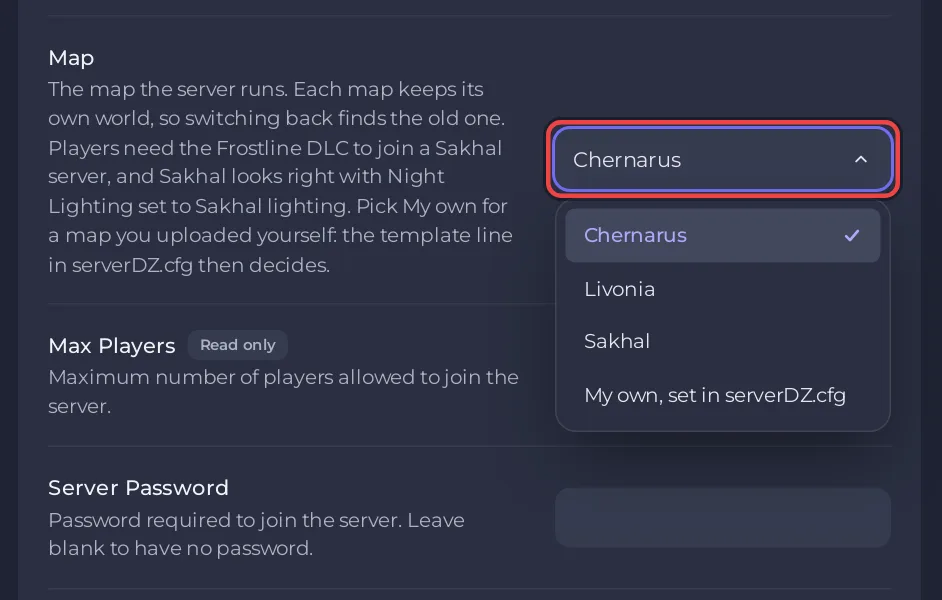
To change the map of your PlayNHost DayZ server, open Settings, Game Settings, pick Chernarus, Livonia or Sakhal under Map, and restart the server. Each map keeps its own world, so switching back later finds the old one.
Switch the map
- Open your server in the panel and click the Settings tab.
- Open Game Settings and find Map.
- Pick Chernarus, Livonia or Sakhal.
- Click Restart now.
- Open the Console. It says
[pnh-dayz] Map set to dayzOffline.enoch (was dayzOffline.chernarusplus).with the map you picked, then the game loads it and printsMission read.
If the server does not have that map's mission files yet, the Console first says Fetching the dayzOffline.sakhal mission files from release ... (with your map). The files come from Bohemia's own DayZ Central Economy releases. This happens once per map.
The three maps
| Map | Mission folder | Note |
|---|---|---|
| Chernarus | mpmissions/dayzOffline.chernarusplus | The default map. In the base game |
| Livonia | mpmissions/dayzOffline.enoch | In the base game |
| Sakhal | mpmissions/dayzOffline.sakhal | Players need the Frostline expansion. Set Night Lighting to Sakhal lighting |
Steam's DayZ page says the base game includes Chernarus and Livonia, so every DayZ player can join those. Sakhal is the map of DayZ Frostline, released on 15 October 2024. The panel's Map setting says players need Frostline to join a Sakhal server; a player without it gets This server is running DLC that is not owned. (Bohemia's error code list). The Console reminds you of the lighting: Tip: Sakhal is made for Night Lighting 2 (Sakhal lighting) under Settings. See How to change day and night on your DayZ server.
What happens to the old world?
Nothing. Each mission folder keeps its own world in its storage_1 folder, which the panel describes as the loot, vehicles and bases of that map. Bohemia's configuration page calls these the server's persistence files. Switch back and the old world is there. A Persistence Wipe clears the worlds of every map at once: How to wipe your DayZ server.
A map you uploaded yourself
Pick My own, set in serverDZ.cfg for a map that is not in the list. The panel then leaves the map line of serverDZ.cfg as you write it. Upload the map's mission folder into mpmissions, upload the map's mod folder (see How to add mods to your DayZ server), then set the template line inside class Missions in serverDZ.cfg to the mission folder's name. Follow the map author's own instructions for the rest.
The Map setting offers Chernarus, Livonia and Sakhal. Badlands, the paid expansion with the Nasdara map released on 15 October 2026 (Steam), is not one of its choices.
No Map setting on your server?
Servers created before the Map setting existed do not show it, because their start-up does not apply it. On those servers the map is the template line inside class Missions in serverDZ.cfg. Stop the server, open serverDZ.cfg in Files, change the mission name, for example dayzOffline.enoch for Livonia, and save. The mission folder must exist in mpmissions. See How to edit serverDZ.cfg on your DayZ server.


