

Five settings in Settings, Game Settings control day and night on a PlayNHost DayZ server: Time Multiplier sets how fast the day passes, Night Multiplier speeds up nights only, Night Lighting sets how dark nights are, Disable Personal Light removes the light above each player, and Persistent Time keeps the clock across restarts.
Change them
- Open your server in the panel and click the Settings tab.
- Open Game Settings and change the values below.
- Click Restart now. The new time and light apply when the server has started again.
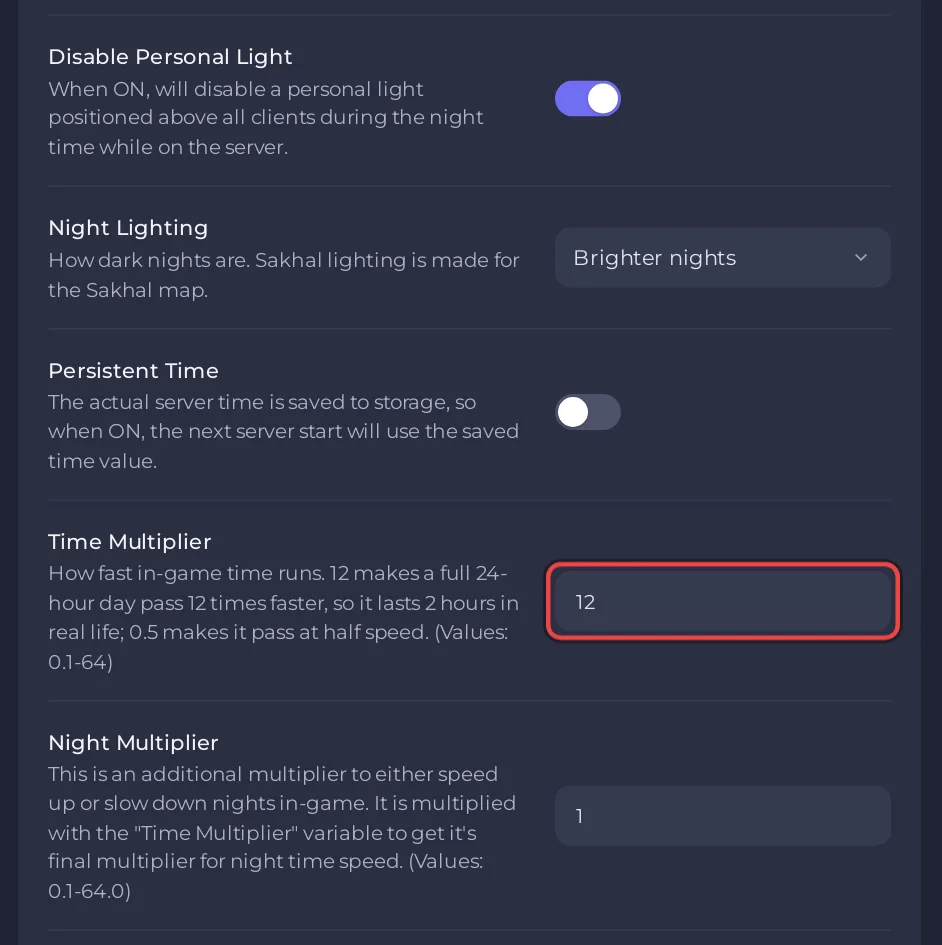
How fast does a day pass?
Time Multiplier (serverTimeAcceleration in Bohemia's server configuration) takes 0.1 to 64, with up to two decimals. The default 12 makes a full 24-hour in-game day pass 12 times faster, so it lasts 2 real hours. 24 makes it last 1 hour; 1 makes it last 24 hours, the same as real time; 0.5 makes time run at half speed.
| Time Multiplier | One in-game day lasts |
|---|---|
| 1 | 24 hours |
| 6 | 4 hours |
| 12 (default) | 2 hours |
| 24 | 1 hour |
How do I make nights shorter?
Night Multiplier (0.1 to 64, default 1) is multiplied with Time Multiplier at night. With Time Multiplier 12 and Night Multiplier 2, nights run 24 times faster than real time while days run 12 times faster. A value below 1 slows nights down.
How dark are the nights?
Night Lighting has three choices:
- Brighter nights (the default).
- Darker nights.
- Sakhal lighting: made for the Sakhal map. Pick it when Map is Sakhal.
One exception, from Bohemia's configuration page: if you add enableCfgGameplayFile = 1; to serverDZ.cfg, the lightingConfig value in the mission's cfggameplay.json replaces Night Lighting.
Disable Personal Light is on by default, which removes the light the game places above each player at night. Turn it off if your players find nights too dark.
Keep the time across restarts
With Persistent Time on, the server saves the in-game time to its storage and the next start continues from it. With it off (the default), each start begins at the time set by the serverTime line of serverDZ.cfg. A new server's file has serverTime="SystemTime";, which Bohemia's configuration page defines as the local time of the machine the server runs on. That line is not in Game Settings, so it stays as you write it: How to edit serverDZ.cfg on your DayZ server.


